Fluke 8842A
8842A
5.5-digit digital multimeter
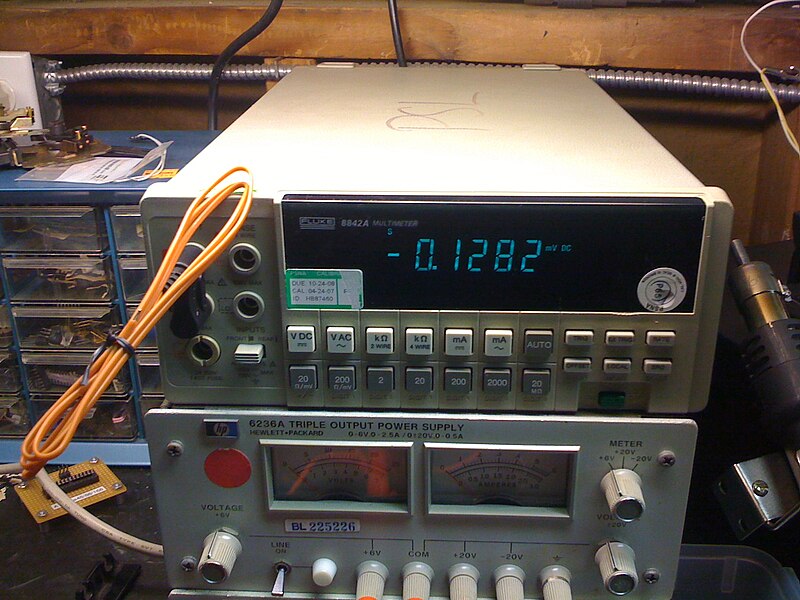
The Fluke 8842A is a 5.5-digit bench multimeter produced from the mid-1980s. It uses a proprietary command set — NOT IEEE 488.2 or SCPI. There are no *IDN?, *RST, or *CLS commands. Use *? for identification and Y0 for self-test. Commands are single-character codes (F, R, S, T, etc.) followed by a digit. Multiple commands can be concatenated into a single string (e.g., F1R0S0T0). The instrument responds with CR LF terminated readings. The 10A current ranges (F7, F8) use a separate front-panel terminal.
Status Byte
Section titled “Status Byte”| Bit 7 | Bit 6 | Bit 5 | Bit 4 | Bit 3 | Bit 2 | Bit 1 | Bit 0 |
|---|---|---|---|---|---|---|---|
| Unused | RQS | Syntax Error | Data Available | Overrange | Unused | Unused | Unused |
| Not used | Requesting service (SRQ asserted) | Command syntax error detected | Reading available in output buffer (MAV equivalent) | Measurement is over range | Not used | Not used | Not used |
Read via serial poll. No *STB? or *SRE commands — this instrument predates IEEE 488.2. SRQ mask is set with the SRQ command (e.g., S0 to S63).
Commands
Section titled “Commands”Function Selection
Section titled “Function Selection”Select the measurement function. Commands take effect immediately.
| Command | Type | Description |
|---|---|---|
F1 | command | Select DC Volts function |
F2 | command | Select AC Volts function |
F3 | command | Select 2-wire kOhms (resistance) function |
F4 | command | Select 4-wire kOhms (resistance) function |
F5 | command | Select DC mA (current) function |
F6 | command | Select AC mA (current) function |
F7 | command | Select DC Amps function (10A input terminal) |
F8 | command | Select AC Amps function (10A input terminal) |
Range Selection
Section titled “Range Selection”Select the measurement range. Available ranges depend on the active function. R0 enables autoranging for all functions.
| Command | Type | Description |
|---|---|---|
R0 | command | Enable autorange |
R1 | command | Range 1: DCV/ACV=200mV, kOhms=200ohm, mA=200uA |
Details Note: Lowest range for the active function | ||
R2 | command | Range 2: DCV/ACV=2V, kOhms=2kohm, mA=2mA |
R3 | command | Range 3: DCV/ACV=20V, kOhms=20kohm, mA=20mA |
R4 | command | Range 4: DCV/ACV=200V, kOhms=200kohm, mA=200mA |
R5 | command | Range 5: DCV=1200V, ACV=750V, kOhms=2Mohm, mA=2A |
R6 | command | Range 6: kOhms=20Mohm (resistance only) |
Details Note: Only valid for 2-wire and 4-wire resistance functions (F3, F4) | ||
Rate / Resolution
Section titled “Rate / Resolution”Set measurement rate, which determines digit resolution. Slower rate yields higher resolution.
| Command | Type | Description |
|---|---|---|
S0 | command | Slow rate: 5.5-digit resolution, ~2.8 readings/sec |
Details Note: Best accuracy and noise rejection | ||
S1 | command | Medium rate: 4.5-digit resolution, ~5.6 readings/sec |
S2 | command | Fast rate: 3.5-digit resolution, ~20 readings/sec |
Details Note: Fastest measurement rate | ||
Trigger Mode
Section titled “Trigger Mode”Configure the trigger source. Determines when the meter takes a reading.
| Command | Type | Description |
|---|---|---|
T0 | command | Internal trigger: continuous free-running measurements |
T1 | command | External trigger: trigger from rear-panel external trigger input |
T2 | command | GET trigger: trigger via IEEE-488 Group Execute Trigger |
Details Note: Use the GPIB GET command (or AR488 ++trg) to trigger a reading | ||
T3 | command | Single trigger: take one reading then hold |
Details Note: After the reading is taken, meter enters hold state until retriggered | ||
T4 | command | Hold: no triggers accepted, measurement suspended |
Reading / Output
Section titled “Reading / Output”Request readings and configure output format.
| Command | Type | Description |
|---|---|---|
? | query | Request the current display reading |
Details Returns (string) — Reading in the selected output format
Example: +01.23456E+0 Note: Returns the most recent measurement value | ||
G0 | command | Output format: engineering notation with prefix (e.g., +01.23456E+0) |
G1 | command | Output format: programming format with status and function info |
Details Note: Includes status byte, function code, and range code with reading | ||
G4 | command | Output format: one-shot — send single reading then stop output |
G8 | command | Output format: all readings — continuously output every reading |
Offset / Null
Section titled “Offset / Null”Enable or disable relative (null/offset) mode. Stores a reference value and subtracts it from subsequent readings.
| Command | Type | Description |
|---|---|---|
O0 | command | Disable offset (null) — readings are absolute |
O1 | command | Enable offset (null) — current reading is stored as reference and subtracted from subsequent readings |
Details Note: Take a reading with the reference connected before enabling, so the null value captures the current measurement | ||
Suffix
Section titled “Suffix”Control whether units suffix is appended to readings.
| Command | Type | Description |
|---|---|---|
W0 | command | No units suffix on readings |
W1 | command | Append units suffix to readings (e.g., VDC, VAC, KOHM, MA) |
Details Note: Suffix indicates the active measurement function | ||
Display Control
Section titled “Display Control”Control the front-panel display.
| Command | Type | Description |
|---|---|---|
D0 | command | Display on — normal front-panel display operation |
D1 | command | Display off — blanks the display for faster measurement throughput |
Details Note: Disabling the display eliminates display-update overhead and increases reading rate | ||
Beeper
Section titled “Beeper”Control the audible beeper.
| Command | Type | Description |
|---|---|---|
B0 | command | Beeper off |
B1 | command | Beeper on |
System / Identification
Section titled “System / Identification”Self-test and identification commands.
| Command | Type | Description |
|---|---|---|
Y0 | command | Execute self-test |
Details Note: Runs internal diagnostics. Takes several seconds. Returns error code if a fault is detected. | ||
*? | query | Model identification query |
Details Returns (string) — Model identification string
Example: FLUKE,8842A,0,0 Note: This is NOT an IEEE 488.2 *IDN? command. The 8842A uses *? as its proprietary identification query. | ||
Compound Commands
Section titled “Compound Commands”Multiple commands can be sent in a single string. The 8842A parses them left to right.
| Command | Type | Description |
|---|---|---|
F1R0S0T0 | command | Example: Set DC Volts, autorange, slow (5.5 digits), internal trigger |
Details Note: Commands can be concatenated without delimiters. The meter parses character-by-character. | ||
F3R3S0T2 | command | Example: Set 2-wire resistance, 20kohm range, slow rate, GET trigger |
Common Workflows
Section titled “Common Workflows”Measure DC Voltage
Section titled “Measure DC Voltage”Take a high-resolution DC voltage measurement with autorange
Select DC Volts function
F1 Enable autorange
R0 Set slow rate for 5.5-digit resolution
S0 Set internal trigger (continuous)
T0 Read the measurement
? +XX.XXXXXE+X High-Resolution Resistance
Section titled “High-Resolution Resistance”Measure 2-wire resistance at maximum resolution on a specific range
Select 2-wire kOhms function
F3 Select 20kohm range
R3 Set slow rate for 5.5-digit resolution
S0 Set internal trigger
T0 Read the measurement
? +XX.XXXXXE+X Triggered Measurement (GET)
Section titled “Triggered Measurement (GET)”Configure for Group Execute Trigger and take a single reading on command
Select DC Volts and configure (compound command)
F1R0S0 Set GET trigger mode
T2 Send Group Execute Trigger via GPIB bus
++trg Read the triggered measurement
? +XX.XXXXXE+X Fast Continuous Readings
Section titled “Fast Continuous Readings”Stream readings at maximum speed for monitoring
Select function (e.g., DC Volts)
F1 Enable autorange
R0 Set fast rate for 3.5-digit resolution (~20 rdg/sec)
S2 Turn off display for maximum throughput
D1 Set internal trigger for continuous readings
T0 Set continuous output mode
G8 Read measurements (each bus read returns next reading)
? +XX.XXXE+X Re-enable display when done
D0 Null / Relative Measurement
Section titled “Null / Relative Measurement”Zero out lead resistance or offset before measuring
Select function and range
F3R1S0 Connect reference (e.g., short leads for resistance null)
Manual stepSet internal trigger and wait for stable reading
T0 Enable offset — stores current reading as null reference
O1 Connect the device under test
Manual stepRead the nulled measurement
? Reading with offset subtracted