Hewlett-Packard 1660A
1660A
136-channel 100 MHz state / 500 MHz timing logic analyzer
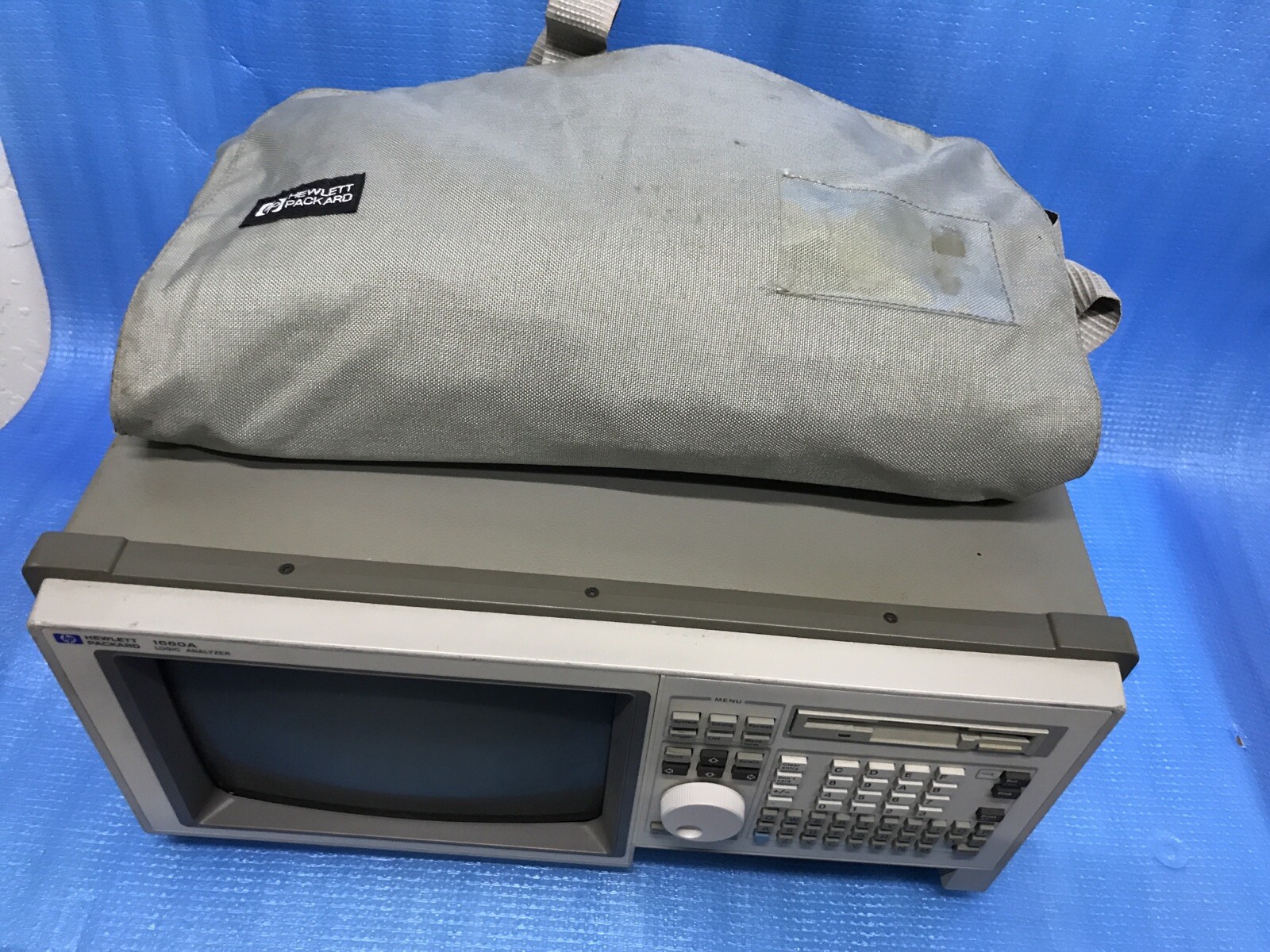
The HP 1660A is a 136-channel benchtop logic analyzer from the HP 1660-series, introduced in the early 1990s. It supports two independent analysis modes: state analysis (sampling on an external clock at up to 100 MHz, synchronized to the device under test) and timing analysis (sampling on an internal clock at 250 MHz full channel or 500 MHz half channel, for asynchronous waveform capture). The 136 channels are organized across 8 pods of 16 channels each, plus clock and qualifier inputs. Two independent analyzer machines can run simultaneously, allowing mixed state and timing analysis. The 1660A is IEEE 488.2-compliant but uses HP-proprietary commands rather than SCPI. The 1660-series family includes the 1660A (136-ch), 1661A (102-ch), 1662A (68-ch), and 1663A (34-ch), plus 'S' variants that add a built-in oscilloscope (1660AS, etc.). The 1660-series replaced the earlier 1650/1651 analyzers and was itself succeeded by the 1660C-series and later the 16700-series modular logic analysis systems.
Status Byte
Section titled “Status Byte”| Bit 7 | Bit 6 | Bit 5 | Bit 4 | Bit 3 | Bit 2 | Bit 1 | Bit 0 |
|---|---|---|---|---|---|---|---|
| Unused | RQS/MSS | ESB | MAV | Unused | Unused | Unused | Unused |
| Not used | Requesting service / Master summary status | Event status byte summary bit | Message available in output buffer | Not used (HP reserves bit 3; MAV is on bit 4) | Not used | Not used | Not used |
Use *STB? to read status byte, *SRE to set service request enable register. The 1660A follows IEEE 488.2 status reporting. MAV is on bit 4 (standard for IEEE 488.2). Bit 5 (ESB) summarizes the Standard Event Status Register (*ESR?).
Commands
Section titled “Commands”IEEE 488.2 Common Commands
Section titled “IEEE 488.2 Common Commands”Standard IEEE 488.2 commands supported by all compliant instruments. The 1660A implements these per the IEEE 488.2 specification.
| Command | Type | Description |
|---|---|---|
*IDN? | query | Identification query -- returns manufacturer, model, serial, firmware |
Details Returns (string) — Comma-separated identification
Example: HEWLETT-PACKARD,1660A,0,REV_CODE | ||
*RST | command | Reset to factory default state. Clears all analyzer configuration, returns to power-on defaults. |
*CLS | command | Clear status registers and error queue |
*OPC | command | Set operation complete bit in ESR when all pending operations finish |
*OPC? | query | Returns 1 when all pending operations complete |
Details Returns (numeric)
Example: 1 | ||
*ESE {mask} | command | Set event status enable register |
Details Parameters
| ||
*ESE? | query | Query event status enable register |
Details Returns (numeric)
Example: 0 | ||
*ESR? | query | Read and clear event status register |
Details Returns (numeric)
Example: 0 | ||
*SRE {mask} | command | Set service request enable register |
Details Parameters
| ||
*SRE? | query | Query service request enable register |
Details Returns (numeric)
Example: 0 | ||
*STB? | query | Read status byte register |
Details Returns (numeric) — Status byte value
Example: 0 | ||
*TRG | command | Group Execute Trigger -- starts an acquisition run (equivalent to pressing Run) |
*TST? | query | Self-test; returns 0 for pass, non-zero for fail |
Details Returns (numeric)
Example: 0 Note: Takes several seconds to complete. | ||
*WAI | command | Wait until all pending operations complete before executing next command |
*IST? | query | Query individual status -- returns value of IEEE 488.1 ist local message |
Details Returns (numeric) — 0 or 1
Example: 0 | ||
*OPT? | query | Query installed options |
Details Returns (string) — Comma-separated list of installed options
Example: 0 | ||
*PRE {mask} | command | Set parallel poll enable register |
Details Parameters
| ||
*PRE? | query | Query parallel poll enable register |
Details Returns (numeric)
Example: 0 | ||
Machine Control
Section titled “Machine Control”Select and control analyzer machines. The 1660A has two independent analyzer machines (Machine 1 and Machine 2) that can each be configured as state or timing analyzers. The SELECT command chooses which machine subsequent commands apply to.
| Command | Type | Description |
|---|---|---|
SELECT {machine} | command | Select active machine for subsequent configuration commands |
Details Parameters
Example SELECT 1 Note: All subsequent analyzer configuration commands apply to the selected machine until another SELECT is issued. | ||
SELECT? | query | Query currently selected machine |
Details Returns (numeric)
Example: 1 | ||
XWINDOW {window} | command | Select the display window for data viewing |
Details Parameters
Example XWINDOW LISTING | ||
MACH {machine} | command | Assign a machine number for the current analyzer configuration |
Details Parameters
| ||
RUN | command | Start a single acquisition run. Analyzer acquires data until trigger condition is met or memory is full. |
Details Note: Use *OPC? or poll status to determine when acquisition completes. | ||
STOP | command | Stop the current acquisition run |
SINGLE | command | Start a single acquisition (same as RUN for one-shot capture) |
REPETITIVE | command | Start repetitive acquisition mode -- analyzer runs continuously until STOP |
Details Note: Data is overwritten each run. Useful for monitoring changing signals. | ||
Analyzer Configuration
Section titled “Analyzer Configuration”Configure the selected machine’s analysis mode, channel assignments, labels, and clocking. The 1660A supports both state analysis (sampling on an external clock, up to 100 MHz) and timing analysis (sampling on an internal clock, 250 MHz full channel or 500 MHz half channel).
| Command | Type | Description |
|---|---|---|
TYPE {mode} | command | Set analysis type for the selected machine |
Details Parameters
Example TYPE STATE | ||
TYPE? | query | Query analysis type of the selected machine |
Details Returns (string)
Example: STATE | ||
ASSIGN {pod},{assignment} | command | Assign a pod (group of 16 channels) to a machine. Pods are the physical channel groups connected via probe cables. |
Details Parameters
Example ASSIGN POD1,MACH1 | ||
RENAME {label},{new_name} | command | Rename a label for display purposes |
Details Parameters
Example RENAME LABEL1,ADDR | ||
FORMAT {label},{polarity},{bit_assignments} | command | Define which channels are included in a label and their bit ordering |
Details Parameters
Note: Format defines which physical channels map to which bits of a named label. A label groups related signals (e.g., an 8-bit data bus). | ||
LABEL {label},{base} | command | Set the numeric base for displaying a label's values |
Details Parameters
Example LABEL ADDR,HEX | ||
CLOCK {source},{edge} | command | Configure clock source and edge for state analysis |
Details Parameters
Example CLOCK J,RISING Note: Only applies to state analysis mode. In timing mode, the internal clock is used. | ||
MASTER {clock} | command | Set the master clock for state analysis |
Details Parameters
Note: In multi-clock setups, the master clock controls sampling. | ||
SLAVE {clock} | command | Set a slave clock for demultiplexed state analysis |
Details Parameters
Note: Demux mode uses master and slave clocks alternately, doubling effective channel count at half the state speed. | ||
Trigger
Section titled “Trigger”Define trigger conditions that determine when the analyzer captures data. The 1660A supports sequential triggering with up to 12 sequence levels, pattern matching, range detection, and timer-based qualification.
| Command | Type | Description |
|---|---|---|
TRIGGER | command | Software trigger -- forces an immediate trigger event |
Details Note: Equivalent to *TRG for starting an acquisition. | ||
SEQUENCE {level},{action},{condition} | command | Define a trigger sequence level with an action and condition |
Details Parameters
Example SEQUENCE 1,FIND,PATTERN1 Note: The trigger system walks through sequence levels. When a level's condition is met, its action is executed (e.g., go to next level, start storing, or trigger). | ||
STORE {qualifier} | command | Define which data to store in acquisition memory |
Details Parameters
Example STORE ANYTHING | ||
QUALIFIER {level},{qualifier} | command | Set a storage qualifier for a specific sequence level |
Details Parameters
| ||
PATTERN {name},{label},{value} | command | Define a named pattern for use in trigger sequences |
Details Parameters
Example PATTERN PATTERN1,ADDR,#HFF00 Note: Patterns can use don't-care bits (X). The # prefix followed by H, O, or B specifies hex, octal, or binary base. | ||
RANGE {name},{label},{low},{high} | command | Define a named range for trigger qualification |
Details Parameters
Example RANGE RANGE1,ADDR,#H0000,#H00FF | ||
TIMER {level},{duration} | command | Set timer duration for a sequence level (used for time-qualified triggers) |
Details Parameters
Example TIMER 2,100US | ||
ARMS {mode} | command | Configure cross-machine arming. When both machines are active, one can arm the other. |
Details Parameters
Note: Allows Machine 1 and Machine 2 to coordinate triggers, e.g., Machine 1 arms Machine 2 when a state condition is met. | ||
Acquisition and Data Transfer
Section titled “Acquisition and Data Transfer”Transfer captured data to the controller. The 1660A can transfer listing data, waveform data, and complete analyzer configurations.
| Command | Type | Description |
|---|---|---|
DATA? | query | Query acquired data from the selected machine. Returns captured logic states in the configured format. |
Details Returns (string) — Comma-separated state data values for each label at each sample point Note: Data format depends on label configuration. Large acquisitions may require multiple transfers. | ||
DATA {label}? | query | Query acquired data for a specific label only |
Details Parameters
Returns (string) — Data values for the specified label Example DATA ADDR? | ||
WAVEFORM? | query | Query waveform data from timing analyzer. Returns sample values for display as waveforms. |
Details Returns (string) — Binary waveform data Note: Primarily used in timing mode for waveform display reconstruction. | ||
UPLOAD | command | Upload a complete analyzer configuration or data set from the controller to the 1660A |
Details Note: Used to restore previously saved configurations. Binary data transfer. | ||
DOWNLOAD | query | Download the complete analyzer configuration and data from the 1660A to the controller |
Details Note: Used to save the entire instrument state including configuration and captured data. Binary data transfer. | ||
CATALOG? | query | Query the catalog of saved configurations stored on the internal disk (if equipped) |
Details Returns (string) — List of saved configuration file names | ||
Display and Markers
Section titled “Display and Markers”Control display windows, markers, and data comparison. Markers let you navigate through captured data and measure time or state differences between events.
| Command | Type | Description |
|---|---|---|
MMODE {mode} | command | Set marker mode |
Details Parameters
Example MMODE PATTERN | ||
MARKER {marker},{position} | command | Position a marker at a specific sample or time |
Details Parameters
Example MARKER X,TRIGGER | ||
MARKER? {marker} | query | Query current marker position |
Details Parameters
Returns (string) — Marker position (sample number or time) | ||
XPATTERN {label},{value} | command | Set the X marker search pattern for a specific label |
Details Parameters
Example XPATTERN ADDR,#HFF00 | ||
OPATTERN {label},{value} | command | Set the O marker search pattern for a specific label |
Details Parameters
| ||
COMPARE | command | Start a data comparison between the current acquisition and a reference |
Details Note: Compares captured data against a previously stored reference to find differences. | ||
COMPARE? | query | Query the result of the last data comparison |
Details Returns (string) — Comparison result | ||
System
Section titled “System”System-level commands for display menus, printing, autoscale, and general system queries.
| Command | Type | Description |
|---|---|---|
MENU {menu_name} | command | Navigate to a specific front-panel menu |
Details Parameters
Example MENU FORMAT | ||
PRINT | command | Print the current display to the configured printer or output |
Details Note: Output destination configured via front panel System menu. | ||
PRINT? {dest} | query | Query print configuration |
Details Parameters
Returns (string) — Print configuration details | ||
AUTOSCALE | command | Automatically detect and configure active channels. Scans all input channels, identifies those with activity, assigns active channels to labels, and sets up a basic trigger. |
Details Note: Very useful for initial setup. Takes several seconds. Configures both format and trigger based on detected activity. | ||
SYSTEM:HEADER {state} | command | Enable or disable response headers in query results |
Details Parameters
Example SYSTEM:HEADER OFF Note: When ON, query responses include the command header. For programmatic parsing, turn headers OFF. | ||
SYSTEM:HEADER? | query | Query header state |
Details Returns (string)
Example: OFF | ||
SYSTEM:LONGFORM {state} | command | Enable or disable long-form (verbose) query responses |
Details Parameters
Note: When ON, responses use full keyword names. When OFF, abbreviated mnemonics are used. | ||
SYSTEM:LONGFORM? | query | Query long-form state |
Details Returns (string)
Example: OFF | ||
SYSTEM:DATA? | query | Query system data including configuration details |
Details Returns (string) — System configuration information | ||
Common Workflows
Section titled “Common Workflows”Basic State Capture
Section titled “Basic State Capture”Reset the analyzer, configure for state analysis on an external clock, define a trigger pattern, run an acquisition, and download the captured data
Reset to factory defaults
*RST Clear status registers
*CLS Turn off response headers for clean parsing
SYSTEM:HEADER OFF Select Machine 1
SELECT 1 Set to state analysis mode
TYPE STATE Configure clock on J input, rising edge
CLOCK J,RISING Rename label for clarity
RENAME LABEL1,ADDR Set label display to hexadecimal
LABEL ADDR,HEX Define trigger pattern on address bus
PATTERN PATTERN1,ADDR,#HFF00 Set trigger to find the pattern
SEQUENCE 1,FIND,PATTERN1 Store all data (no qualification)
STORE ANYTHING Start acquisition
RUN Wait for acquisition to complete
*OPC? 1 Download captured data for the ADDR label
DATA ADDR? Comma-separated hex values Timing Waveform Capture
Section titled “Timing Waveform Capture”Configure timing analysis mode with the internal clock, set sample rate, trigger on a pattern, and retrieve waveform data
Reset to factory defaults
*RST Clear status registers
*CLS Turn off response headers
SYSTEM:HEADER OFF Select Machine 1
SELECT 1 Set to timing analysis mode
TYPE TIMING Rename label for the signals of interest
RENAME LABEL1,DATA Set label display to hexadecimal
LABEL DATA,HEX Define trigger pattern
PATTERN PATTERN1,DATA,#HFF Set trigger sequence
SEQUENCE 1,FIND,PATTERN1 Start acquisition
RUN Wait for acquisition to complete
*OPC? 1 Retrieve waveform data
WAVEFORM? Binary waveform data Identify Instrument
Section titled “Identify Instrument”Simple identification query to verify GPIB communication
Query instrument identification
*IDN? HEWLETT-PACKARD,1660A,<serial>,<firmware> Query installed options
*OPT? Option list or 0 Run self-test
*TST? 0 (pass)