Hewlett-Packard 33120A
33120A
15 MHz function/arbitrary waveform generator
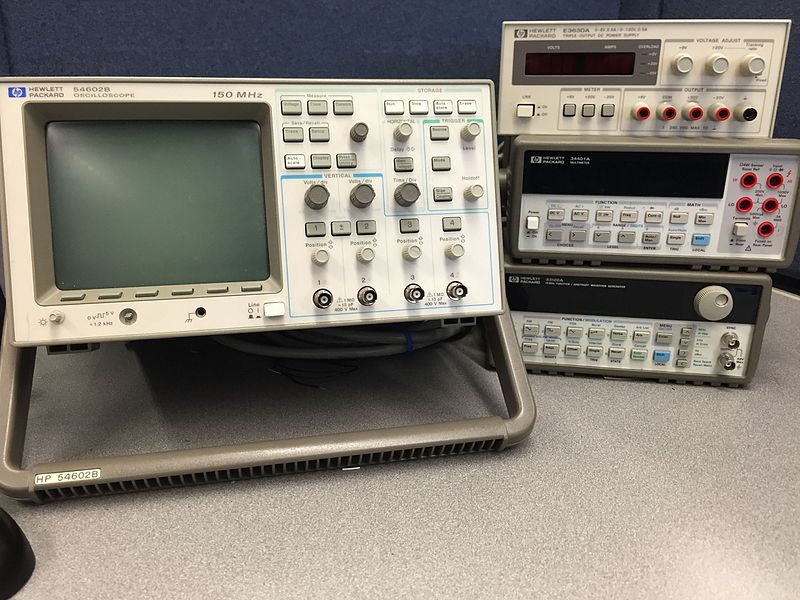
The 33120A was produced from 1994 until approximately 2012. It was one of the most popular bench function generators of its era, found in university labs, production test, and R&D worldwide. Superseded by the 33220A (single-channel) and 33500B series. GPIB is standard on all units. Built-in arbitrary waveforms include SINC, NEG_RAMP, EXP_RISE, EXP_FALL, and CARDIAC. Up to 4 additional user-defined waveforms can be stored in non-volatile memory.
Status Byte
Section titled “Status Byte”| Bit 7 | Bit 6 | Bit 5 | Bit 4 | Bit 3 | Bit 2 | Bit 1 | Bit 0 |
|---|---|---|---|---|---|---|---|
| Operation Complete | RQS/MSS | ESB | MAV | Questionable Data | Error Queue | Unused | Unused |
| Operation summary bit | Requesting service / Master summary status | Event status byte summary bit | Message available in output buffer | Questionable data summary bit | One or more errors in error queue | Not used | Not used |
Use *STB? to read status byte, *SRE to set service request enable register
Commands
Section titled “Commands”IEEE 488.2 Common Commands
Section titled “IEEE 488.2 Common Commands”Standard IEEE 488.2 commands supported by all compliant instruments
| Command | Type | Description |
|---|---|---|
*IDN? | query | Identification query -- returns manufacturer, model, serial, firmware |
Details Returns (string) — Comma-separated identification
Example: HEWLETT-PACKARD,33120A,US36010001,10.0-5.0-1.0 | ||
*RST | command | Reset to factory default state (100 Hz sine, 100 mVpp, 0 offset) |
*CLS | command | Clear status registers and error queue |
*ESE {mask} | command | Set event status enable register |
Details Parameters
| ||
*ESE? | query | Query event status enable register |
Details Returns (numeric)
Example: 0 | ||
*ESR? | query | Read and clear event status register |
Details Returns (numeric)
Example: 0 | ||
*OPC | command | Set operation complete bit in ESR when all pending operations finish |
*OPC? | query | Returns 1 when all pending operations complete |
Details Returns (numeric)
Example: 1 | ||
*SRE {mask} | command | Set service request enable register |
Details Parameters
| ||
*SRE? | query | Query service request enable register |
Details Returns (numeric)
Example: 0 | ||
*STB? | query | Read status byte register |
Details Returns (numeric) — Status byte value
Example: 0 | ||
*TST? | query | Self-test; returns 0 for pass, 1 for fail |
Details Returns (numeric)
Example: 0 Note: Takes several seconds to complete | ||
*TRG | command | Trigger from bus (used with burst/sweep when trigger source is BUS) |
*SAV {location} | command | Save current instrument state to non-volatile memory |
Details Parameters
| ||
*RCL {location} | command | Recall instrument state from non-volatile memory |
Details Parameters
| ||
Output Configuration
Section titled “Output Configuration”Configure output waveform function, frequency, amplitude, and offset
| Command | Type | Description |
|---|---|---|
APPL:SIN [{frequency}[,{amplitude}[,{offset}]]] | command | Apply sine wave with specified parameters |
Details Parameters
Example APPL:SIN 1000,1.0,0 | ||
APPL:SQU [{frequency}[,{amplitude}[,{offset}]]] | command | Apply square wave with specified parameters |
Details Parameters
Example APPL:SQU 10000,2.5,0 | ||
APPL:TRI [{frequency}[,{amplitude}[,{offset}]]] | command | Apply triangle wave with specified parameters |
Details Parameters
| ||
APPL:RAMP [{frequency}[,{amplitude}[,{offset}]]] | command | Apply ramp (sawtooth) wave with specified parameters |
Details Parameters
| ||
APPL:NOIS [{amplitude}[,{offset}]] | command | Apply Gaussian noise with specified amplitude |
Details Parameters
Note: Frequency parameter is not applicable for noise | ||
APPL:DC [{offset}] | command | Apply DC voltage |
Details Parameters
Note: For APPL:DC, the offset parameter sets the DC level. Use VOLT:OFFS for the actual value. | ||
APPL:USER [{frequency}[,{amplitude}[,{offset}]]] | command | Apply the currently selected arbitrary waveform |
Details Parameters
Note: Select the arbitrary waveform first with FUNC:USER {name} | ||
APPL? | query | Query current output configuration |
Details Returns (string) — Quoted string with function, frequency, amplitude, offset
Example: "SIN +1.000000000000E+03,+1.000000000000E+00,+0.000000000000E+00" | ||
FUNC {function} | command | Set output waveform function without changing other parameters |
Details Parameters
| ||
FUNC? | query | Query current output function |
Details Returns (string)
Example: SIN | ||
FREQ {value} | command | Set output frequency |
Details Parameters
Example FREQ 1000 | ||
FREQ? | query | Query output frequency |
Details Returns (numeric)
Example: +1.000000000000E+03 | ||
VOLT {value} | command | Set output amplitude in current units (Vpp, Vrms, or dBm) |
Details Parameters
Example VOLT 1.5 | ||
VOLT? | query | Query output amplitude |
Details Returns (numeric)
Example: +1.500000000000E+00 | ||
VOLT:OFFS {value} | command | Set DC offset voltage |
Details Parameters
Example VOLT:OFFS 0.5 | ||
VOLT:OFFS? | query | Query DC offset voltage |
Details Returns (numeric)
Example: +5.000000000000E-01 | ||
VOLT:UNIT {unit} | command | Set amplitude units |
Details Parameters
| ||
VOLT:UNIT? | query | Query amplitude units |
Details Returns (string)
Example: VPP | ||
OUTP {state} | command | Enable or disable the front-panel output connector |
Details Parameters
| ||
OUTP? | query | Query output state |
Details Returns (numeric) — 0=OFF, 1=ON
Example: 1 | ||
Modulation
Section titled “Modulation”Amplitude modulation (AM), frequency modulation (FM), frequency-shift keying (FSK), and burst mode
| Command | Type | Description |
|---|---|---|
AM:SOUR {source} | command | Set AM modulation source |
Details Parameters
| ||
AM:SOUR? | query | |
Details Returns (string)
Example: INT | ||
AM:INT:FUNC {function} | command | Set internal AM modulating waveform shape |
Details Parameters
| ||
AM:INT:FUNC? | query | |
Details Returns (string)
Example: SIN | ||
AM:INT:FREQ {value} | command | Set internal AM modulating frequency |
Details Parameters
| ||
AM:INT:FREQ? | query | |
Details Returns (numeric)
Example: +1.000000000000E+02 | ||
AM:DEPT {percent} | command | Set AM modulation depth |
Details Parameters
| ||
AM:DEPT? | query | |
Details Returns (numeric)
Example: +1.000000000000E+02 | ||
AM:STAT {state} | command | Enable or disable AM modulation |
Details Parameters
Note: Enabling AM disables FM, FSK, burst, and sweep if active | ||
AM:STAT? | query | |
Details Returns (numeric)
Example: 0 | ||
FM:SOUR {source} | command | Set FM modulation source |
Details Parameters
| ||
FM:SOUR? | query | |
Details Returns (string)
Example: INT | ||
FM:INT:FUNC {function} | command | Set internal FM modulating waveform shape |
Details Parameters
| ||
FM:INT:FUNC? | query | |
Details Returns (string)
Example: SIN | ||
FM:INT:FREQ {value} | command | Set internal FM modulating frequency |
Details Parameters
| ||
FM:INT:FREQ? | query | |
Details Returns (numeric)
Example: +1.000000000000E+02 | ||
FM:DEV {value} | command | Set FM frequency deviation |
Details Parameters
Note: Deviation must be less than or equal to carrier frequency | ||
FM:DEV? | query | |
Details Returns (numeric)
Example: +1.000000000000E+03 | ||
FM:STAT {state} | command | Enable or disable FM modulation |
Details Parameters
Note: Enabling FM disables AM, FSK, burst, and sweep if active | ||
FM:STAT? | query | |
Details Returns (numeric)
Example: 0 | ||
FSK:SOUR {source} | command | Set FSK source for hop trigger |
Details Parameters
| ||
FSK:SOUR? | query | |
Details Returns (string)
Example: INT | ||
FSK:FREQ {value} | command | Set FSK hop (alternate) frequency |
Details Parameters
| ||
FSK:FREQ? | query | |
Details Returns (numeric)
Example: +1.000000000000E+04 | ||
FSK:INT:RATE {value} | command | Set internal FSK hop rate |
Details Parameters
| ||
FSK:INT:RATE? | query | |
Details Returns (numeric)
Example: +1.000000000000E+01 | ||
FSK:STAT {state} | command | Enable or disable FSK modulation |
Details Parameters
Note: Enabling FSK disables AM, FM, burst, and sweep if active | ||
FSK:STAT? | query | |
Details Returns (numeric)
Example: 0 | ||
BURS:MODE {mode} | command | Set burst mode type |
Details Parameters
| ||
BURS:MODE? | query | |
Details Returns (string)
Example: TRIG | ||
BURS:NCYC {count} | command | Set number of cycles per burst in triggered mode |
Details Parameters
| ||
BURS:NCYC? | query | |
Details Returns (numeric)
Example: +1.000000000000E+00 | ||
BURS:INT:PER {value} | command | Set internal burst period (time between bursts) |
Details Parameters
Note: Burst period must be greater than burst duration (ncycles / frequency) | ||
BURS:INT:PER? | query | |
Details Returns (numeric)
Example: +1.000000000000E-02 | ||
BURS:PHAS {degrees} | command | Set starting phase of burst waveform |
Details Parameters
| ||
BURS:PHAS? | query | |
Details Returns (numeric)
Example: +0.000000000000E+00 | ||
BURS:STAT {state} | command | Enable or disable burst mode |
Details Parameters
Note: Enabling burst disables AM, FM, FSK, and sweep if active | ||
BURS:STAT? | query | |
Details Returns (numeric)
Example: 0 | ||
Trigger
Section titled “Trigger”Trigger system for burst and sweep modes
| Command | Type | Description |
|---|---|---|
TRIG:SOUR {source} | command | Set trigger source for burst and sweep |
Details Parameters
| ||
TRIG:SOUR? | query | Query trigger source |
Details Returns (string)
Example: IMM | ||
TRIG:SLOP {edge} | command | Set trigger slope for external trigger input |
Details Parameters
| ||
TRIG:SLOP? | query | |
Details Returns (string)
Example: POS | ||
*TRG | command | Issue a bus trigger (requires TRIG:SOUR BUS) |
Frequency Sweep
Section titled “Frequency Sweep”Linear or logarithmic frequency sweep configuration
| Command | Type | Description |
|---|---|---|
SWE:STAT {state} | command | Enable or disable frequency sweep mode |
Details Parameters
Note: Enabling sweep disables AM, FM, FSK, and burst if active | ||
SWE:STAT? | query | |
Details Returns (numeric)
Example: 0 | ||
SWE:SPAC {type} | command | Set sweep spacing type |
Details Parameters
| ||
SWE:SPAC? | query | |
Details Returns (string)
Example: LIN | ||
SWE:TIME {seconds} | command | Set sweep time (duration of one sweep) |
Details Parameters
| ||
SWE:TIME? | query | |
Details Returns (numeric)
Example: +1.000000000000E+00 | ||
FREQ:STAR {value} | command | Set sweep start frequency |
Details Parameters
| ||
FREQ:STAR? | query | |
Details Returns (numeric)
Example: +1.000000000000E+02 | ||
FREQ:STOP {value} | command | Set sweep stop frequency |
Details Parameters
| ||
FREQ:STOP? | query | |
Details Returns (numeric)
Example: +1.500000000000E+07 | ||
FREQ:CENT {value} | command | Set sweep center frequency (alternative to start/stop) |
Details Parameters
Note: Setting center frequency adjusts start and stop to maintain span | ||
FREQ:CENT? | query | |
Details Returns (numeric)
Example: +7.500050000000E+06 | ||
FREQ:SPAN {value} | command | Set sweep frequency span (alternative to start/stop) |
Details Parameters
Note: Setting span adjusts start and stop to maintain center | ||
FREQ:SPAN? | query | |
Details Returns (numeric)
Example: +1.499980000000E+07 | ||
MARK:FREQ {value} | command | Set marker frequency (generates sync pulse at this frequency during sweep) |
Details Parameters
| ||
MARK:FREQ? | query | |
Details Returns (numeric)
Example: +5.000000000000E+03 | ||
MARK:STAT {state} | command | Enable or disable frequency marker |
Details Parameters
| ||
MARK:STAT? | query | |
Details Returns (numeric)
Example: 0 | ||
Arbitrary Waveform
Section titled “Arbitrary Waveform”Download, manage, and select arbitrary waveform data
| Command | Type | Description |
|---|---|---|
DATA:DAC VOLATILE,{values} | command | Download DAC values to volatile memory |
Details Parameters
Example DATA:DAC VOLATILE,2047,0,-2047,0 Note: Overwrites any existing data in volatile memory. Use DATA:COPY to save permanently. | ||
DATA:COPY {name} | command | Copy volatile waveform to non-volatile memory with given name |
Details Parameters
Example DATA:COPY MYWAVE Note: Up to 4 user-defined waveforms can be stored in non-volatile memory | ||
DATA:CAT? | query | List all arbitrary waveforms in memory (built-in and user-defined) |
Details Returns (string) — Comma-separated list of waveform names
Example: "SINC","NEG_RAMP","EXP_RISE","EXP_FALL","CARDIAC","VOLATILE" | ||
DATA:DEL {name} | command | Delete a user-defined arbitrary waveform from non-volatile memory |
Details Parameters
Note: Cannot delete built-in waveforms or the currently selected waveform | ||
DATA:DEL:ALL | command | Delete all user-defined arbitrary waveforms from non-volatile memory |
FUNC:USER {name} | command | Select a stored arbitrary waveform as the active USER waveform |
Details Parameters
Example FUNC:USER SINC | ||
FUNC:USER? | query | Query currently selected arbitrary waveform name |
Details Returns (string)
Example: SINC | ||
DATA:ATTR:AVER? | query | Query average value of the selected arbitrary waveform data points |
Details Returns (numeric)
Example: +0 | ||
DATA:ATTR:CRES? | query | Query crest factor of the selected arbitrary waveform |
Details Returns (numeric) | ||
DATA:ATTR:PTP? | query | Query peak-to-peak value of the selected arbitrary waveform data points |
Details Returns (numeric) | ||
DATA:POIN? | query | Query number of data points in the selected arbitrary waveform |
Details Returns (numeric)
Example: +16000 | ||
System
Section titled “System”System configuration, display, and error handling
| Command | Type | Description |
|---|---|---|
SYST:ERR? | query | Read and remove one error from error queue (up to 20 errors stored) |
Details Returns (string) — Error code and message
Example: +0,"No error" | ||
SYST:VERS? | query | Query SCPI version |
Details Returns (string)
Example: 1994.0 | ||
DISP {state} | command | Turn front panel display on or off |
Details Parameters
Note: Turning display off prevents local user changes but does not affect output | ||
DISP? | query | |
Details Returns (numeric)
Example: 1 | ||
DISP:TEXT "{message}" | command | Display custom text on front panel (up to 12 characters) |
Details Parameters
Example DISP:TEXT "READY" | ||
DISP:TEXT? | query | Query current display text |
Details Returns (string)
Example: "READY" | ||
DISP:TEXT:CLE | command | Clear custom display text and return to normal display |
SYST:BEEP | command | Issue a single beep from the front panel |
OUTP:LOAD {impedance} | command | Set expected output termination impedance (affects displayed amplitude) |
Details Parameters
Note: This setting does not change the actual output impedance (always 50 ohm). It adjusts the amplitude values displayed and programmed so they reflect the voltage delivered to the expected load. | ||
OUTP:LOAD? | query | Query expected output termination impedance |
Details Returns (numeric) — 50 or 9.9E+37 (infinite)
Example: +5.000000000000E+01 | ||
OUTP:SYNC {state} | command | Enable or disable the front-panel Sync output |
Details Parameters
| ||
OUTP:SYNC? | query | |
Details Returns (numeric)
Example: 1 | ||
Status Subsystem
Section titled “Status Subsystem”Questionable data status register for monitoring output conditions
| Command | Type | Description |
|---|---|---|
STAT:QUES? | query | Read and clear the questionable data event register |
Details Returns (numeric)
Example: 0 | ||
STAT:QUES:ENAB {mask} | command | Set the questionable data enable register |
Details Parameters
| ||
STAT:QUES:ENAB? | query | Query the questionable data enable register |
Details Returns (numeric)
Example: 0 | ||
STAT:QUES:COND? | query | Read the questionable data condition register (not cleared on read) |
Details Returns (numeric)
Example: 0 | ||
Common Workflows
Section titled “Common Workflows”Generate 1 kHz Sine Wave
Section titled “Generate 1 kHz Sine Wave”Output a 1 kHz sine wave at 1 Vpp with no offset into a 50-ohm load
Reset to known state
*RST Clear status registers
*CLS Configure 1 kHz sine at 1 Vpp, 0 V offset
APPL:SIN 1000,1.0,0 Verify output load is 50 ohm
OUTP:LOAD 50 Enable output
OUTP ON Verify configuration
APPL? "SIN +1.000000000000E+03,+1.000000000000E+00,+0.000000000000E+00" Frequency Sweep
Section titled “Frequency Sweep”Sweep a sine wave from 100 Hz to 10 kHz over 5 seconds, linear spacing
Reset to known state
*RST Set sine wave at 1 Vpp
APPL:SIN 100,1.0,0 Set sweep start frequency
FREQ:STAR 100 Set sweep stop frequency
FREQ:STOP 10000 Set linear sweep spacing
SWE:SPAC LIN Set 5-second sweep time
SWE:TIME 5 Set trigger source to immediate (auto-repeat)
TRIG:SOUR IMM Enable sweep mode
SWE:STAT ON Enable output
OUTP ON Triggered Burst Mode
Section titled “Triggered Burst Mode”Output 5 cycles of a 10 kHz sine at 2 Vpp on each bus trigger
Reset to known state
*RST Configure 10 kHz sine at 2 Vpp
APPL:SIN 10000,2.0,0 Set burst mode to triggered
BURS:MODE TRIG Set 5 cycles per burst
BURS:NCYC 5 Set starting phase to 0 degrees
BURS:PHAS 0 Set trigger source to bus
TRIG:SOUR BUS Enable burst mode
BURS:STAT ON Enable output
OUTP ON Send bus trigger to initiate burst
*TRG Wait for completion
*OPC? 1 AM Modulated Output
Section titled “AM Modulated Output”Generate a 1 MHz carrier with 80% AM depth, 1 kHz internal modulation
Reset to known state
*RST Configure 1 MHz sine at 2 Vpp
APPL:SIN 1000000,2.0,0 Set internal AM source
AM:SOUR INT Set modulating waveform to sine
AM:INT:FUNC SIN Set modulating frequency to 1 kHz
AM:INT:FREQ 1000 Set modulation depth to 80%
AM:DEPT 80 Enable AM modulation
AM:STAT ON Enable output
OUTP ON Arbitrary Waveform Download
Section titled “Arbitrary Waveform Download”Download a custom 4-point waveform and output at 1 kHz
Reset to known state
*RST Download DAC values to volatile memory
DATA:DAC VOLATILE,2047,2047,-2047,-2047 Copy to non-volatile memory
DATA:COPY MYSQUARE Select the user waveform
FUNC:USER MYSQUARE Apply the user waveform at 1 kHz, 3 Vpp
APPL:USER 1000,3.0,0 Enable output
OUTP ON