Hewlett-Packard 34401A
34401A
6.5-digit digital multimeter
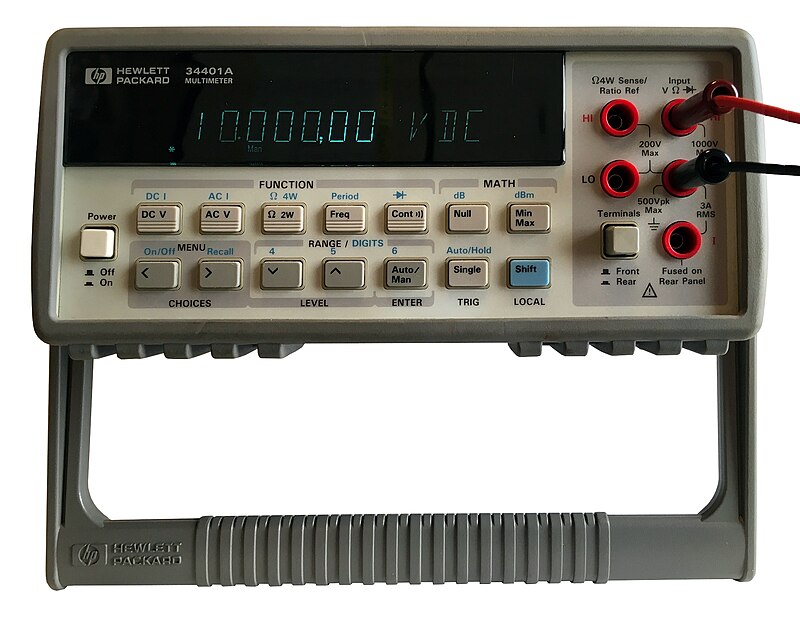
The 34401A was one of the most widely deployed bench multimeters in history. Produced from 1991 to 2014, superseded by the 34461A (Truevolt series). Many are still in active lab use. GPIB interface is standard on all units.
Status Byte
Section titled “Status Byte”| Bit 7 | Bit 6 | Bit 5 | Bit 4 | Bit 3 | Bit 2 | Bit 1 | Bit 0 |
|---|---|---|---|---|---|---|---|
| Operation Complete | RQS/MSS | ESB | MAV | Questionable Data | Error Queue | Unused | Unused |
| Operation summary bit | Requesting service / Master summary status | Event status byte summary bit | Message available in output buffer | Questionable data summary bit | One or more errors in error queue | Not used | Not used |
Use *STB? to read status byte, *SRE to set service request enable register
Commands
Section titled “Commands”IEEE 488.2 Common Commands
Section titled “IEEE 488.2 Common Commands”Standard IEEE 488.2 commands supported by all compliant instruments
| Command | Type | Description |
|---|---|---|
*IDN? | query | Identification query — returns manufacturer, model, serial, firmware |
Details Returns (string) — Comma-separated identification
Example: HEWLETT-PACKARD,34401A,MY47000001,10-5-2 | ||
*RST | command | Reset to factory default state |
*CLS | command | Clear status registers and error queue |
*ESE {mask} | command | Set event status enable register |
Details Parameters
| ||
*ESE? | query | Query event status enable register |
Details Returns (numeric)
Example: 0 | ||
*ESR? | query | Read and clear event status register |
Details Returns (numeric)
Example: 0 | ||
*OPC | command | Set operation complete bit in ESR when all pending operations finish |
*OPC? | query | Returns 1 when all pending operations complete |
Details Returns (numeric)
Example: 1 | ||
*SRE {mask} | command | Set service request enable register |
Details Parameters
| ||
*SRE? | query | Query service request enable register |
Details Returns (numeric)
Example: 0 | ||
*STB? | query | Read status byte register |
Details Returns (numeric) — Status byte value
Example: 0 | ||
*TST? | query | Self-test; returns 0 for pass, 1 for fail |
Details Returns (numeric)
Example: 0 Note: Takes several seconds to complete | ||
*TRG | command | Trigger measurement from bus (requires trigger source BUS) |
Measurement Configuration
Section titled “Measurement Configuration”Configure measurement function, range, and resolution
| Command | Type | Description |
|---|---|---|
CONF:VOLT:DC [{range}[,{resolution}]] | command | Configure for DC voltage measurement |
Details Parameters
Example CONF:VOLT:DC 10,0.001 | ||
CONF:VOLT:AC [{range}[,{resolution}]] | command | Configure for AC voltage measurement |
Details Parameters
| ||
CONF:CURR:DC [{range}[,{resolution}]] | command | Configure for DC current measurement |
Details Parameters
| ||
CONF:CURR:AC [{range}[,{resolution}]] | command | Configure for AC current measurement |
Details Parameters
| ||
CONF:RES [{range}[,{resolution}]] | command | Configure for 2-wire resistance measurement |
Details Parameters
| ||
CONF:FRES [{range}[,{resolution}]] | command | Configure for 4-wire resistance measurement |
Details Parameters
| ||
CONF:FREQ [{range}[,{resolution}]] | command | Configure for frequency measurement |
Details Parameters
| ||
CONF:PER [{range}[,{resolution}]] | command | Configure for period measurement |
Details Parameters
| ||
CONF:CONT | command | Configure for continuity test (threshold ~1000 ohm, beeper) |
CONF:DIOD | command | Configure for diode test (1mA test current, reads voltage) |
CONF? | query | Query current measurement configuration |
Details Returns (string)
Example: "VOLT +1.00000000E+01,+1.00000000E-06" | ||
Measurement Execution
Section titled “Measurement Execution”Trigger and read measurements
| Command | Type | Description |
|---|---|---|
MEAS:VOLT:DC? [{range}[,{resolution}]] | query | Configure, trigger, and return one DC voltage reading |
Details Parameters
Returns (numeric) — Voltage in volts
Example: +1.23456789E+00 Example MEAS:VOLT:DC? 10,0.001 | ||
MEAS:VOLT:AC? [{range}[,{resolution}]] | query | Configure, trigger, and return one AC voltage reading |
Details Returns (numeric)
Example: +1.20000000E+02 | ||
MEAS:CURR:DC? [{range}[,{resolution}]] | query | Configure, trigger, and return one DC current reading |
Details Returns (numeric)
Example: +5.00000000E-02 | ||
MEAS:CURR:AC? [{range}[,{resolution}]] | query | Configure, trigger, and return one AC current reading |
Details Returns (numeric)
Example: +1.00000000E-01 | ||
MEAS:RES? [{range}[,{resolution}]] | query | Configure, trigger, and return one 2-wire resistance reading |
Details Returns (numeric)
Example: +1.00000000E+03 | ||
MEAS:FRES? [{range}[,{resolution}]] | query | Configure, trigger, and return one 4-wire resistance reading |
Details Returns (numeric)
Example: +1.00000000E+03 | ||
MEAS:FREQ? [{range}[,{resolution}]] | query | Configure, trigger, and return one frequency reading |
Details Returns (numeric)
Example: +1.00000000E+03 | ||
MEAS:PER? [{range}[,{resolution}]] | query | Configure, trigger, and return one period reading |
Details Returns (numeric)
Example: +1.00000000E-03 | ||
READ? | query | Trigger and return one reading using current configuration |
Details Returns (numeric) — Measurement result in current function's units
Example: +1.23456789E+00 | ||
INIT | command | Initiate measurement and place in wait-for-trigger state |
FETCH? | query | Return stored readings from internal memory (no new trigger) |
Details Returns (numeric) — Comma-separated readings
Example: +1.23456789E+00,+1.23456790E+00 | ||
R? [{max_count}] | query | Read and remove readings from memory; optionally limit count |
Details Parameters
Returns (numeric)
Example: +1.23456789E+00 | ||
Trigger
Section titled “Trigger”Trigger system configuration
| Command | Type | Description |
|---|---|---|
TRIG:SOUR {source} | command | Set trigger source |
Details Parameters
| ||
TRIG:SOUR? | query | |
Details Returns (string)
Example: IMM | ||
TRIG:DEL {seconds} | command | Set trigger delay |
Details Parameters
| ||
TRIG:DEL? | query | |
Details Returns (numeric)
Example: +0.00000000E+00 | ||
TRIG:DEL:AUTO {state} | command | Enable/disable automatic trigger delay |
Details Parameters
| ||
TRIG:COUN {count} | command | Set number of triggers to accept before returning to idle |
Details Parameters
| ||
TRIG:COUN? | query | |
Details Returns (numeric)
Example: +1 | ||
SAMP:COUN {count} | command | Set number of readings per trigger |
Details Parameters
| ||
SAMP:COUN? | query | |
Details Returns (numeric)
Example: +1 | ||
Measurement Parameters
Section titled “Measurement Parameters”Detailed configuration of measurement parameters
| Command | Type | Description |
|---|---|---|
VOLT:DC:RANG {range} | command | Set DC voltage range manually |
Details Parameters
| ||
VOLT:DC:RANG? | query | |
Details Returns (numeric)
Example: +1.00000000E+01 | ||
VOLT:DC:RANG:AUTO {state} | command | Enable/disable DC voltage autoranging |
Details Parameters
| ||
VOLT:DC:NPLC {nplc} | command | Set integration time in power line cycles |
Details Parameters
Note: Higher NPLC = better resolution but slower. 100 NPLC = 6.5 digits. | ||
VOLT:DC:NPLC? | query | |
Details Returns (numeric)
Example: +1.00000000E+01 | ||
VOLT:DC:RES {resolution} | command | Set DC voltage resolution directly |
Details Parameters
| ||
INP:IMP:AUTO {state} | command | Enable/disable high-impedance (>10G ohm) input on 100mV and 1V ranges |
Details Parameters
Note: When OFF, input impedance is 10M ohm on all ranges. When ON, >10G ohm on 100mV and 1V DC ranges. | ||
INP:IMP:AUTO? | query | |
Details Returns (string)
Example: 0 | ||
VOLT:AC:BAND {bandwidth} | command | Set AC voltage bandwidth |
Details Parameters
Note: Lower bandwidth = more accurate for low frequencies but slower settling | ||
ZERO:AUTO {state} | command | Enable/disable autozero for DC measurements |
Details Parameters
Note: ONCE performs single zero then disables. OFF doubles measurement speed. | ||
Math Operations
Section titled “Math Operations”Built-in math and null offset functions
| Command | Type | Description |
|---|---|---|
CALC:FUNC {function} | command | Select math function |
Details Parameters
| ||
CALC:STAT {state} | command | Enable/disable selected math function |
Details Parameters
| ||
CALC:NULL:OFFS {value} | command | Set null offset value |
Details Parameters
| ||
CALC:NULL:OFFS? | query | |
Details Returns (numeric)
Example: +0.00000000E+00 | ||
CALC:AVER:MIN? | query | Query minimum reading since statistics cleared |
Details Returns (numeric)
Example: +1.20000000E+00 | ||
CALC:AVER:MAX? | query | Query maximum reading since statistics cleared |
Details Returns (numeric)
Example: +1.30000000E+00 | ||
CALC:AVER:AVER? | query | Query average of all readings since statistics cleared |
Details Returns (numeric)
Example: +1.25000000E+00 | ||
CALC:AVER:COUN? | query | Query number of readings taken since statistics cleared |
Details Returns (numeric)
Example: +100 | ||
CALC:LIM:LOW {value} | command | Set lower limit for limit test |
Details Parameters
| ||
CALC:LIM:UPP {value} | command | Set upper limit for limit test |
Details Parameters
| ||
CALC:LIM:LOW? | query | |
Details Returns (numeric)
Example: +0.00000000E+00 | ||
CALC:LIM:UPP? | query | |
Details Returns (numeric)
Example: +0.00000000E+00 | ||
System
Section titled “System”System configuration and queries
| Command | Type | Description |
|---|---|---|
SYST:ERR? | query | Read and remove one error from error queue |
Details Returns (string) — Error code and message
Example: +0,"No error" | ||
SYST:VERS? | query | Query SCPI version |
Details Returns (string)
Example: 1994.0 | ||
DISP {state} | command | Turn front panel display on/off |
Details Parameters
Note: Turning display off improves measurement speed by ~10% | ||
DISP:TEXT "{message}" | command | Display custom text on front panel (up to 12 chars) |
Details Parameters
Example DISP:TEXT "TESTING" | ||
DISP:TEXT:CLE | command | Clear custom display text and return to normal display |
SYST:BEEP | command | Issue a single beep |
SYST:BEEP:STAT {state} | command | Enable/disable beeper |
Details Parameters
| ||
DATA:POIN? | query | Query number of readings stored in internal memory |
Details Returns (numeric)
Example: 0 | ||
Output Format
Section titled “Output Format”Control the format of returned data
| Command | Type | Description |
|---|---|---|
FORM:DATA {format} | command | Set data transfer format |
Details Parameters
Note: REAL formats are faster for bulk data transfer but require binary parsing | ||
FORM:DATA? | query | |
Details Returns (string)
Example: ASC | ||
Common Workflows
Section titled “Common Workflows”Measure DC Voltage
Section titled “Measure DC Voltage”Take a single DC voltage measurement on the 10V range with 6.5-digit resolution
Reset to known state
*RST Clear status registers
*CLS Configure for DC voltage, 10V range, max resolution
CONF:VOLT:DC 10,MIN Set 100 NPLC for maximum resolution
VOLT:DC:NPLC 100 Enable high-impedance input
INP:IMP:AUTO ON Trigger and read one measurement
READ? +X.XXXXXXXXE+XX Fast Multi-Reading Burst
Section titled “Fast Multi-Reading Burst”Capture 100 DC voltage readings at maximum speed
Reset to known state
*RST Configure DC voltage, autorange
CONF:VOLT:DC Set fastest integration (4.5 digits)
VOLT:DC:NPLC 0.02 Disable autozero for speed
ZERO:AUTO OFF Turn off display for speed
DISP OFF Set trigger count to 100
TRIG:COUN 100 Set immediate trigger
TRIG:SOUR IMM Initiate measurement sequence
INIT Wait for completion
*OPC? 1 Fetch all readings
FETCH? Comma-separated values Re-enable display
DISP ON 4-Wire Resistance with Null
Section titled “4-Wire Resistance with Null”Measure 4-wire resistance with lead-resistance null compensation
Reset to known state
*RST Configure 4-wire resistance
CONF:FRES Set high resolution
VOLT:DC:NPLC 10 Short test leads together, then null the reading
READ? Enable null math function
CALC:FUNC NULL Set null offset to the shorted reading
CALC:NULL:OFFS {shorted_reading} Enable math
CALC:STAT ON Connect DUT and measure
READ? Resistance with lead compensation