Hewlett-Packard 3458A
3458A
8.5-digit high-performance digital multimeter
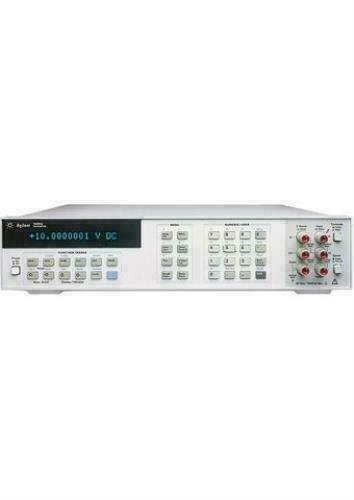
The 3458A is widely regarded as the highest-performance bench multimeter ever produced. First introduced in 1989, it remains in production. It does NOT use SCPI — all commands (except IEEE 488.2 common commands) use HP-proprietary short mnemonics. The command parser accepts abbreviated forms (e.g., DCV, OHM, NPLC) rather than SCPI tree-structured syntax. Two ADCs are available: an integrating multi-slope ADC (for high-resolution measurements up to 8.5 digits) and a fast sigma-delta ADC (for digitizing up to 100 kSa/s). Auto-calibration uses built-in 7V and 10k ohm references.
Status Byte
Section titled “Status Byte”| Bit 7 | Bit 6 | Bit 5 | Bit 4 | Bit 3 | Bit 2 | Bit 1 | Bit 0 |
|---|---|---|---|---|---|---|---|
| Power On | RQS | ESB | MAV | Auxiliary Error | Error | Unused | Data Ready |
| Power-on SRQ occurred | Requesting service | Event status byte summary bit | Message available in output buffer | Auxiliary error (calibration, self-test, memory) | Syntax error or hardware error detected | Not used | A reading is available in output buffer |
Use *STB? or serial poll to read. The 3458A data-ready bit (0) is critical for high-speed reading workflows. Use *SRE to configure which bits generate SRQ.
Commands
Section titled “Commands”IEEE 488.2 Common Commands
Section titled “IEEE 488.2 Common Commands”Standard IEEE 488.2 commands — the only SCPI-like syntax this instrument uses
| Command | Type | Description |
|---|---|---|
*IDN? | query | Identification query — returns manufacturer, model, serial, firmware |
Details Returns (string) — Comma-separated identification
Example: HEWLETT-PACKARD,3458A,0,8+9 | ||
*RST | command | Reset to power-on state (same as RESET) |
*CLS | command | Clear status registers and error queue |
*ESE {mask} | command | Set event status enable register |
Details Parameters
| ||
*ESE? | query | Query event status enable register |
Details Returns (numeric)
Example: 0 | ||
*ESR? | query | Read and clear event status register |
Details Returns (numeric)
Example: 0 | ||
*OPC | command | Set operation complete bit in ESR when all pending operations finish |
*OPC? | query | Returns 1 when all pending operations complete |
Details Returns (numeric)
Example: 1 | ||
*SRE {mask} | command | Set service request enable register |
Details Parameters
| ||
*SRE? | query | Query service request enable register |
Details Returns (numeric)
Example: 0 | ||
*STB? | query | Read status byte register |
Details Returns (numeric) — Status byte value
Example: 0 | ||
*TST? | query | Self-test; returns 0 for pass, nonzero for failure code |
Details Returns (numeric)
Example: 0 Note: Takes several seconds to complete. Resets instrument state. | ||
*TRG | command | IEEE 488.2 group execute trigger (same as GET) |
Function Selection
Section titled “Function Selection”Select the measurement function. These are short mnemonics, not SCPI. Each command optionally accepts a range parameter.
| Command | Type | Description |
|---|---|---|
DCV [{range}] | command | Select DC voltage function |
Details Parameters
Example DCV 10 | ||
ACV [{range}] | command | Select AC voltage function (RMS, AC-coupled) |
Details Parameters
Example ACV 10 | ||
ACDCV [{range}] | command | Select AC+DC voltage function (true RMS, DC-coupled) |
Details Parameters
Example ACDCV 10 | ||
OHM [{range}] | command | Select 2-wire resistance function |
Details Parameters
Example OHM 1E3 | ||
OHMF [{range}] | command | Select 4-wire resistance function |
Details Parameters
Example OHMF 1E3 | ||
DCI [{range}] | command | Select DC current function |
Details Parameters
Example DCI 0.1 | ||
ACI [{range}] | command | Select AC current function (RMS, AC-coupled) |
Details Parameters
Example ACI 0.1 | ||
ACDCI [{range}] | command | Select AC+DC current function (true RMS, DC-coupled) |
Details Parameters
Example ACDCI 0.1 | ||
FREQ [{range}] | command | Select frequency measurement function |
Details Parameters
Example FREQ | ||
PER [{range}] | command | Select period measurement function |
Details Parameters
Example PER | ||
Digitizing Functions
Section titled “Digitizing Functions”Direct-sampling and sub-sampling digitizing modes. These select the function and prepare the 3458A as a high-speed digitizer.
| Command | Type | Description |
|---|---|---|
DSDC [{range}] | command | Direct-sampling DC-coupled digitizing — up to 100,000 readings/sec |
Details Parameters
Example DSDC 10 | ||
DSAC [{range}] | command | Direct-sampling AC-coupled digitizing — up to 100,000 readings/sec |
Details Parameters
Example DSAC 10 | ||
SSDC [{range}] | command | Sub-sampling DC-coupled digitizing — equivalent-time sampling up to 20 MHz bandwidth |
Details Parameters
Example SSDC 10 | ||
SSAC [{range}] | command | Sub-sampling AC-coupled digitizing — equivalent-time sampling up to 20 MHz bandwidth |
Details Parameters
Example SSAC 10 | ||
SWEEP {interval},{count} | command | Configure digitizing sweep — sets sample interval and number of samples |
Details Parameters
Example SWEEP 10E-6,1000 Note: Equivalent to setting TIMER and NRDGS together. Overrides TIMER and NRDGS settings. | ||
ISCALE {state} | command | Enable/disable input scaling for digitizing — applies gain and offset correction |
Details Parameters
| ||
Range and Resolution
Section titled “Range and Resolution”Configure measurement range, resolution, integration time, and autozero. These work with the currently selected function.
| Command | Type | Description |
|---|---|---|
RANGE {value} | command | Set measurement range for current function |
Details Parameters
Example RANGE 10 | ||
RANGE? | query | Query current range setting |
Details Returns (numeric)
Example: +1.00000000E+01 | ||
ARANGE {state} | command | Enable or disable autoranging |
Details Parameters
Example ARANGE ON | ||
ARANGE? | query | Query autorange state |
Details Returns (string)
Example: 1 | ||
NPLC {value} | command | Set integration time in power line cycles — primary resolution control |
Details Parameters
Example NPLC 100 Note: NPLC 100 at 60Hz = 1.67 sec integration. Higher NPLC improves noise rejection but slows measurement. NPLC 0 selects the fast ADC (digitizing modes). | ||
NPLC? | query | Query current NPLC setting |
Details Returns (numeric)
Example: +1.00000000E+02 | ||
APER {seconds} | command | Set integration aperture time directly in seconds |
Details Parameters
Example APER 0.1 Note: Overrides NPLC. Provides exact integration time independent of line frequency. | ||
APER? | query | Query current aperture time |
Details Returns (numeric)
Example: +1.00000000E-01 | ||
NDIG {digits} | command | Set display resolution in number of digits — controls NPLC indirectly |
Details Parameters
Example NDIG 8 Note: Sets NPLC to achieve the requested number of digits. NDIG 4=NPLC 0.02, NDIG 6=NPLC 10, NDIG 8=NPLC 512 approx. | ||
NDIG? | query | Query current digit resolution setting |
Details Returns (numeric)
Example: 8 | ||
AZERO {state} | command | Enable/disable autozero — reduces thermal drift but halves measurement speed |
Details Parameters
Note: ONCE performs a single autozero then disables. OFF doubles reading rate. ON is the default. | ||
AZERO? | query | Query autozero state |
Details Returns (string)
Example: 1 | ||
LFILTER {state} | command | Enable/disable analog low-pass filter (for AC rejection in DC measurements) |
Details Parameters
| ||
LFILTER? | query | Query analog filter state |
Details Returns (string)
Example: 0 | ||
FIXEDZ {state} | command | Enable fixed input impedance (10M ohm on all DCV ranges). When OFF, low ranges use >10G ohm input. |
Details Parameters
Note: ON forces 10M input on all ranges. OFF (default) uses high-impedance input on 100mV and 1V ranges. | ||
FIXEDZ? | query | Query fixed input impedance state |
Details Returns (string)
Example: 0 | ||
Trigger System
Section titled “Trigger System”Three-level trigger model: trigger arm (TARM) -> trigger (TRIG) -> sample. Each level has its own event source.
| Command | Type | Description |
|---|---|---|
TARM {event} | command | Set trigger arm event — the first level of the trigger model |
Details Parameters
Example TARM SGL | ||
TARM? | query | Query trigger arm event source |
Details Returns (string)
Example: 1 | ||
TRIG {event} | command | Set trigger event — the second level of the trigger model |
Details Parameters
Example TRIG AUTO | ||
TRIG? | query | Query trigger event source |
Details Returns (string)
Example: 1 | ||
NRDGS {count},{event} | command | Set number of readings per trigger and the sample event |
Details Parameters
Example NRDGS 100,TIMER | ||
NRDGS? | query | Query number of readings setting |
Details Returns (string)
Example: 1,1 | ||
TIMER {seconds} | command | Set timer interval between readings when NRDGS uses TIMER event |
Details Parameters
Example TIMER 0.001 | ||
TIMER? | query | Query timer interval |
Details Returns (numeric)
Example: +1.00000000E-03 | ||
DELAY {seconds} | command | Set delay between trigger event and first reading |
Details Parameters
Example DELAY 0.01 Note: DELAY -1 selects automatic delay (recommended for autorange). DELAY 0 for fastest response. | ||
DELAY? | query | Query trigger delay |
Details Returns (numeric)
Example: +0.00000000E+00 | ||
LEVEL {voltage},{slope} | command | Set analog level trigger parameters (used when TRIG LEVEL or NRDGS event LEVEL) |
Details Parameters
Example LEVEL 0.5,POS | ||
Math Operations
Section titled “Math Operations”Built-in math processing on readings. Multiple math operations can be chained.
| Command | Type | Description |
|---|---|---|
MATH {operation} | command | Enable a math operation on readings |
Details Parameters
Example MATH STAT | ||
MATH? | query | Query active math operations |
Details Returns (string)
Example: 0 | ||
MMATH {operation} | command | Enable multiple math operations simultaneously (additive to current state) |
Details Parameters
Example MMATH FILTER | ||
NULL [{value}] | command | Store null (offset) value — if no parameter, uses the last reading |
Details Parameters
Example NULL Note: Automatically enables MATH NULL. Send with no parameter to null the current reading. | ||
NULL? | query | Query stored null value |
Details Returns (numeric)
Example: +0.00000000E+00 | ||
SCALE {gain},{offset} | command | Set scale factors — result = (reading * gain) + offset |
Details Parameters
Example SCALE 1000,0 | ||
SCALE? | query | Query scale factors |
Details Returns (string)
Example: +1.00000000E+03,+0.00000000E+00 | ||
PERC {reference} | command | Set percentage reference value — result = ((reading - ref) / ref) * 100 |
Details Parameters
Example PERC 10.0 | ||
PERC? | query | Query percentage reference value |
Details Returns (numeric)
Example: +1.00000000E+01 | ||
SMATH? | query | Query statistics — returns count, mean, variance, and standard deviation |
Details Returns (string) — Count, mean, variance, standard deviation
Example: 100,+1.23456789E+00,+1.23456789E-12,+1.11111111E-06 Note: Only valid when MATH STAT or MMATH STAT is active. | ||
RMATH | command | Reset statistics accumulators to zero |
Memory and Output
Section titled “Memory and Output”Reading memory buffer and output format control. The 3458A can store up to ~16,000 readings in internal memory.
| Command | Type | Description |
|---|---|---|
MEM {mode} | command | Set memory mode for reading storage |
Details Parameters
Example MEM FIFO Note: MEM FIFO is required for digitizing workflows. Readings are stored in memory and retrieved with RMEM. | ||
MEM? | query | Query memory mode |
Details Returns (string)
Example: 2 | ||
RMEM {start},{count} | command | Recall readings from memory buffer |
Details Parameters
Example RMEM 1,1000 Note: Readings are returned in the current OFORMAT. Use after capture with MEM FIFO. | ||
MCOUNT? | query | Query number of readings stored in memory |
Details Returns (numeric)
Example: 1000 | ||
MSIZE? | query | Query memory size (maximum number of readings that can be stored) |
Details Returns (numeric)
Example: 16384 | ||
OFORMAT {format} | command | Set output format for readings |
Details Parameters
Example OFORMAT ASCII Note: Binary formats (SINT, DINT, SREAL, DREAL) are much faster for bulk transfer but require binary parsing on the controller. | ||
OFORMAT? | query | Query output format |
Details Returns (string)
Example: 1 | ||
END {mode} | command | Control when EOI is asserted on output |
Details Parameters
Example END ON | ||
END? | query | Query EOI mode |
Details Returns (string)
Example: 1 | ||
Status and Error
Section titled “Status and Error”Status register, error reporting, and service request configuration. The 3458A uses a proprietary status model alongside IEEE 488.2 registers.
| Command | Type | Description |
|---|---|---|
STB? | query | Read status byte (same as serial poll but does not clear RQS) |
Details Returns (numeric) — Status byte value 0-255
Example: 0 | ||
ERR? | query | Read and clear the error register |
Details Returns (numeric) — Error code — 0 means no error
Example: 0 Note: Nonzero indicates an error condition. See manual for error code definitions. | ||
AUXERR? | query | Read auxiliary error register (provides detail on calibration and hardware errors) |
Details Returns (numeric)
Example: 0 | ||
ERRSTR? | query | Read error string for the most recent error |
Details Returns (string)
Example: 0,NO ERROR | ||
System and Display
Section titled “System and Display”System control, display, identification, and housekeeping commands
| Command | Type | Description |
|---|---|---|
PRESET | command | Set instrument to a known, fast-measurement state (different from *RST — PRESET selects DCV AUTO, NPLC 10, TARM AUTO, TRIG AUTO) |
Details Note: PRESET is the preferred way to initialize the 3458A for measurement. Unlike *RST, PRESET selects reasonable defaults for remote operation. | ||
RESET | command | Full reset to power-on defaults (equivalent to *RST) |
INBUF {state} | command | Enable/disable input buffer — when ON, commands are queued and executed sequentially |
Details Parameters
Note: INBUF ON is recommended for GPIB operation. It allows the controller to send commands without waiting for each to complete. | ||
INBUF? | query | Query input buffer state |
Details Returns (string)
Example: 1 | ||
ID? | query | Query instrument identification string (HP-proprietary, shorter than *IDN?) |
Details Returns (string)
Example: HP3458A | ||
REV? | query | Query firmware revision numbers |
Details Returns (string) — Main CPU and I/O processor revision
Example: 8,9 | ||
OPT? | query | Query installed hardware options |
Details Returns (string)
Example: 0 | ||
LINE? | query | Query detected power line frequency |
Details Returns (numeric) — Line frequency in Hz
Example: +6.00000000E+01 Note: Returns 50 or 60. Affects NPLC timing. Measured at power-on. | ||
TEMP? | query | Query internal temperature of the instrument |
Details Returns (numeric) — Temperature in degrees Celsius
Example: +3.50000000E+01 | ||
DISP {state} | command | Control front panel display |
Details Parameters
Note: Disabling the display improves measurement throughput. | ||
DISP {state},"{message}" | command | Display a custom message on the front panel |
Details Parameters
Example DISP MSG,"CALIBRATING" | ||
BEEP | command | Sound the front panel beeper |
LOCK {state} | command | Lock/unlock front panel controls |
Details Parameters
Note: LOCK ON prevents local operation from the front panel. | ||
EMASK {mask} | command | Set error mask — controls which errors set the error bit in the status byte |
Details Parameters
| ||
EMASK? | query | Query error mask |
Details Returns (numeric)
Example: 0 | ||
Calibration
Section titled “Calibration”Self-calibration commands. ACAL runs internal auto-calibration routines using built-in references. Full calibration (CAL) requires external standards.
| Command | Type | Description |
|---|---|---|
ACAL {type} | command | Run auto-calibration — uses internal DC and resistance references |
Details Parameters
Example ACAL ALL Note: ACAL ALL takes several minutes. Allow 2-hour warm-up before running for best results. Disconnect all inputs first. | ||
ACAL? | query | Query auto-calibration status |
Details Returns (string) — Calibration state information | ||
CAL {value} | command | Enter a calibration reference value during a full calibration sequence |
Details Parameters
Note: Full calibration requires external standards and should only be performed by qualified metrology personnel. | ||
CALNUM? | query | Query total number of calibrations performed on this unit |
Details Returns (numeric)
Example: 42 | ||
Subprogram and Macro
Section titled “Subprogram and Macro”The 3458A supports stored subprograms (macros) in non-volatile memory that can execute command sequences.
| Command | Type | Description |
|---|---|---|
SUB {number} | command | Begin recording a subprogram |
Details Parameters
Example SUB 1 | ||
SUBEND | command | End recording a subprogram |
CALL {number} | command | Execute a stored subprogram |
Details Parameters
Example CALL 1 | ||
DELSUB {number} | command | Delete a stored subprogram |
Details Parameters
| ||
Common Workflows
Section titled “Common Workflows”High-Resolution DC Measurement
Section titled “High-Resolution DC Measurement”Take a single DC voltage measurement at maximum resolution (8.5 digits) with full noise rejection
Initialize to known state
PRESET Select DC voltage function with 10V range
DCV 10 Set integration to 100 NPLC for ~7.5 digit resolution
NPLC 100 Enable autozero for best accuracy
AZERO ON Set trigger to single measurement
TARM HOLD Arm a single trigger cycle
TARM SGL Read the measurement result
Manual step+X.XXXXXXXXE+XX Fast Digitizing
Section titled “Fast Digitizing”Capture 1000 DC-coupled samples at 100 kSa/s using the direct-sampling ADC
Initialize to known state
PRESET Select direct-sampling DC mode, 10V range
DSDC 10 Configure sweep: 10us interval, 1000 samples
SWEEP 10E-6,1000 Enable FIFO memory for burst capture
MEM FIFO Arm a single sweep
TARM SGL Wait for sweep to complete (100ms for 1000 samples at 10us)
Manual stepRead all captured samples from memory
RMEM 1,1000 Continuous Readings with Statistics
Section titled “Continuous Readings with Statistics”Take continuous DC voltage readings and accumulate statistics (min, max, mean, std dev)
Initialize to known state
PRESET Select DC voltage, autorange
DCV AUTO Set moderate integration
NPLC 10 Enable statistics math
MATH STAT Clear previous statistics
RMATH Set continuous triggering
TARM AUTO Let readings accumulate, then query statistics
SMATH? count,mean,variance,std_dev 4-Wire Resistance with Null
Section titled “4-Wire Resistance with Null”Measure 4-wire resistance with lead compensation using null offset
Initialize to known state
PRESET Select 4-wire resistance, autorange
OHMF AUTO Set high resolution
NPLC 100 Enable autozero
AZERO ON Short the test leads and take a reading
TARM SGL Null the lead resistance (uses last reading)
NULL Connect DUT and measure
TARM SGL Compensated resistance value AC Voltage Measurement
Section titled “AC Voltage Measurement”Measure AC voltage with appropriate settling time for accurate RMS
Initialize to known state
PRESET Select AC voltage, 10V range
ACV 10 Set trigger delay for RMS settling
DELAY 1 Single trigger and read
TARM SGL +X.XXXXXXXXE+XX For signals below 100 Hz, increase delay
Manual step