Hewlett-Packard 4284A
4284A
20 Hz to 1 MHz precision LCR meter
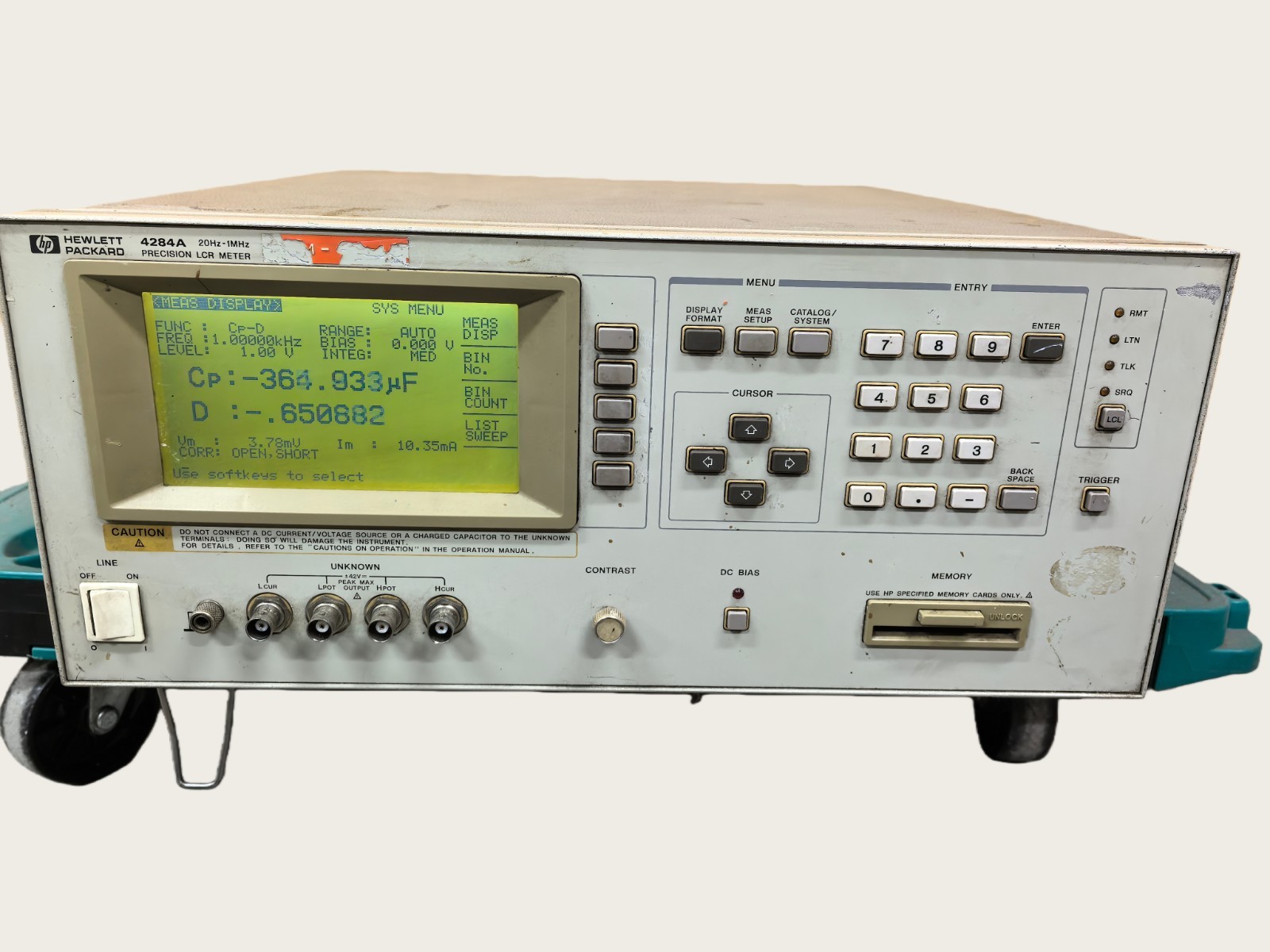
The HP/Agilent 4284A was the industry-standard precision LCR meter from 1992 until its discontinuation around 2014 (superseded by the E4980A/E4980AL). Covers 20 Hz to 1 MHz with 0.05% basic accuracy. Uses a four-terminal pair (4TP) measurement topology for best accuracy. The command set is quasi-SCPI — mostly SCPI-compliant but with some proprietary extensions (e.g., FUNC:IMP parameter codes). Option 001 adds extended DC bias (up to 40V). Widely used for characterizing capacitors, inductors, ferrites, piezoelectrics, and semiconductor C-V measurements. Many are still in active lab use.
Status Byte
Section titled “Status Byte”| Bit 7 | Bit 6 | Bit 5 | Bit 4 | Bit 3 | Bit 2 | Bit 1 | Bit 0 |
|---|---|---|---|---|---|---|---|
| Unused | RQS/MSS | ESB | MAV | Unused | Error Queue | Unused | Unused |
| Not used | Requesting service / Master summary status | Event status byte summary bit | Message available in output buffer | Not used | One or more errors in error queue | Not used | Not used |
Use *STB? to read status byte, *SRE to set service request enable register. Bit 2 indicates error queue not empty.
Commands
Section titled “Commands”IEEE 488.2 Common Commands
Section titled “IEEE 488.2 Common Commands”Standard IEEE 488.2 commands supported by all compliant instruments
| Command | Type | Description |
|---|---|---|
*IDN? | query | Identification query — returns manufacturer, model, serial, firmware |
Details Returns (string) — Comma-separated identification
Example: HEWLETT-PACKARD,4284A,MY12345678,01.00 | ||
*RST | command | Reset to factory default state |
*CLS | command | Clear status registers and error queue |
*ESE {mask} | command | Set event status enable register |
Details Parameters
| ||
*ESE? | query | Query event status enable register |
Details Returns (numeric)
Example: 0 | ||
*ESR? | query | Read and clear event status register |
Details Returns (numeric)
Example: 0 | ||
*OPC | command | Set operation complete bit in ESR when all pending operations finish |
*OPC? | query | Returns 1 when all pending operations complete |
Details Returns (numeric)
Example: 1 | ||
*SRE {mask} | command | Set service request enable register |
Details Parameters
| ||
*SRE? | query | Query service request enable register |
Details Returns (numeric)
Example: 0 | ||
*STB? | query | Read status byte register |
Details Returns (numeric) — Status byte value
Example: 0 | ||
*TST? | query | Self-test; returns 0 for pass, non-zero for fail |
Details Returns (numeric)
Example: 0 Note: Takes several seconds to complete | ||
*TRG | command | Trigger measurement from bus (requires trigger source BUS) |
Measurement Function
Section titled “Measurement Function”Select the impedance parameter pair to measure. The 4284A always measures a primary and secondary parameter simultaneously.
| Command | Type | Description |
|---|---|---|
FUNC:IMP {parameter} | command | Select measurement function (impedance parameter pair) |
Details Parameters
Example FUNC:IMP CPD Note: CPD = parallel capacitance + dissipation factor. Use parallel model (Cp) for high-impedance DUTs, series model (Cs) for low-impedance DUTs. | ||
FUNC:IMP? | query | Query current measurement function |
Details Returns (string)
Example: CPD | ||
FUNC:IMP:RANG {range} | command | Set impedance measurement range manually |
Details Parameters
Note: Manual ranging avoids auto-range settling time | ||
FUNC:IMP:RANG? | query | Query current impedance range |
Details Returns (numeric)
Example: +1.00000000E+03 | ||
FUNC:IMP:RANG:AUTO {state} | command | Enable/disable impedance auto-ranging |
Details Parameters
| ||
FUNC:IMP:RANG:AUTO? | query | Query auto-ranging state |
Details Returns (string)
Example: 1 | ||
Frequency
Section titled “Frequency”Configure the test signal frequency. The 4284A covers 20 Hz to 1 MHz.
| Command | Type | Description |
|---|---|---|
FREQ {value} | command | Set test signal frequency |
Details Parameters
Example FREQ 1E3 Note: Frequency resolution is 4 digits or 1 mHz, whichever is larger | ||
FREQ? | query | Query current test frequency |
Details Returns (numeric)
Example: +1.00000000E+03 | ||
LIST:FREQ {f1},{f2},... | command | Set list of frequencies for list sweep mode (up to 201 points) |
Details Parameters
Example LIST:FREQ 100,1E3,10E3,100E3,1E6 | ||
LIST:FREQ? | query | Query list sweep frequency points |
Details Returns (string) — Comma-separated frequency values | ||
Signal Level
Section titled “Signal Level”Configure the AC test signal level and DC bias for measurements
| Command | Type | Description |
|---|---|---|
VOLT {value} | command | Set AC test signal voltage level |
Details Parameters
Example VOLT 1.0 | ||
VOLT? | query | Query AC test signal voltage level |
Details Returns (numeric)
Example: +1.00000000E+00 | ||
CURR {value} | command | Set AC test signal current level (constant current mode) |
Details Parameters
Example CURR 1E-3 | ||
CURR? | query | Query AC test signal current level |
Details Returns (numeric)
Example: +1.00000000E-03 | ||
VOLT:RANG:AUTO {state} | command | Enable/disable automatic signal level ranging |
Details Parameters
| ||
VOLT:RANG:AUTO? | query | Query automatic signal level ranging state |
Details Returns (string)
Example: 1 | ||
BIAS:VOLT {value} | command | Set DC bias voltage |
Details Parameters
Example BIAS:VOLT 5.0 Note: Standard unit supports 0 to 2V internal DC bias. Option 001 extends to 40V. | ||
BIAS:VOLT? | query | Query DC bias voltage setting |
Details Returns (numeric)
Example: +0.00000000E+00 | ||
BIAS:VOLT:STAT {state} | command | Enable/disable DC bias voltage output |
Details Parameters
| ||
BIAS:VOLT:STAT? | query | Query DC bias voltage output state |
Details Returns (string)
Example: 0 | ||
BIAS:CURR {value} | command | Set DC bias current |
Details Parameters
Note: Requires option 001 for extended bias | ||
BIAS:CURR? | query | Query DC bias current setting |
Details Returns (numeric)
Example: +0.00000000E+00 | ||
LIST:VOLT {v1},{v2},... | command | Set list of AC voltage levels for list sweep mode |
Details Parameters
Example LIST:VOLT 0.1,0.5,1.0 | ||
LIST:VOLT? | query | Query list sweep voltage points |
Details Returns (string) — Comma-separated voltage values | ||
LIST:BIAS:VOLT {v1},{v2},... | command | Set list of DC bias voltages for list sweep mode |
Details Parameters
| ||
LIST:BIAS:VOLT? | query | Query list sweep DC bias voltage points |
Details Returns (string) — Comma-separated DC bias voltage values | ||
Trigger
Section titled “Trigger”Trigger system configuration and measurement initiation
| Command | Type | Description |
|---|---|---|
TRIG:SOUR {source} | command | Set trigger source |
Details Parameters
| ||
TRIG:SOUR? | query | Query trigger source |
Details Returns (string)
Example: INT | ||
TRIG:DEL {seconds} | command | Set trigger delay time |
Details Parameters
| ||
TRIG:DEL? | query | Query trigger delay time |
Details Returns (numeric)
Example: +0.00000000E+00 | ||
TRIG:DEL:AUTO {state} | command | Enable/disable automatic trigger delay |
Details Parameters
| ||
TRIG:DEL:AUTO? | query | Query automatic trigger delay state |
Details Returns (string)
Example: 1 | ||
INIT | command | Place instrument in wait-for-trigger state and initiate trigger system |
Details Note: Required before *TRG when trigger source is BUS | ||
INIT:CONT {state} | command | Enable/disable continuous initiation mode |
Details Parameters
Note: When ON, instrument re-arms trigger automatically after each measurement | ||
INIT:CONT? | query | Query continuous initiation state |
Details Returns (string)
Example: 0 | ||
FETCH? | query | Return the most recent measurement result without triggering a new measurement |
Details Returns (string) — Primary value, secondary value, status code
Example: +1.00540000E-09,+1.23400000E-02,+0 Note: Returns three comma-separated values: primary parameter, secondary parameter, and measurement status (0=normal, +1=overload) | ||
ABORT | command | Abort a measurement in progress and return trigger system to idle |
Correction (Compensation)
Section titled “Correction (Compensation)”Open, short, and load correction to remove fixture/cable parasitic errors from measurements
| Command | Type | Description |
|---|---|---|
CORR:OPEN | command | Perform open correction measurement at all frequencies |
Details Note: Leave the test fixture terminals open (no DUT connected). Takes several seconds as it sweeps all preset frequencies. | ||
CORR:OPEN:STAT {state} | command | Enable/disable open correction |
Details Parameters
| ||
CORR:OPEN:STAT? | query | Query open correction state |
Details Returns (string)
Example: 0 | ||
CORR:SHOR | command | Perform short correction measurement at all frequencies |
Details Note: Short the test fixture terminals together (use a shorting bar). Takes several seconds. | ||
CORR:SHOR:STAT {state} | command | Enable/disable short correction |
Details Parameters
| ||
CORR:SHOR:STAT? | query | Query short correction state |
Details Returns (string)
Example: 0 | ||
CORR:LOAD {reference_primary},{reference_secondary} | command | Perform load correction using known reference standard values |
Details Parameters
Note: Connect a calibrated reference standard to the fixture. The instrument measures it and computes load correction coefficients. | ||
CORR:LOAD:STAT {state} | command | Enable/disable load correction |
Details Parameters
| ||
CORR:LOAD:STAT? | query | Query load correction state |
Details Returns (string)
Example: 0 | ||
CORR:LENG {length} | command | Set cable length for cable length correction |
Details Parameters
Note: Compensates for phase shift introduced by test cables. Set to 0 for direct connection. | ||
CORR:LENG? | query | Query cable length correction setting |
Details Returns (numeric)
Example: +0 | ||
Averaging and Aperture
Section titled “Averaging and Aperture”Control measurement speed and averaging for noise reduction
| Command | Type | Description |
|---|---|---|
APER {mode}[,{count}] | command | Set measurement aperture (integration time) and averaging count |
Details Parameters
Example APER MED,8 Note: Total measurement time = aperture_time x averaging_count. LONG with high averaging gives best accuracy but slowest speed. | ||
APER? | query | Query aperture mode and averaging count |
Details Returns (string)
Example: MED,1 | ||
Data Format
Section titled “Data Format”Control the format of returned measurement data
| Command | Type | Description |
|---|---|---|
FORM:DATA {format} | command | Set data transfer format |
Details Parameters
Note: ASCII format returns human-readable numbers. Binary formats are faster for bulk data transfer but require binary parsing. | ||
FORM:DATA? | query | Query data transfer format |
Details Returns (string)
Example: ASC | ||
List Sweep
Section titled “List Sweep”Configure and execute list-based parameter sweeps
| Command | Type | Description |
|---|---|---|
LIST:MODE {mode} | command | Set list sweep mode |
Details Parameters
| ||
LIST:MODE? | query | Query list sweep mode |
Details Returns (string)
Example: SEQ | ||
LIST:BAND {bw1},{bw2},... | command | Set measurement aperture for each list sweep point |
Details Parameters
| ||
LIST:BAND? | query | Query list sweep aperture settings |
Details Returns (string) | ||
System
Section titled “System”System configuration, display control, and error handling
| Command | Type | Description |
|---|---|---|
SYST:ERR? | query | Read and remove one error from error queue |
Details Returns (string) — Error code and message
Example: +0,"No error" | ||
DISP:PAGE {page} | command | Select front panel display page |
Details Parameters
| ||
DISP:PAGE? | query | Query current display page |
Details Returns (string)
Example: MEAS | ||
DISP:LINE "{message}" | command | Display custom message on the auxiliary display line |
Details Parameters
Example DISP:LINE "CAL IN PROGRESS" | ||
SYST:BEEP | command | Issue a single beep |
SYST:BEEP:STAT {state} | command | Enable/disable beeper |
Details Parameters
| ||
SYST:BEEP:STAT? | query | Query beeper state |
Details Returns (string)
Example: 1 | ||
SYST:LFR {frequency} | command | Set power line frequency for line rejection |
Details Parameters
| ||
SYST:LFR? | query | Query power line frequency setting |
Details Returns (numeric)
Example: +60 | ||
Common Workflows
Section titled “Common Workflows”Measure Capacitor at 1 kHz
Section titled “Measure Capacitor at 1 kHz”Measure a capacitor using the parallel capacitance + dissipation factor model at 1 kHz with 1 Vrms signal
Reset to known state
*RST Clear status registers
*CLS Select Cp-D measurement function
FUNC:IMP CPD Set test frequency to 1 kHz
FREQ 1E3 Set AC signal level to 1 Vrms
VOLT 1.0 Set medium aperture with 4x averaging for good accuracy
APER MED,4 Set trigger source to BUS
TRIG:SOUR BUS Initiate trigger system
INIT Send bus trigger
*TRG Read measurement (Cp in farads, D unitless, status)
FETCH? +1.00540000E-09,+1.23400000E-02,+0 Open/Short Compensation
Section titled “Open/Short Compensation”Perform open and short correction to remove fixture parasitics before measurement
Reset to known state
*RST Clear status registers
*CLS Set desired measurement function
FUNC:IMP CPD Set desired test frequency
FREQ 1E3 Ensure fixture terminals are OPEN (no DUT), then execute open correction
CORR:OPEN Wait for open correction to complete
*OPC? 1 Enable open correction
CORR:OPEN:STAT ON SHORT fixture terminals (use shorting bar), then execute short correction
CORR:SHOR Wait for short correction to complete
*OPC? 1 Enable short correction
CORR:SHOR:STAT ON Connect DUT and trigger measurement
TRIG:SOUR BUS Initiate and trigger
INIT Send bus trigger
*TRG Read compensated measurement
FETCH? +X.XXXXXXXXE+XX,+X.XXXXXXXXE+XX,+0 Frequency Sweep via List Mode
Section titled “Frequency Sweep via List Mode”Sweep measurement across multiple frequencies using list mode to characterize impedance vs frequency
Reset to known state
*RST Clear status registers
*CLS Select impedance magnitude + phase function
FUNC:IMP ZTD Set AC signal level to 1 Vrms
VOLT 1.0 Set list sweep frequencies (logarithmic spread)
LIST:FREQ 100,1E3,10E3,100E3,1E6 Set sequential sweep mode (all points per trigger)
LIST:MODE SEQ Set trigger source to BUS
TRIG:SOUR BUS Switch display to list view
DISP:PAGE LIST Initiate trigger system
INIT Send bus trigger to start sweep
*TRG Wait for sweep completion
*OPC? 1 Read sweep results (|Z|, theta pairs at each frequency)
FETCH? Comma-separated |Z|,theta,status triplets for each frequency point