Hewlett-Packard 53131A
53131A
225 MHz universal frequency counter/timer
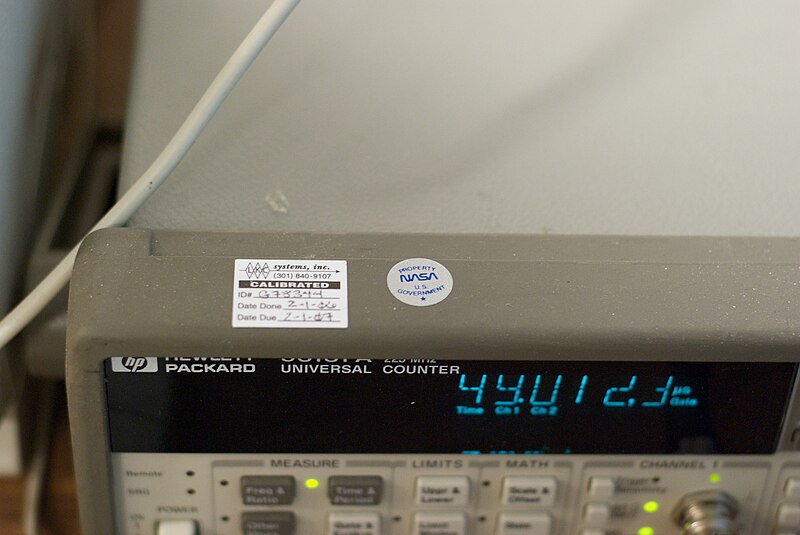
The 53131A is a 225 MHz universal counter produced by HP (later Agilent/Keysight) from the mid-1990s. It features two 225 MHz channels with an optional third channel extending to 12.4 GHz. The reciprocal counting technique provides high resolution at all frequencies -- not just at high frequencies like traditional counters. Resolution is determined by gate time, not input frequency. Standard timebase is a 10 MHz TCXO; optional high-stability OCXO or rear-panel external 10 MHz reference input available. The 53132A is the higher-resolution sibling (12-digit/s vs 10-digit/s). Very common in calibration labs and production test. GPIB is standard on all units.
Status Byte
Section titled “Status Byte”| Bit 7 | Bit 6 | Bit 5 | Bit 4 | Bit 3 | Bit 2 | Bit 1 | Bit 0 |
|---|---|---|---|---|---|---|---|
| Operation Complete | RQS/MSS | ESB | MAV | Questionable Data | Error Queue | Unused | Unused |
| Operation summary bit | Requesting service / Master summary status | Event status byte summary bit | Message available in output buffer | Questionable data summary bit | One or more errors in error queue | Not used | Not used |
Use *STB? to read status byte, *SRE to set service request enable register
Commands
Section titled “Commands”IEEE 488.2 Common Commands
Section titled “IEEE 488.2 Common Commands”Standard IEEE 488.2 commands supported by all compliant instruments
| Command | Type | Description |
|---|---|---|
*IDN? | query | Identification query -- returns manufacturer, model, serial, firmware |
Details Returns (string) — Comma-separated identification
Example: HEWLETT-PACKARD,53131A,0,4806 | ||
*RST | command | Reset to factory default state |
*CLS | command | Clear status registers and error queue |
*ESE {mask} | command | Set event status enable register |
Details Parameters
| ||
*ESE? | query | Query event status enable register |
Details Returns (numeric)
Example: 0 | ||
*ESR? | query | Read and clear event status register |
Details Returns (numeric)
Example: 0 | ||
*OPC | command | Set operation complete bit in ESR when all pending operations finish |
*OPC? | query | Returns 1 when all pending operations complete |
Details Returns (numeric)
Example: 1 | ||
*SRE {mask} | command | Set service request enable register |
Details Parameters
| ||
*SRE? | query | Query service request enable register |
Details Returns (numeric)
Example: 0 | ||
*STB? | query | Read status byte register |
Details Returns (numeric) — Status byte value
Example: 0 | ||
*TST? | query | Self-test; returns 0 for pass, non-zero for fail |
Details Returns (numeric)
Example: 0 Note: Takes several seconds to complete | ||
*TRG | command | Trigger measurement from bus (requires trigger source BUS) |
*WAI | command | Wait for all pending operations to complete before executing next command |
*SAV {register} | command | Save current instrument state to non-volatile register |
Details Parameters
| ||
*RCL {register} | command | Recall instrument state from non-volatile register |
Details Parameters
| ||
Measurement Configuration
Section titled “Measurement Configuration”Configure measurement function and parameters. CONF sets up the measurement without triggering; MEAS configures, triggers, and returns a reading in one operation.
| Command | Type | Description |
|---|---|---|
CONF:FREQ [{expected}[,{resolution}[,{channel}]]] | command | Configure for frequency measurement on specified channel |
Details Parameters
Example CONF:FREQ 1E6,1,(@1) | ||
CONF:FREQ? | query | Query current frequency configuration |
Details Returns (string)
Example: "FREQ +1.00000000E+06,+1.00000000E+00" | ||
CONF:PER [{expected}[,{resolution}[,{channel}]]] | command | Configure for period measurement on specified channel |
Details Parameters
Example CONF:PER DEF,DEF,(@1) | ||
CONF:PHAS [{expected}[,{resolution}]] | command | Configure for phase measurement between channel 1 and channel 2 |
Details Parameters
Note: Phase is always measured from channel 1 to channel 2 | ||
CONF:TINT [{expected}[,{resolution}]] | command | Configure for time interval measurement (channel 1 start, channel 2 stop) |
Details Parameters
Note: Start event on channel 1, stop event on channel 2 | ||
CONF:TOT [{channel}] | command | Configure for totalize (event counting) measurement |
Details Parameters
Note: Counts threshold crossings. Gate control determines counting window. | ||
CONF:FREQ:RAT [{expected}[,{resolution}[,{ch_num},{ch_den}]]] | command | Configure for frequency ratio measurement (numerator channel / denominator channel) |
Details Parameters
Example CONF:FREQ:RAT DEF,DEF,(@1),(@2) | ||
CONF? | query | Query current measurement configuration |
Details Returns (string)
Example: "FREQ +1.00000000E+06,+1.00000000E+00" | ||
MEAS:FREQ? [{expected}[,{resolution}[,{channel}]]] | query | Configure, trigger, and return one frequency reading |
Details Parameters
Returns (numeric) — Frequency in Hz
Example: +1.00000123E+06 Example MEAS:FREQ? 1E6,1,(@1) | ||
MEAS:PER? [{expected}[,{resolution}[,{channel}]]] | query | Configure, trigger, and return one period reading |
Details Returns (numeric) — Period in seconds
Example: +9.99999877E-07 | ||
MEAS:PHAS? [{expected}[,{resolution}]] | query | Configure, trigger, and return one phase reading (ch1 to ch2) |
Details Returns (numeric) — Phase in degrees
Example: +4.50000000E+01 | ||
MEAS:TINT? [{expected}[,{resolution}]] | query | Configure, trigger, and return one time interval reading |
Details Returns (numeric) — Time interval in seconds
Example: +1.00000000E-06 | ||
MEAS:TOT? [{channel}] | query | Configure, trigger, and return a totalize count |
Details Returns (numeric) — Total event count
Example: +1.00000000E+05 | ||
MEAS:FREQ:RAT? [{expected}[,{resolution}[,{ch_num},{ch_den}]]] | query | Configure, trigger, and return one frequency ratio reading |
Details Returns (numeric) — Frequency ratio (dimensionless)
Example: +2.00000000E+00 | ||
Input Configuration
Section titled “Input Configuration”Configure input channel coupling, impedance, attenuation, triggering level, slope, and filtering. Channel is specified as 1 or 2 (e.g., INP1: or INP2:). INP: with no suffix defaults to channel 1.
| Command | Type | Description |
|---|---|---|
INP{n}:COUP {coupling} | command | Set input coupling for specified channel |
Details Parameters
Example INP1:COUP DC | ||
INP{n}:COUP? | query | Query input coupling for specified channel |
Details Returns (string)
Example: AC | ||
INP{n}:IMP {impedance} | command | Set input impedance for specified channel |
Details Parameters
Example INP1:IMP 50 Note: 50 ohm provides proper termination for transmission lines; 1 megohm for high-impedance probing | ||
INP{n}:IMP? | query | Query input impedance for specified channel |
Details Returns (numeric)
Example: +1.00000000E+06 | ||
INP{n}:ATT {attenuation} | command | Set input attenuation for specified channel |
Details Parameters
Example INP1:ATT 1 | ||
INP{n}:ATT? | query | Query input attenuation for specified channel |
Details Returns (numeric)
Example: +1 | ||
INP{n}:FILT {state} | command | Enable/disable 100 kHz low-pass input filter for specified channel |
Details Parameters
Note: Filter removes high-frequency noise that could cause false triggers on low-frequency signals | ||
INP{n}:FILT? | query | Query input filter state for specified channel |
Details Returns (string)
Example: 0 | ||
INP{n}:LEV {level} | command | Set trigger level (threshold) for specified channel |
Details Parameters
Example INP1:LEV 0.5 Note: Range depends on coupling and attenuation settings. Typically -5.125V to +5.125V (1x, 50 ohm) | ||
INP{n}:LEV? | query | Query trigger level for specified channel |
Details Returns (numeric) — Trigger level in volts
Example: +0.00000000E+00 | ||
INP{n}:LEV:AUTO {state} | command | Enable/disable automatic trigger level for specified channel |
Details Parameters
Note: When ON, counter automatically sets trigger level to ~50% of signal amplitude | ||
INP{n}:LEV:AUTO? | query | Query automatic trigger level state for specified channel |
Details Returns (string)
Example: 1 | ||
INP{n}:SLOP {slope} | command | Set trigger slope (edge) for specified channel |
Details Parameters
Example INP1:SLOP POS | ||
INP{n}:SLOP? | query | Query trigger slope for specified channel |
Details Returns (string)
Example: POS | ||
Trigger and Measurement Execution
Section titled “Trigger and Measurement Execution”Control the trigger system, sample count, and read measurement results
| Command | Type | Description |
|---|---|---|
TRIG:SOUR {source} | command | Set trigger source |
Details Parameters
| ||
TRIG:SOUR? | query | |
Details Returns (string)
Example: IMM | ||
TRIG:COUN {count} | command | Set number of trigger events to accept before returning to idle |
Details Parameters
| ||
TRIG:COUN? | query | |
Details Returns (numeric)
Example: +1 | ||
SAMP:COUN {count} | command | Set number of measurements per trigger event |
Details Parameters
| ||
SAMP:COUN? | query | |
Details Returns (numeric)
Example: +1 | ||
INIT | command | Initiate measurement and place in wait-for-trigger state |
READ? | query | Trigger and return one reading using current configuration (equivalent to INIT + FETCH?) |
Details Returns (numeric) — Measurement result in current function's units
Example: +1.00000123E+06 | ||
FETCH? | query | Return the last measurement result without triggering a new measurement |
Details Returns (numeric) — Last measurement result
Example: +1.00000123E+06 | ||
R? [{max_count}] | query | Read and remove readings from memory; optionally limit count |
Details Parameters
Returns (numeric)
Example: +1.00000123E+06 | ||
ABORT | command | Abort measurement in progress and return to idle trigger state |
Gate Control
Section titled “Gate Control”Configure the gate (arming) mechanism that determines how long the counter counts events. The gate directly controls measurement resolution for frequency and period measurements.
| Command | Type | Description |
|---|---|---|
FREQ:ARM:STAR:SOUR {source} | command | Set start arm source for frequency/period measurements |
Details Parameters
Note: Most measurements use IMMediate start arm | ||
FREQ:ARM:STAR:SOUR? | query | |
Details Returns (string)
Example: IMM | ||
FREQ:ARM:STOP:SOUR {source} | command | Set stop arm (gate) source for frequency/period measurements |
Details Parameters
| ||
FREQ:ARM:STOP:SOUR? | query | |
Details Returns (string)
Example: TIM | ||
FREQ:ARM:STOP:TIM {seconds} | command | Set gate time when stop arm source is TIMer |
Details Parameters
Example FREQ:ARM:STOP:TIM 1 Note: Longer gate time = higher resolution. 1s gate gives ~10 digits for 10 MHz signal. Default after *RST is 0.1s. | ||
FREQ:ARM:STOP:TIM? | query | Query current gate time |
Details Returns (numeric) — Gate time in seconds
Example: +1.00000000E-01 | ||
FREQ:ARM:STOP:DIG {digits} | command | Set number of digits of resolution when stop arm source is DIGits |
Details Parameters
Example FREQ:ARM:STOP:DIG 10 Note: Counter automatically adjusts gate time to achieve requested number of digits | ||
FREQ:ARM:STOP:DIG? | query | Query number of digits for auto-gate |
Details Returns (numeric)
Example: +10 | ||
TOT:ARM:STAR:SOUR {source} | command | Set start arm source for totalize measurements |
Details Parameters
| ||
TOT:ARM:STOP:SOUR {source} | command | Set stop arm source for totalize measurements |
Details Parameters
| ||
TOT:ARM:STOP:TIM {seconds} | command | Set totalize gate time when stop source is TIMer |
Details Parameters
| ||
Math and Statistics
Section titled “Math and Statistics”Built-in statistical analysis and limit testing. Statistics accumulate over successive measurements until cleared.
| Command | Type | Description |
|---|---|---|
CALC:AVER:STAT {state} | command | Enable/disable statistical accumulation (min, max, mean, std deviation) |
Details Parameters
Note: When enabled, each measurement is added to the statistics register. Use *RST or CALC:AVER:STAT OFF then ON to clear. | ||
CALC:AVER:STAT? | query | Query whether statistics accumulation is enabled |
Details Returns (string)
Example: 0 | ||
CALC:AVER:COUN? | query | Query number of readings accumulated in statistics register |
Details Returns (numeric)
Example: +100 | ||
CALC:AVER:MIN? | query | Query minimum reading since statistics were last cleared |
Details Returns (numeric) — Minimum value in measurement units
Example: +9.99999900E+05 | ||
CALC:AVER:MAX? | query | Query maximum reading since statistics were last cleared |
Details Returns (numeric) — Maximum value in measurement units
Example: +1.00000010E+06 | ||
CALC:AVER:AVER? | query | Query arithmetic mean of all accumulated readings |
Details Returns (numeric) — Mean value in measurement units
Example: +1.00000001E+06 | ||
CALC:AVER:SDEV? | query | Query standard deviation of all accumulated readings |
Details Returns (numeric) — Standard deviation in measurement units
Example: +2.50000000E-01 | ||
CALC:MATH:STAT {state} | command | Enable/disable math operations (scale and offset) |
Details Parameters
| ||
CALC:MATH:GAIN {value} | command | Set math scale factor (result = reading * gain + offset) |
Details Parameters
| ||
CALC:MATH:GAIN? | query | |
Details Returns (numeric)
Example: +1.00000000E+00 | ||
CALC:MATH:OFFS {value} | command | Set math offset value (result = reading * gain + offset) |
Details Parameters
| ||
CALC:MATH:OFFS? | query | |
Details Returns (numeric)
Example: +0.00000000E+00 | ||
CALC:LIM:STAT {state} | command | Enable/disable limit testing |
Details Parameters
| ||
CALC:LIM:LOW {value} | command | Set lower limit for limit test |
Details Parameters
| ||
CALC:LIM:LOW? | query | |
Details Returns (numeric)
Example: +0.00000000E+00 | ||
CALC:LIM:UPP {value} | command | Set upper limit for limit test |
Details Parameters
| ||
CALC:LIM:UPP? | query | |
Details Returns (numeric)
Example: +0.00000000E+00 | ||
CALC:LIM:FAIL? | query | Query whether last measurement was within limits |
Details Returns (numeric) — 0=pass (within limits), 1=fail (outside limits)
Example: 0 | ||
System
Section titled “System”System configuration, error handling, display, and beeper control
| Command | Type | Description |
|---|---|---|
SYST:ERR? | query | Read and remove one error from error queue |
Details Returns (string) — Error code and message
Example: +0,"No error" | ||
SYST:VERS? | query | Query SCPI version supported by instrument |
Details Returns (string)
Example: 1994.0 | ||
DISP {state} | command | Turn front panel display on/off |
Details Parameters
Note: Turning display off slightly improves measurement throughput | ||
DISP:TEXT "{message}" | command | Display custom text on front panel |
Details Parameters
Example DISP:TEXT "CALIBRATING" | ||
DISP:TEXT:CLE | command | Clear custom display text and return to normal measurement display |
SYST:BEEP | command | Issue a single beep from the front panel speaker |
SYST:BEEP:STAT {state} | command | Enable/disable the beeper |
Details Parameters
| ||
DATA:POIN? | query | Query number of readings stored in internal memory |
Details Returns (numeric)
Example: 0 | ||
SYST:TOUT {state} | command | Enable/disable measurement timeout |
Details Parameters
Note: When ON, measurement will timeout if no valid trigger event occurs within the timeout period | ||
SYST:TOUT:TIM {seconds} | command | Set measurement timeout period |
Details Parameters
| ||
Format
Section titled “Format”Control the format of returned measurement data
| Command | Type | Description |
|---|---|---|
FORM:DATA {format} | command | Set data transfer format |
Details Parameters
Note: REAL formats are faster for bulk data transfer but require binary parsing | ||
FORM:DATA? | query | |
Details Returns (string)
Example: ASC | ||
Common Workflows
Section titled “Common Workflows”Measure Frequency
Section titled “Measure Frequency”Measure frequency of a signal on channel 1 with a 1-second gate time for high resolution
Reset to known state
*RST Clear status registers
*CLS Configure for frequency measurement on channel 1
CONF:FREQ DEF,DEF,(@1) Set gate time to 1 second for ~10-digit resolution
FREQ:ARM:STOP:SOUR TIM Set the gate time value
FREQ:ARM:STOP:TIM 1 Enable auto trigger level
INP1:LEV:AUTO ON Trigger and read the frequency
READ? +X.XXXXXXXXE+XX (frequency in Hz) Statistical Analysis
Section titled “Statistical Analysis”Take 100 frequency readings and compute statistics (min, max, mean, standard deviation)
Reset to known state
*RST Clear status registers
*CLS Configure for frequency measurement
CONF:FREQ DEF,DEF,(@1) Set 0.1s gate time
FREQ:ARM:STOP:SOUR TIM Set gate time value
FREQ:ARM:STOP:TIM 0.1 Enable auto trigger level
INP1:LEV:AUTO ON Enable statistics
CALC:AVER:STAT ON Set sample count to 100
SAMP:COUN 100 Set trigger source to immediate
TRIG:SOUR IMM Initiate measurement sequence
INIT Wait for all measurements to complete
*OPC? 1 Read number of accumulated readings
CALC:AVER:COUN? +100 Read minimum frequency
CALC:AVER:MIN? +X.XXXXXXXXE+XX Read maximum frequency
CALC:AVER:MAX? +X.XXXXXXXXE+XX Read mean frequency
CALC:AVER:AVER? +X.XXXXXXXXE+XX Read standard deviation
CALC:AVER:SDEV? +X.XXXXXXXXE+XX Measure Time Interval
Section titled “Measure Time Interval”Measure time interval between a rising edge on channel 1 and a rising edge on channel 2
Reset to known state
*RST Configure for time interval measurement
CONF:TINT Set channel 1 to trigger on rising edge
INP1:SLOP POS Set channel 2 to trigger on rising edge
INP2:SLOP POS Enable auto trigger level on channel 1
INP1:LEV:AUTO ON Enable auto trigger level on channel 2
INP2:LEV:AUTO ON Trigger and read the time interval
READ? +X.XXXXXXXXE+XX (time in seconds) High-Resolution Frequency with Digit Gate
Section titled “High-Resolution Frequency with Digit Gate”Measure frequency using automatic gate sizing to achieve a specific number of digits of resolution
Reset to known state
*RST Configure for frequency measurement
CONF:FREQ DEF,DEF,(@1) Set stop arm source to digits mode
FREQ:ARM:STOP:SOUR DIG Request 12 digits of resolution
FREQ:ARM:STOP:DIG 12 Enable auto trigger level
INP1:LEV:AUTO ON Trigger and read
READ? +X.XXXXXXXXXXE+XX (12-digit result) Query actual gate time used
FREQ:ARM:STOP:TIM? Gate time automatically selected Totalize Events
Section titled “Totalize Events”Count events on channel 1 over a 10-second gate window
Reset to known state
*RST Configure for totalize on channel 1
CONF:TOT (@1) Set start arm to immediate
TOT:ARM:STAR:SOUR IMM Set stop arm to timed gate
TOT:ARM:STOP:SOUR TIM Set gate time to 10 seconds
TOT:ARM:STOP:TIM 10 Set channel 1 coupling to DC
INP1:COUP DC Set trigger level to 0.5V
INP1:LEV 0.5 Set trigger slope to rising edge
INP1:SLOP POS Trigger and read total count
READ? +X.XXXXXXXXE+XX (total event count)