Hewlett-Packard 8566B
8566B
100 Hz to 22 GHz spectrum analyzer
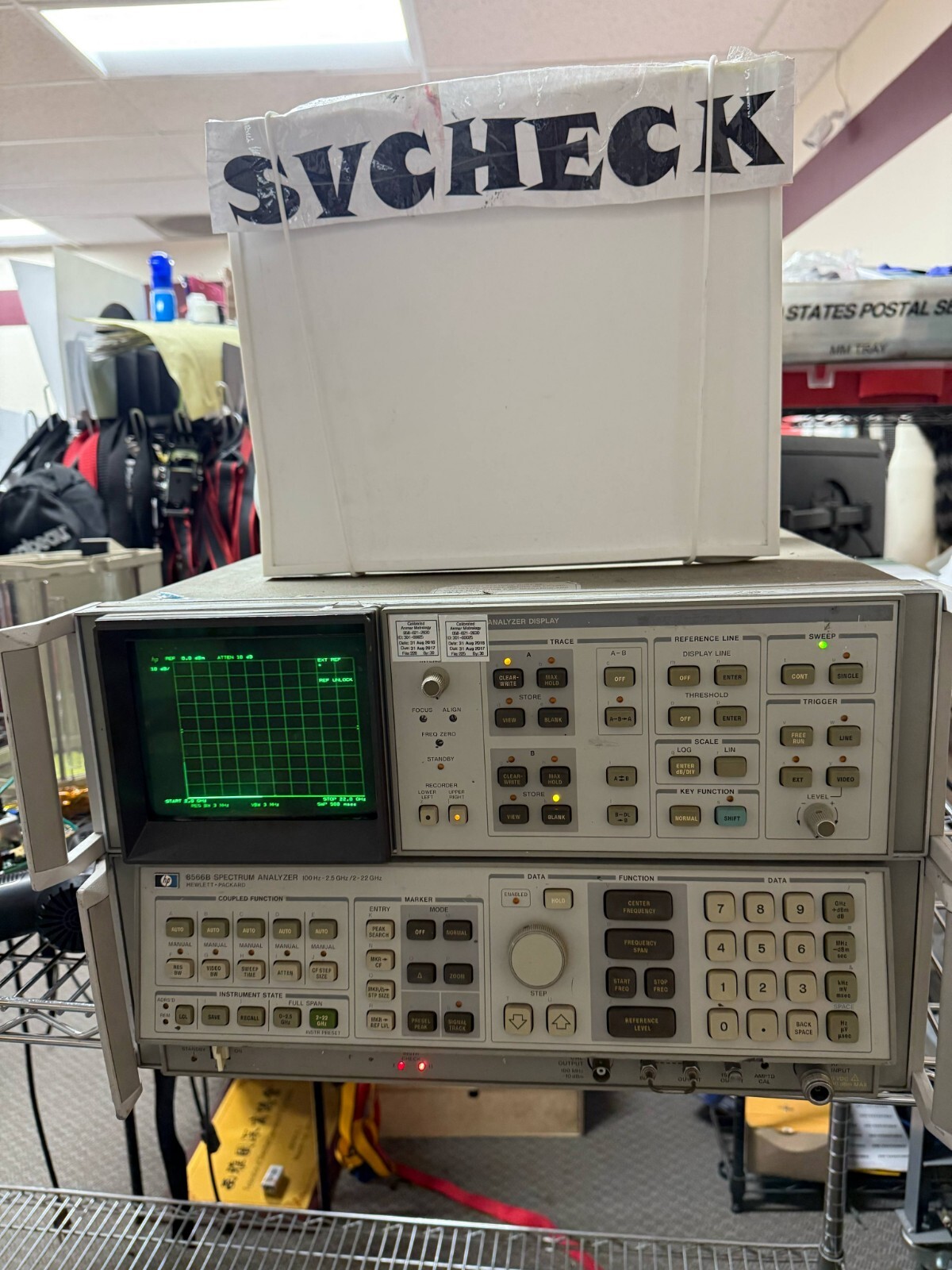
The 8566B is a legacy HP-IB (pre-IEEE 488.2) spectrum analyzer produced from the early 1980s through the 1990s. It uses a proprietary command syntax with short mnemonics and unit suffixes rather than SCPI. The instrument does not support *IDN? or other IEEE 488.2 common commands; use the ID? proprietary command for identification. Frequency coverage is 100 Hz to 22 GHz (2.5 GHz with internal mixer, to 22 GHz with external mixing). The trace contains 1001 display points. The 8566B replaced the 8566A with improved amplitude accuracy and additional digital features.
Status Byte
Section titled “Status Byte”| Bit 7 | Bit 6 | Bit 5 | Bit 4 | Bit 3 | Bit 2 | Bit 1 | Bit 0 |
|---|---|---|---|---|---|---|---|
| Unused | RQS | Command Complete | MAV | End of Sweep | Error | Unused | Unused |
| Not used | Requesting service | Requested operation completed | Message available in output buffer | Sweep has completed | Command or hardware error | Not used | Not used |
Use serial poll to read status byte. SRQ is asserted based on the SRQ mask set with SQUELCH/SRQ commands. This instrument predates IEEE 488.2 so *STB?/*SRE are not available.
Commands
Section titled “Commands”Frequency Control
Section titled “Frequency Control”Set center frequency, start/stop frequencies, and frequency span. Values are specified with a numeric value followed by a unit suffix.
| Command | Type | Description |
|---|---|---|
CF {freq}HZ | command | Set center frequency in Hz |
Details Parameters
Example CF 1000000000HZ | ||
CF {freq}KZ | command | Set center frequency in kHz |
Details Parameters
Example CF 1000000KZ | ||
CF {freq}MZ | command | Set center frequency in MHz |
Details Parameters
Example CF 1000MZ | ||
CF {freq}GZ | command | Set center frequency in GHz |
Details Parameters
Example CF 1GZ | ||
CF? | query | Query current center frequency |
Details Returns (numeric) — Center frequency in Hz
Example: 1000000000 | ||
FA {freq}HZ | command | Set start frequency in Hz |
Details Parameters
Example FA 900000000HZ | ||
FA {freq}MZ | command | Set start frequency in MHz |
Details Parameters
Example FA 900MZ | ||
FA? | query | Query start frequency |
Details Returns (numeric) — Start frequency in Hz
Example: 900000000 | ||
FB {freq}HZ | command | Set stop frequency in Hz |
Details Parameters
Example FB 1100000000HZ | ||
FB {freq}MZ | command | Set stop frequency in MHz |
Details Parameters
Example FB 1100MZ | ||
FB? | query | Query stop frequency |
Details Returns (numeric) — Stop frequency in Hz
Example: 1100000000 | ||
SP {span}HZ | command | Set frequency span in Hz |
Details Parameters
Example SP 200000000HZ | ||
SP {span}KZ | command | Set frequency span in kHz |
Details Parameters
Example SP 200000KZ | ||
SP {span}MZ | command | Set frequency span in MHz |
Details Parameters
Example SP 200MZ | ||
SP {span}GZ | command | Set frequency span in GHz |
Details Parameters
Example SP 2GZ | ||
SP? | query | Query current span |
Details Returns (numeric) — Span in Hz
Example: 200000000 | ||
Amplitude Control
Section titled “Amplitude Control”Reference level, attenuation, and amplitude units
| Command | Type | Description |
|---|---|---|
RL {level}DM | command | Set reference level in dBm |
Details Parameters
Example RL 0DM | ||
RL? | query | Query reference level |
Details Returns (numeric) — Reference level in current amplitude units
Example: 0.0 | ||
AT {atten}DB | command | Set RF input attenuation in dB |
Details Parameters
Example AT 10DB | ||
AT? | query | Query input attenuation |
Details Returns (numeric) — Attenuation in dB
Example: 10 | ||
AUNITS DBM | command | Set amplitude units to dBm |
AUNITS DBMV | command | Set amplitude units to dBmV |
AUNITS DBUV | command | Set amplitude units to dBuV |
AUNITS VOLT | command | Set amplitude units to volts |
AUNITS WATT | command | Set amplitude units to watts |
AUNITS? | query | Query current amplitude units |
Details Returns (string)
Example: DBM | ||
LG {scale}DB | command | Set log scale (dB per division) |
Details Parameters
Example LG 10DB | ||
LN | command | Switch to linear amplitude scale |
Bandwidth Control
Section titled “Bandwidth Control”Resolution bandwidth and video bandwidth settings
| Command | Type | Description |
|---|---|---|
RB {bw}HZ | command | Set resolution bandwidth in Hz |
Details Parameters
Example RB 10000HZ | ||
RB {bw}KZ | command | Set resolution bandwidth in kHz |
Details Parameters
Example RB 10KZ | ||
RB? | query | Query resolution bandwidth |
Details Returns (numeric) — Resolution bandwidth in Hz
Example: 10000 | ||
RB AUTO | command | Set resolution bandwidth to auto-coupled mode |
VB {bw}HZ | command | Set video bandwidth in Hz |
Details Parameters
Example VB 1000HZ | ||
VB {bw}KZ | command | Set video bandwidth in kHz |
Details Parameters
Example VB 1KZ | ||
VB? | query | Query video bandwidth |
Details Returns (numeric) — Video bandwidth in Hz
Example: 1000 | ||
VB AUTO | command | Set video bandwidth to auto-coupled mode |
Sweep Control
Section titled “Sweep Control”Sweep time, trigger mode, and single-sweep control
| Command | Type | Description |
|---|---|---|
ST {time}SC | command | Set sweep time in seconds |
Details Parameters
Example ST 1SC | ||
ST? | query | Query sweep time |
Details Returns (numeric) — Sweep time in seconds
Example: 0.1 | ||
ST AUTO | command | Set sweep time to auto-coupled mode |
TS | command | Take sweep — trigger a single sweep and wait for completion |
Details Note: Blocks GPIB until sweep is complete. Use after setting TM SNGL for controlled data acquisition. | ||
TM FREE | command | Set trigger mode to free-run (continuous sweep) |
TM SNGL | command | Set trigger mode to single sweep |
TM LINE | command | Set trigger mode to line trigger |
TM EXT | command | Set trigger mode to external trigger |
TM? | query | Query current trigger mode |
Details Returns (string)
Example: FREE | ||
Marker Control
Section titled “Marker Control”Marker positioning, peak search, and marker readout
| Command | Type | Description |
|---|---|---|
MKPK HI | command | Move marker to highest peak on display |
MKPK NH | command | Move marker to next highest peak |
MKPK NR | command | Move marker to next peak to the right |
MKPK NL | command | Move marker to next peak to the left |
MKA? | query | Query marker amplitude |
Details Returns (numeric) — Marker amplitude in current units
Example: -23.5 | ||
MKF? | query | Query marker frequency |
Details Returns (numeric) — Marker frequency in Hz
Example: 1000000000 | ||
MK {freq}HZ | command | Position marker at specified frequency in Hz |
Details Parameters
Example MK 1000000000HZ | ||
MK {freq}MZ | command | Position marker at specified frequency in MHz |
Details Parameters
Example MK 1000MZ | ||
MKCF | command | Set center frequency to current marker frequency |
MKN | command | Turn marker to normal mode |
MKD | command | Activate delta marker (reference to current marker position) |
MKOFF | command | Turn off all markers |
MKMIN | command | Move marker to minimum trace point |
Trace Control
Section titled “Trace Control”Trace data readout and trace operations
| Command | Type | Description |
|---|---|---|
TRA? | query | Query trace A data — returns 1001 comma-separated amplitude values |
Details Returns (string) — 1001 amplitude values in current units, comma-separated
Example: -70.5,-68.2,-65.1,... Note: Returns 1001 data points covering the current span. Each point is an amplitude in the current AUNITS. | ||
TRB? | query | Query trace B data — returns 1001 comma-separated amplitude values |
Details Returns (string) — 1001 amplitude values in current units, comma-separated | ||
CLRW TRA | command | Clear-write trace A (reset to clear and begin new data) |
CLRW TRB | command | Clear-write trace B |
VAVG {count} | command | Enable video averaging with specified count |
Details Parameters
Example VAVG 10 | ||
MXMH TRA | command | Set trace A to max-hold mode |
VIEW TRA | command | Set trace A to view mode (freeze trace) |
BLANK TRA | command | Blank (hide) trace A |
BLANK TRB | command | Blank (hide) trace B |
Instrument Control
Section titled “Instrument Control”General instrument preset, identification, and state control
| Command | Type | Description |
|---|---|---|
IP | command | Instrument preset — reset all settings to defaults (CF 11.01 GHz, full span, RL 0 dBm, auto-coupled BW and sweep) |
ID? | query | Query instrument identification |
Details Returns (string) — Model identification string
Example: HP8566B | ||
CS | command | Clear status — clears error conditions and status byte |
ERR? | query | Query error status |
Details Returns (numeric) — Error code (0=no error)
Example: 0 | ||
DONE? | query | Query whether current operation has completed |
Details Returns (numeric) — 1=done, 0=not done
Example: 1 | ||
Common Workflows
Section titled “Common Workflows”Measure Signal
Section titled “Measure Signal”Measure a known signal by setting center frequency and span, then reading marker amplitude
Preset instrument to known state
IP Set center frequency to 1 GHz
CF 1000MZ Set span to 10 MHz
SP 10MZ Set reference level to 0 dBm
RL 0DM Set amplitude units to dBm
AUNITS DBM Set single sweep mode
TM SNGL Take a sweep
TS Move marker to peak
MKPK HI Read marker frequency
MKF? Frequency in Hz Read marker amplitude
MKA? Amplitude in dBm Find Peak
Section titled “Find Peak”Find the strongest signal across a wide span and zoom in for accurate measurement
Preset instrument
IP Set wide span for search
SP 2GZ Set reference level high enough to avoid clipping
RL 10DM Single sweep
TM SNGL Take a sweep
TS Find highest peak
MKPK HI Center display on peak
MKCF Narrow span for detail
SP 1MZ Take another sweep
TS Find peak again in narrower view
MKPK HI Read marker frequency
MKF? Frequency in Hz Read marker amplitude
MKA? Amplitude in dBm Set Span and RBW
Section titled “Set Span and RBW”Configure span and resolution bandwidth for a specific measurement, with video averaging for noise reduction
Preset instrument
IP Set center frequency
CF 1000MZ Set span to 100 kHz
SP 100KZ Set resolution bandwidth to 1 kHz
RB 1KZ Set video bandwidth to 100 Hz
VB 100HZ Set reference level
RL -20DM Enable video averaging for 20 sweeps
VAVG 20 Single sweep mode
TM SNGL Take a sweep (waits for all averages)
TS Read trace A data
TRA? 1001 comma-separated amplitude values