Hewlett-Packard E3631A
E3631A
80W triple-output DC power supply (6V/5A, +25V/1A, -25V/1A)
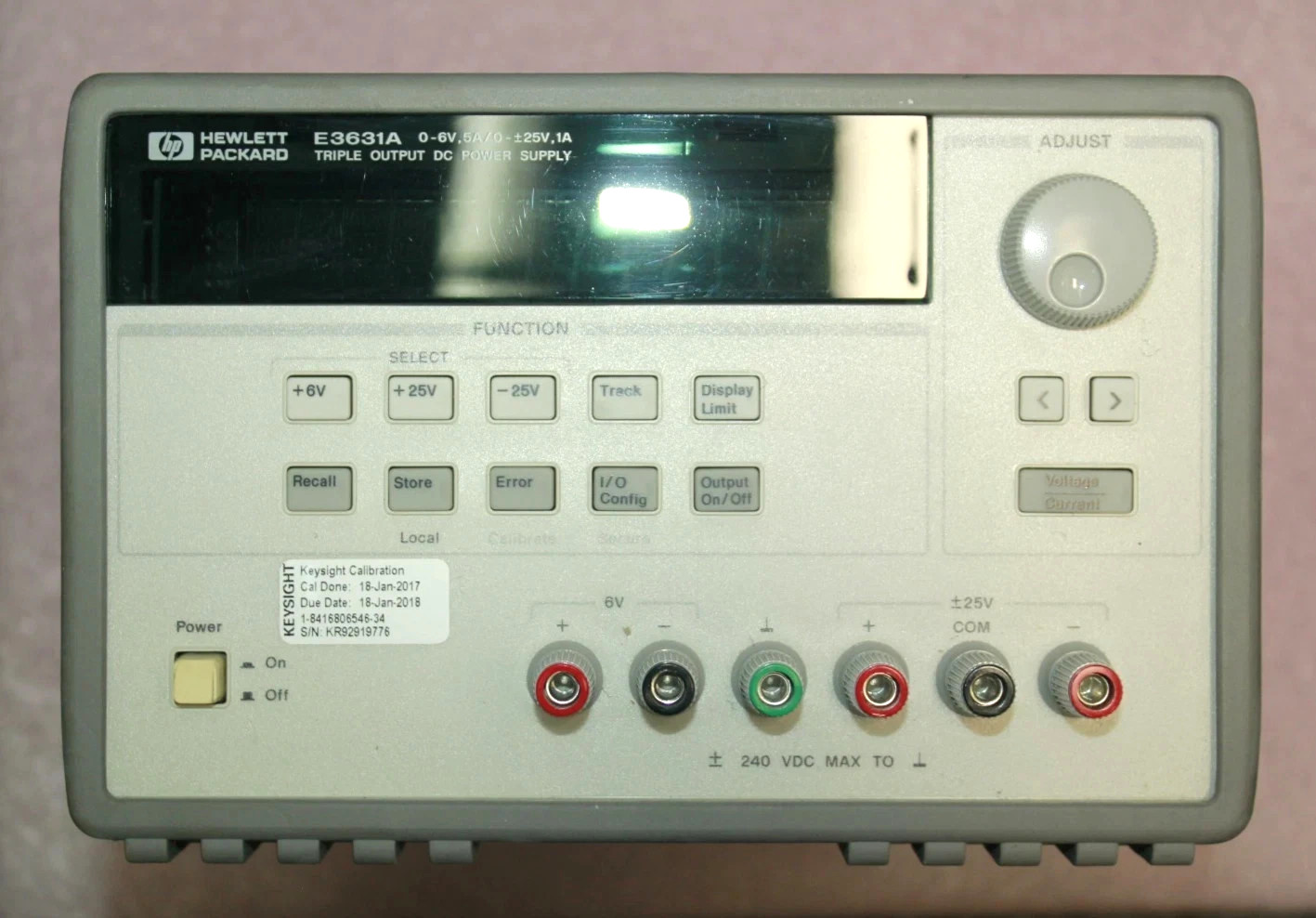
The E3631A is a widely-used benchtop triple-output power supply produced from the late 1990s. It provides three isolated outputs: 6V/5A (30W), +25V/1A (25W), and -25V/1A (25W) for a total of 80W. The P25V and N25V outputs share a common return terminal and can be configured for tracking mode to provide symmetric bipolar supplies. All three outputs are controlled by a single output enable relay. GPIB (standard) and RS-232 interfaces are included. Superseded by the E36300 series.
Status Byte
Section titled “Status Byte”| Bit 7 | Bit 6 | Bit 5 | Bit 4 | Bit 3 | Bit 2 | Bit 1 | Bit 0 |
|---|---|---|---|---|---|---|---|
| Operation | RQS/MSS | ESB | MAV | Questionable Data | Error Queue | Unused | Unused |
| Operation condition summary bit | Requesting service / Master summary status | Event status byte summary bit | Message available in output buffer | Questionable condition summary bit | One or more errors in error queue | Not used | Not used |
Use *STB? to read status byte, *SRE to set service request enable register
Commands
Section titled “Commands”IEEE 488.2 Common Commands
Section titled “IEEE 488.2 Common Commands”Standard IEEE 488.2 commands supported by all compliant instruments
| Command | Type | Description |
|---|---|---|
*IDN? | query | Identification query -- returns manufacturer, model, serial, firmware |
Details Returns (string) — Comma-separated identification
Example: HEWLETT-PACKARD,E3631A,0,1.7-5.0-1.0 | ||
*RST | command | Reset to factory default state. All outputs set to 0V/0A, output disabled, P6V selected. |
*CLS | command | Clear status registers and error queue |
*ESE {mask} | command | Set event status enable register |
Details Parameters
| ||
*ESE? | query | Query event status enable register |
Details Returns (numeric)
Example: 0 | ||
*ESR? | query | Read and clear event status register |
Details Returns (numeric)
Example: 0 | ||
*OPC | command | Set operation complete bit in ESR when all pending operations finish |
*OPC? | query | Returns 1 when all pending operations complete |
Details Returns (numeric)
Example: 1 | ||
*SRE {mask} | command | Set service request enable register |
Details Parameters
| ||
*SRE? | query | Query service request enable register |
Details Returns (numeric)
Example: 0 | ||
*STB? | query | Read status byte register |
Details Returns (numeric) — Status byte value
Example: 0 | ||
*TST? | query | Self-test; returns 0 for pass, 1 for fail |
Details Returns (numeric)
Example: 0 Note: Takes several seconds to complete. Output is disabled during self-test. | ||
*TRG | command | Trigger output change from bus (requires trigger source BUS) |
*WAI | command | Wait until all pending operations complete before executing next command |
*SAV {location} | command | Save present state to non-volatile memory location |
Details Parameters
| ||
*RCL {location} | command | Recall saved state from non-volatile memory location |
Details Parameters
Note: Restores voltage, current, output state, and selected output for all three channels. | ||
Output Control
Section titled “Output Control”Select outputs and set voltage/current levels
| Command | Type | Description |
|---|---|---|
INST {output} | command | Select active output for subsequent voltage/current commands |
Details Parameters
Example INST P25V | ||
INST? | query | Query currently selected output |
Details Returns (string)
Example: P6V | ||
INST:NSEL {number} | command | Select active output by numeric index |
Details Parameters
| ||
INST:NSEL? | query | Query currently selected output as numeric index |
Details Returns (numeric)
Example: 1 | ||
VOLT {value} | command | Set voltage level on currently selected output |
Details Parameters
Example VOLT 3.3 Note: Range depends on selected output. UP/DOWN step by VOLT:STEP increment. | ||
VOLT? | query | Query programmed voltage on currently selected output |
Details Returns (numeric) — Voltage setpoint in volts
Example: +3.300000E+00 | ||
VOLT? MIN | query | Query minimum programmable voltage on currently selected output |
Details Returns (numeric)
Example: +0.000000E+00 | ||
VOLT? MAX | query | Query maximum programmable voltage on currently selected output |
Details Returns (numeric)
Example: +6.180000E+00 | ||
VOLT:STEP {value} | command | Set voltage step size for VOLT UP/DOWN commands |
Details Parameters
Note: Default step is the minimum resolution of the selected output. | ||
VOLT:STEP? | query | Query current voltage step size |
Details Returns (numeric)
Example: +1.000000E-03 | ||
CURR {value} | command | Set current limit on currently selected output |
Details Parameters
Example CURR 1.5 Note: Range depends on selected output. UP/DOWN step by CURR:STEP increment. | ||
CURR? | query | Query programmed current limit on currently selected output |
Details Returns (numeric) — Current setpoint in amps
Example: +1.500000E+00 | ||
CURR? MIN | query | Query minimum programmable current on currently selected output |
Details Returns (numeric)
Example: +0.000000E+00 | ||
CURR? MAX | query | Query maximum programmable current on currently selected output |
Details Returns (numeric)
Example: +5.150000E+00 | ||
CURR:STEP {value} | command | Set current step size for CURR UP/DOWN commands |
Details Parameters
| ||
CURR:STEP? | query | Query current step size |
Details Returns (numeric)
Example: +1.000000E-03 | ||
OUTP {state} | command | Enable or disable all three outputs simultaneously |
Details Parameters
Note: There is only one output enable for all three channels. Individual channels cannot be enabled/disabled separately. | ||
OUTP? | query | Query output state |
Details Returns (numeric) — 0=OFF, 1=ON
Example: 0 | ||
Measurement
Section titled “Measurement”Read back actual output voltage and current
| Command | Type | Description |
|---|---|---|
MEAS:VOLT? | query | Measure actual voltage on currently selected output |
Details Returns (numeric) — Measured voltage in volts
Example: +3.298000E+00 | ||
MEAS:VOLT? {output} | query | Measure actual voltage on specified output without changing the selection |
Details Parameters
Returns (numeric) — Measured voltage in volts
Example: +5.021000E+00 Example MEAS:VOLT? P6V | ||
MEAS:CURR? | query | Measure actual current on currently selected output |
Details Returns (numeric) — Measured current in amps
Example: +1.234000E-01 | ||
MEAS:CURR? {output} | query | Measure actual current on specified output without changing the selection |
Details Parameters
Returns (numeric) — Measured current in amps
Example: +5.000000E-02 Example MEAS:CURR? P25V | ||
Output Configuration (APPL)
Section titled “Output Configuration (APPL)”Combined commands to set output, voltage, and current in a single command
| Command | Type | Description |
|---|---|---|
APPL {output},{voltage},{current} | command | Select output and set voltage and current in one command |
Details Parameters
Example APPL P6V,3.3,2.0 Note: This is the most efficient way to configure an output. Equivalent to INST + VOLT + CURR. | ||
APPL? {output} | query | Query voltage and current settings for specified output |
Details Parameters
Returns (string) — Quoted voltage and current pair
Example: "3.300000,2.000000" Example APPL? P6V | ||
APPL? | query | Query voltage and current settings for currently selected output |
Details Returns (string)
Example: "3.300000,2.000000" | ||
VOLT:RANG? | query | Query voltage range of currently selected output |
Details Returns (string) — P6V, P25V, or N25V range identifier
Example: P6V Note: Returns the range name corresponding to the currently selected output. | ||
Overvoltage Protection
Section titled “Overvoltage Protection”Overvoltage protection (OVP) configuration and control
| Command | Type | Description |
|---|---|---|
VOLT:PROT {value} | command | Set overvoltage protection level on currently selected output |
Details Parameters
Example VOLT:PROT 7.0 Note: When output voltage exceeds this level, output is disabled and the OVP condition is latched. P6V: 1-7.5V, P25V: 1-27.5V, N25V: 1-27.5V. | ||
VOLT:PROT? | query | Query overvoltage protection level on currently selected output |
Details Returns (numeric)
Example: +7.000000E+00 | ||
VOLT:PROT:STAT {state} | command | Enable or disable overvoltage protection on currently selected output |
Details Parameters
| ||
VOLT:PROT:STAT? | query | Query overvoltage protection enabled state |
Details Returns (numeric) — 0=OFF, 1=ON
Example: 1 | ||
VOLT:PROT:CLE | command | Clear a latched OVP condition on currently selected output |
Details Note: After clearing, you must reduce the voltage below the OVP level before re-enabling the output. | ||
VOLT:PROT:TRIP? | query | Query whether OVP has tripped on currently selected output |
Details Returns (numeric) — 0=not tripped, 1=tripped
Example: 0 | ||
CURR:PROT:STAT {state} | command | Enable or disable overcurrent protection (OCP) on currently selected output |
Details Parameters
Note: When OCP is enabled, output disables if it enters constant-current mode. | ||
CURR:PROT:STAT? | query | Query overcurrent protection enabled state |
Details Returns (numeric) — 0=OFF, 1=ON
Example: 0 | ||
CURR:PROT:CLE | command | Clear a latched OCP condition on currently selected output |
CURR:PROT:TRIP? | query | Query whether OCP has tripped on currently selected output |
Details Returns (numeric) — 0=not tripped, 1=tripped
Example: 0 | ||
Trigger
Section titled “Trigger”Trigger system for deferred output changes
| Command | Type | Description |
|---|---|---|
TRIG:SOUR {source} | command | Set trigger source for output changes |
Details Parameters
| ||
TRIG:SOUR? | query | |
Details Returns (string)
Example: BUS | ||
TRIG:DEL {seconds} | command | Set delay between trigger and output change |
Details Parameters
| ||
TRIG:DEL? | query | |
Details Returns (numeric)
Example: +0.000000E+00 | ||
VOLT:TRIG {value} | command | Set pending triggered voltage level on currently selected output |
Details Parameters
Note: This value is applied when a trigger is received after INIT. | ||
VOLT:TRIG? | query | Query pending triggered voltage level |
Details Returns (numeric)
Example: +5.000000E+00 | ||
CURR:TRIG {value} | command | Set pending triggered current level on currently selected output |
Details Parameters
Note: This value is applied when a trigger is received after INIT. | ||
CURR:TRIG? | query | Query pending triggered current level |
Details Returns (numeric)
Example: +1.000000E+00 | ||
INIT | command | Enable trigger system -- supply enters wait-for-trigger state |
Details Note: After INIT, the supply waits for a trigger event to apply VOLT:TRIG and CURR:TRIG values. | ||
System
Section titled “System”System configuration, errors, and display control
| Command | Type | Description |
|---|---|---|
SYST:ERR? | query | Read and remove one error from error queue |
Details Returns (string) — Error code and message
Example: +0,"No error" Note: Error queue holds up to 20 errors. Errors are returned FIFO. | ||
SYST:VERS? | query | Query SCPI version compliance |
Details Returns (string)
Example: 1995.0 | ||
DISP {state} | command | Turn front panel display on/off |
Details Parameters
Note: Display turns back on automatically when returning to local mode. | ||
DISP? | query | Query display state |
Details Returns (numeric) — 0=OFF, 1=ON
Example: 1 | ||
DISP:TEXT "{message}" | command | Display custom text on front panel (up to 11 characters) |
Details Parameters
Example DISP:TEXT "TESTING" | ||
DISP:TEXT:CLE | command | Clear custom display text and return to normal display |
SYST:BEEP | command | Issue a single beep |
SYST:LOC | command | Place instrument in local mode (front panel enabled) |
Details Note: Equivalent to IEEE-488 Go To Local (GTL) command. | ||
SYST:REM | command | Place instrument in remote mode (front panel locked out) |
Details Note: Equivalent to IEEE-488 Remote Enable (REN) assertion. | ||
SYST:RWL | command | Place instrument in remote mode with local lockout |
Details Note: Front panel LOCAL key is also disabled. Use SYST:LOC to return to local. | ||
OUTP:TRAC {state} | command | Enable or disable tracking mode for P25V and N25V outputs |
Details Parameters
Note: When tracking is enabled, P25V and N25V maintain equal and opposite voltages. Setting voltage on P25V automatically mirrors to N25V. | ||
OUTP:TRAC? | query | Query tracking mode state |
Details Returns (numeric) — 0=OFF, 1=ON
Example: 0 | ||
Calibration
Section titled “Calibration”Calibration commands (require secure code)
| Command | Type | Description |
|---|---|---|
CAL:SEC:STAT {state},{code} | command | Enable or disable calibration mode with security code |
Details Parameters
Note: Calibration requires physical access. See service manual for full calibration procedure. | ||
CAL:COUN? | query | Query number of times the instrument has been calibrated |
Details Returns (numeric)
Example: 52 | ||
CAL:STR? | query | Query calibration message string (typically contains last cal date) |
Details Returns (string)
Example: "CAL 2024-01-15" | ||
Status Subsystem
Section titled “Status Subsystem”Questionable and operation status register control
| Command | Type | Description |
|---|---|---|
STAT:QUES? | query | Read and clear questionable status event register |
Details Returns (numeric) — Bit 0=P6V in CV/CC, bit 1=P25V in CV/CC, bit 9=N25V in CV/CC, bit 10=unregulated, bit 11=OVP tripped, bit 12=OCP tripped
Example: 0 | ||
STAT:QUES:ENAB {mask} | command | Set questionable status enable register |
Details Parameters
| ||
STAT:QUES:ENAB? | query | Query questionable status enable register |
Details Returns (numeric)
Example: 0 | ||
STAT:QUES:COND? | query | Read questionable status condition register (not latched, real-time) |
Details Returns (numeric) — Same bit mapping as STAT:QUES? but reflects current conditions
Example: 0 | ||
STAT:OPER? | query | Read and clear operation status event register |
Details Returns (numeric) — Bit 5=wait-for-trigger, bit 8=CV on P6V, bit 9=CV on P25V, bit 10=CV on N25V
Example: 0 | ||
STAT:OPER:ENAB {mask} | command | Set operation status enable register |
Details Parameters
| ||
STAT:OPER:ENAB? | query | Query operation status enable register |
Details Returns (numeric)
Example: 0 | ||
STAT:OPER:COND? | query | Read operation status condition register (not latched, real-time) |
Details Returns (numeric) — Same bit mapping as STAT:OPER? but reflects current conditions
Example: 0 | ||
STAT:PRES | command | Preset all enable registers to zero |
Common Workflows
Section titled “Common Workflows”Set Output Voltage
Section titled “Set Output Voltage”Configure a single output with voltage and current limit, enable, and verify
Reset to known state
*RST Clear status registers
*CLS Select P6V output and set 3.3V at 1A limit
APPL P6V,3.3,1.0 Enable output
OUTP ON Wait for output to settle
*OPC? 1 Verify actual voltage
MEAS:VOLT? P6V +3.29XXXXX+00 Verify actual current
MEAS:CURR? P6V Load-dependent value Monitor All Outputs
Section titled “Monitor All Outputs”Read actual voltage and current on all three outputs
Measure P6V voltage
MEAS:VOLT? P6V +X.XXXXXXE+XX Measure P6V current
MEAS:CURR? P6V +X.XXXXXXE+XX Measure P25V voltage
MEAS:VOLT? P25V +X.XXXXXXE+XX Measure P25V current
MEAS:CURR? P25V +X.XXXXXXE+XX Measure N25V voltage
MEAS:VOLT? N25V -X.XXXXXXE+XX Measure N25V current
MEAS:CURR? N25V +X.XXXXXXE+XX OVP Test
Section titled “OVP Test”Set overvoltage protection, ramp voltage above threshold, verify trip
Reset to known state
*RST Select P6V output
INST P6V Set OVP level to 5.5V
VOLT:PROT 5.5 Enable OVP
VOLT:PROT:STAT ON Set voltage below OVP
VOLT 5.0 Set current limit
CURR 1.0 Enable output
OUTP ON Verify output is on and voltage is correct
MEAS:VOLT? +5.0XXXXE+00 Raise voltage above OVP threshold
VOLT 5.6 Check if OVP has tripped
VOLT:PROT:TRIP? 1 Output should now be disabled
OUTP? 0 Lower voltage below OVP level
VOLT 3.0 Clear the OVP trip latch
VOLT:PROT:CLE Re-enable output
OUTP ON Symmetric Tracking Supply
Section titled “Symmetric Tracking Supply”Configure P25V and N25V as a symmetric bipolar supply using tracking mode
Reset to known state
*RST Enable tracking mode
OUTP:TRAC ON Set P25V to 12V (N25V automatically mirrors to -12V)
APPL P25V,12.0,0.5 Enable output
OUTP ON Verify positive rail
MEAS:VOLT? P25V +1.20XXXXX+01 Verify negative rail tracks
MEAS:VOLT? N25V -1.20XXXXX+01 Triggered Output Change
Section titled “Triggered Output Change”Pre-program a voltage change and apply it with a bus trigger
Reset to known state
*RST Set initial voltage on P6V
APPL P6V,3.3,2.0 Enable output
OUTP ON Select bus trigger source
TRIG:SOUR BUS Set triggered voltage to 5.0V
INST P6V Program pending voltage level
VOLT:TRIG 5.0 Enable trigger system
INIT Send trigger to apply the change
*TRG Verify voltage changed
MEAS:VOLT? P6V +5.0XXXXE+00