Keithley 2000
2000
6.5-digit digital multimeter
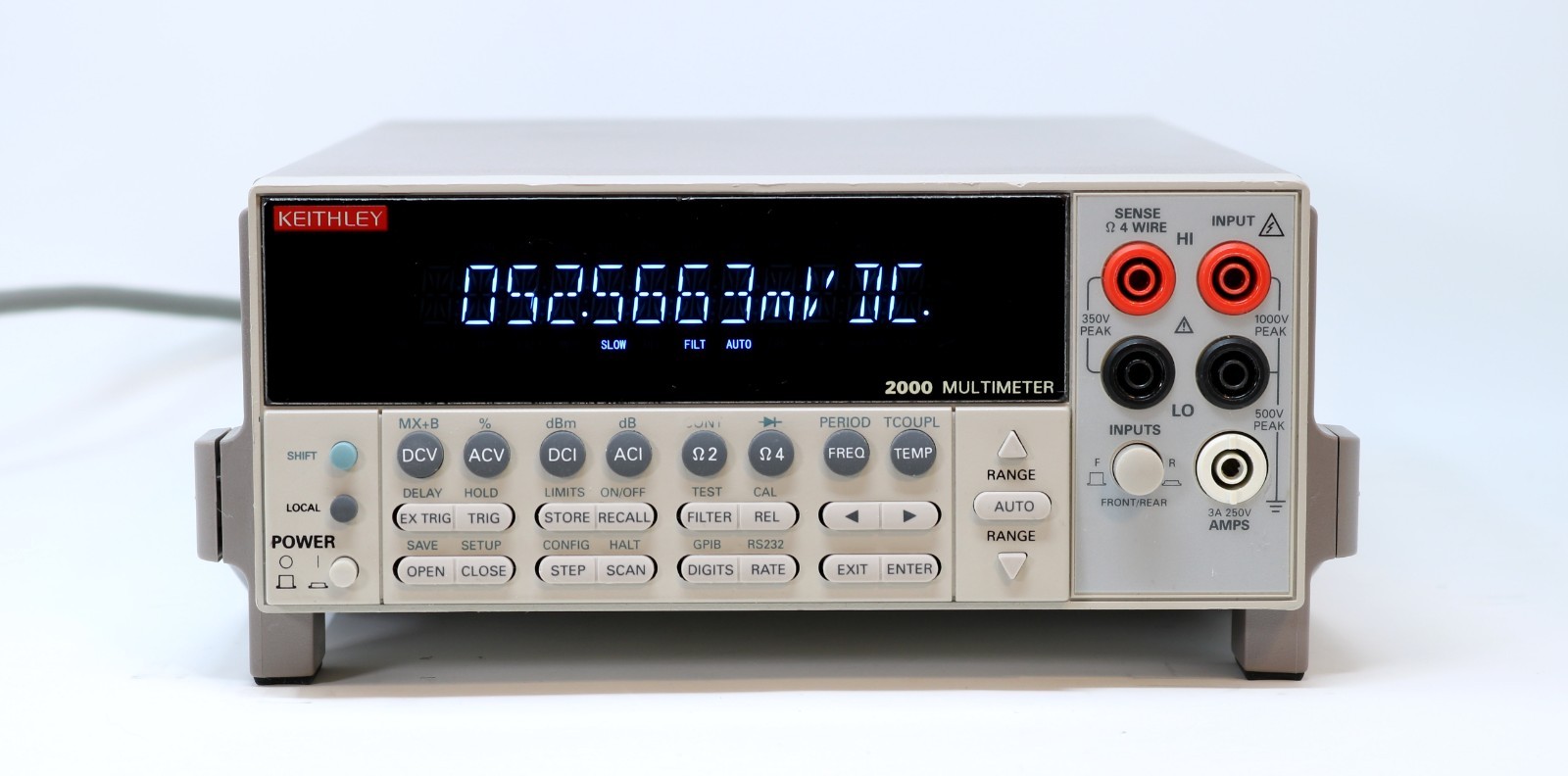
The Keithley 2000 is a high-performance 6.5-digit multimeter popular in production test and laboratory environments. Supports up to 11 measurement functions with optional scanner card for temperature and multi-channel scanning. Now manufactured by Tektronix (acquired Keithley in 2012). GPIB interface is standard on all units.
Status Byte
Section titled “Status Byte”| Bit 7 | Bit 6 | Bit 5 | Bit 4 | Bit 3 | Bit 2 | Bit 1 | Bit 0 |
|---|---|---|---|---|---|---|---|
| Operation | RQS/MSS | ESB | MAV | Questionable Data | Error Queue | Unused | Measurement Event |
| Operation summary bit | Requesting service / Master summary status | Event status byte summary bit | Message available in output buffer | Questionable data summary bit | One or more errors in error queue | Not used | Measurement event summary bit |
Use *STB? to read status byte, *SRE to set service request enable register
Commands
Section titled “Commands”IEEE 488.2 Common Commands
Section titled “IEEE 488.2 Common Commands”Standard IEEE 488.2 commands supported by all compliant instruments
| Command | Type | Description |
|---|---|---|
*IDN? | query | Identification query -- returns manufacturer, model, serial, firmware |
Details Returns (string) — Comma-separated identification
Example: KEITHLEY INSTRUMENTS INC.,MODEL 2000,1234567,A08 /A02 | ||
*RST | command | Reset to factory default state |
*CLS | command | Clear status registers and error queue |
*ESE {mask} | command | Set event status enable register |
Details Parameters
| ||
*ESE? | query | Query event status enable register |
Details Returns (numeric)
Example: 0 | ||
*ESR? | query | Read and clear event status register |
Details Returns (numeric)
Example: 0 | ||
*OPC | command | Set operation complete bit in ESR when all pending operations finish |
*OPC? | query | Returns 1 when all pending operations complete |
Details Returns (numeric)
Example: 1 | ||
*SRE {mask} | command | Set service request enable register |
Details Parameters
| ||
*SRE? | query | Query service request enable register |
Details Returns (numeric)
Example: 0 | ||
*STB? | query | Read status byte register |
Details Returns (numeric) — Status byte value
Example: 0 | ||
*TST? | query | Self-test; returns 0 for pass, 1 for fail |
Details Returns (numeric)
Example: 0 Note: Takes several seconds to complete | ||
*TRG | command | Trigger measurement from bus (requires trigger source BUS) |
*SAV {location} | command | Save current instrument setup to non-volatile memory |
Details Parameters
| ||
*RCL {location} | command | Recall instrument setup from non-volatile memory |
Details Parameters
| ||
Measurement Configuration
Section titled “Measurement Configuration”Configure measurement function, range, and resolution
| Command | Type | Description |
|---|---|---|
CONF:VOLT:DC [{range}[,{resolution}]] | command | Configure for DC voltage measurement |
Details Parameters
Example CONF:VOLT:DC 10,0.001 | ||
CONF:VOLT:AC [{range}[,{resolution}]] | command | Configure for AC voltage measurement |
Details Parameters
| ||
CONF:CURR:DC [{range}[,{resolution}]] | command | Configure for DC current measurement |
Details Parameters
| ||
CONF:CURR:AC [{range}[,{resolution}]] | command | Configure for AC current measurement |
Details Parameters
| ||
CONF:RES [{range}[,{resolution}]] | command | Configure for 2-wire resistance measurement |
Details Parameters
| ||
CONF:FRES [{range}[,{resolution}]] | command | Configure for 4-wire resistance measurement |
Details Parameters
| ||
CONF:FREQ [{range}[,{resolution}]] | command | Configure for frequency measurement |
Details Parameters
| ||
CONF:PER [{range}[,{resolution}]] | command | Configure for period measurement |
Details Parameters
| ||
CONF:TEMP [{sensor_type}] | command | Configure for temperature measurement (requires option card) |
Details Parameters
Note: Requires rear-panel scanner card option (2000-SCAN or equivalent) | ||
CONF:CONT | command | Configure for continuity test (threshold ~1000 ohm, beeper) |
CONF:DIOD | command | Configure for diode test (1mA test current, reads forward voltage) |
CONF? | query | Query current measurement configuration |
Details Returns (string)
Example: "VOLT:DC +1.00000000E+01,+1.00000000E-06" | ||
Measurement Execution
Section titled “Measurement Execution”Trigger and read measurements
| Command | Type | Description |
|---|---|---|
MEAS:VOLT:DC? [{range}[,{resolution}]] | query | Configure, trigger, and return one DC voltage reading |
Details Parameters
Returns (numeric) — Voltage in volts
Example: +1.23456789E+00 Example MEAS:VOLT:DC? 10,0.001 | ||
MEAS:VOLT:AC? [{range}[,{resolution}]] | query | Configure, trigger, and return one AC voltage reading |
Details Returns (numeric)
Example: +1.20000000E+02 | ||
MEAS:CURR:DC? [{range}[,{resolution}]] | query | Configure, trigger, and return one DC current reading |
Details Returns (numeric)
Example: +5.00000000E-02 | ||
MEAS:CURR:AC? [{range}[,{resolution}]] | query | Configure, trigger, and return one AC current reading |
Details Returns (numeric)
Example: +1.00000000E-01 | ||
MEAS:RES? [{range}[,{resolution}]] | query | Configure, trigger, and return one 2-wire resistance reading |
Details Returns (numeric)
Example: +1.00000000E+03 | ||
MEAS:FRES? [{range}[,{resolution}]] | query | Configure, trigger, and return one 4-wire resistance reading |
Details Returns (numeric)
Example: +1.00000000E+03 | ||
MEAS:FREQ? [{range}[,{resolution}]] | query | Configure, trigger, and return one frequency reading |
Details Returns (numeric)
Example: +1.00000000E+03 | ||
MEAS:PER? [{range}[,{resolution}]] | query | Configure, trigger, and return one period reading |
Details Returns (numeric)
Example: +1.00000000E-03 | ||
MEAS:TEMP? [{sensor_type}] | query | Configure, trigger, and return one temperature reading |
Details Returns (numeric) — Temperature in configured units
Example: +2.34500000E+01 Note: Requires temperature option card | ||
READ? | query | Trigger and return one reading using current configuration |
Details Returns (numeric) — Measurement result in current function's units
Example: +1.23456789E+00 | ||
INIT | command | Initiate measurement and place in wait-for-trigger state |
FETCH? | query | Return stored readings from internal memory (no new trigger) |
Details Returns (numeric) — Comma-separated readings
Example: +1.23456789E+00,+1.23456790E+00 | ||
R? [{max_count}] | query | Read and remove readings from memory; optionally limit count |
Details Parameters
Returns (numeric)
Example: +1.23456789E+00 | ||
Measurement Parameters
Section titled “Measurement Parameters”Detailed configuration of measurement parameters (range, NPLC, averaging, autozero)
| Command | Type | Description |
|---|---|---|
VOLT:DC:RANG {range} | command | Set DC voltage range manually |
Details Parameters
| ||
VOLT:DC:RANG? | query | |
Details Returns (numeric)
Example: +1.00000000E+01 | ||
VOLT:DC:RANG:AUTO {state} | command | Enable/disable DC voltage autoranging |
Details Parameters
| ||
VOLT:DC:NPLC {nplc} | command | Set integration time in power line cycles for DC voltage |
Details Parameters
Note: Higher NPLC = better resolution but slower. 100 NPLC = 6.5 digits. | ||
VOLT:DC:NPLC? | query | |
Details Returns (numeric)
Example: +1.00000000E+01 | ||
VOLT:DC:DIG {digits} | command | Set display digits for DC voltage (sets NPLC indirectly) |
Details Parameters
| ||
VOLT:DC:AVER:STAT {state} | command | Enable/disable digital filter (averaging) for DC voltage |
Details Parameters
| ||
VOLT:DC:AVER:COUN {count} | command | Set number of readings to average in the digital filter |
Details Parameters
| ||
VOLT:DC:AVER:TCON {type} | command | Set digital filter type |
Details Parameters
| ||
ZERO:AUTO {state} | command | Enable/disable autozero for DC measurements |
Details Parameters
Note: ONCE performs single zero then disables. OFF doubles measurement speed. | ||
SYST:AZER:STAT {state} | command | Enable/disable system autozero (alternate path for autozero control) |
Details Parameters
| ||
SYST:LSYN:STAT {state} | command | Enable/disable line-cycle synchronization for noise rejection |
Details Parameters
Note: Synchronizes measurements to power line frequency for best noise rejection | ||
Trigger
Section titled “Trigger”Trigger system configuration
| Command | Type | Description |
|---|---|---|
TRIG:SOUR {source} | command | Set trigger source |
Details Parameters
| ||
TRIG:SOUR? | query | |
Details Returns (string)
Example: IMM | ||
TRIG:DEL {seconds} | command | Set trigger delay |
Details Parameters
| ||
TRIG:DEL? | query | |
Details Returns (numeric)
Example: +0.00000000E+00 | ||
TRIG:DEL:AUTO {state} | command | Enable/disable automatic trigger delay |
Details Parameters
| ||
TRIG:COUN {count} | command | Set number of triggers to accept before returning to idle |
Details Parameters
| ||
TRIG:COUN? | query | |
Details Returns (numeric)
Example: +1 | ||
SAMP:COUN {count} | command | Set number of readings per trigger |
Details Parameters
| ||
SAMP:COUN? | query | |
Details Returns (numeric)
Example: +1 | ||
Math Operations
Section titled “Math Operations”Built-in math, null offset, dB, limit test, and statistics functions
| Command | Type | Description |
|---|---|---|
CALC:FUNC {function} | command | Select math function |
Details Parameters
| ||
CALC:STAT {state} | command | Enable/disable selected math function |
Details Parameters
| ||
CALC:NULL:OFFS {value} | command | Set null offset value |
Details Parameters
| ||
CALC:NULL:OFFS? | query | |
Details Returns (numeric)
Example: +0.00000000E+00 | ||
CALC:DBM:REF {impedance} | command | Set dBm reference impedance |
Details Parameters
| ||
CALC:DB:REF {value} | command | Set dB reference value |
Details Parameters
| ||
CALC:AVER:MIN? | query | Query minimum reading since statistics cleared |
Details Returns (numeric)
Example: +1.20000000E+00 | ||
CALC:AVER:MAX? | query | Query maximum reading since statistics cleared |
Details Returns (numeric)
Example: +1.30000000E+00 | ||
CALC:AVER:AVER? | query | Query average of all readings since statistics cleared |
Details Returns (numeric)
Example: +1.25000000E+00 | ||
CALC:AVER:COUN? | query | Query number of readings taken since statistics cleared |
Details Returns (numeric)
Example: +100 | ||
CALC:LIM:LOW {value} | command | Set lower limit for limit test |
Details Parameters
| ||
CALC:LIM:UPP {value} | command | Set upper limit for limit test |
Details Parameters
| ||
CALC:LIM:LOW? | query | |
Details Returns (numeric)
Example: +0.00000000E+00 | ||
CALC:LIM:UPP? | query | |
Details Returns (numeric)
Example: +0.00000000E+00 | ||
Buffer / Data Store
Section titled “Buffer / Data Store”Internal data buffer for storing readings
| Command | Type | Description |
|---|---|---|
TRAC:CLE | command | Clear readings from buffer |
TRAC:POIN {size} | command | Set buffer size (number of readings to store) |
Details Parameters
| ||
TRAC:POIN? | query | Query buffer size |
Details Returns (numeric)
Example: 1024 | ||
TRAC:POIN:ACT? | query | Query number of readings currently stored in buffer |
Details Returns (numeric)
Example: 0 | ||
TRAC:FEED {source} | command | Select data source for buffer |
Details Parameters
| ||
TRAC:FEED:CONT {control} | command | Set buffer control mode |
Details Parameters
| ||
TRAC:DATA? | query | Return all readings from buffer |
Details Returns (numeric) — Comma-separated readings
Example: +1.23456789E+00,+1.23456790E+00,+1.23456791E+00 | ||
Status
Section titled “Status”Status register queries for event detection and service requests
| Command | Type | Description |
|---|---|---|
STAT:MEAS? | query | Read and clear measurement event register |
Details Returns (numeric) — Measurement event register value
Example: 0 | ||
STAT:MEAS:ENAB {mask} | command | Set measurement event enable register |
Details Parameters
| ||
STAT:OPER? | query | Read and clear operation event register |
Details Returns (numeric)
Example: 0 | ||
STAT:OPER:ENAB {mask} | command | Set operation event enable register |
Details Parameters
| ||
STAT:QUES? | query | Read and clear questionable data event register |
Details Returns (numeric)
Example: 0 | ||
STAT:QUES:ENAB {mask} | command | Set questionable data event enable register |
Details Parameters
| ||
STAT:PRES | command | Preset all enable registers to 0 |
System
Section titled “System”System configuration and queries
| Command | Type | Description |
|---|---|---|
SYST:ERR? | query | Read and remove one error from error queue |
Details Returns (string) — Error code and message
Example: +0,"No error" | ||
SYST:VERS? | query | Query SCPI version |
Details Returns (string)
Example: 1995.0 | ||
DISP {state} | command | Turn front panel display on/off |
Details Parameters
Note: Turning display off improves measurement speed | ||
DISP:TEXT "{message}" | command | Display custom text on front panel (up to 32 chars) |
Details Parameters
Example DISP:TEXT "TESTING" | ||
DISP:TEXT:CLE | command | Clear custom display text and return to normal display |
SYST:BEEP | command | Issue a single beep |
SYST:BEEP:STAT {state} | command | Enable/disable beeper |
Details Parameters
| ||
SYST:PRES | command | Return to factory default settings (like *RST but also resets GPIB defaults) |
Output Format
Section titled “Output Format”Control the format of returned data
| Command | Type | Description |
|---|---|---|
FORM:ELEM {elements} | command | Select data elements included in readings |
Details Parameters
Example FORM:ELEM READ,UNIT,TST | ||
FORM:DATA {format} | command | Set data transfer format |
Details Parameters
Note: REAL formats are faster for bulk data transfer but require binary parsing | ||
FORM:DATA? | query | |
Details Returns (string)
Example: ASC | ||
Common Workflows
Section titled “Common Workflows”Measure DC Voltage
Section titled “Measure DC Voltage”Take a single DC voltage measurement on the 10V range with 6.5-digit resolution
Reset to known state
*RST Clear status registers
*CLS Configure for DC voltage, 10V range, max resolution
CONF:VOLT:DC 10,MIN Set 100 NPLC for maximum resolution
VOLT:DC:NPLC 100 Enable autozero for accuracy
ZERO:AUTO ON Trigger and read one measurement
READ? +X.XXXXXXXXE+XX Temperature Measurement
Section titled “Temperature Measurement”Measure temperature using thermocouple sensor (requires option card)
Reset to known state
*RST Clear status registers
*CLS Configure for temperature, thermocouple
CONF:TEMP TC Set high resolution integration
VOLT:DC:NPLC 10 Trigger and read temperature
READ? +2.XXXXXXXXE+01 Read in degrees C/F/K depending on UNIT:TEMP setting
Manual stepData Logging
Section titled “Data Logging”Capture 500 readings into the internal buffer for later retrieval
Reset to known state
*RST Configure DC voltage, autorange
CONF:VOLT:DC Set fast integration (4.5 digits)
VOLT:DC:NPLC 0.1 Disable autozero for speed
ZERO:AUTO OFF Turn off display for speed
DISP OFF Clear buffer
TRAC:CLE Set buffer size to 500
TRAC:POIN 500 Feed raw sensor data to buffer
TRAC:FEED SENS Fill buffer once then stop
TRAC:FEED:CONT NEXT Set trigger count to match buffer
TRIG:COUN 500 Set immediate trigger
TRIG:SOUR IMM Initiate measurement sequence
INIT Wait for completion
*OPC? 1 Retrieve all buffered readings
TRAC:DATA? Comma-separated values Re-enable display
DISP ON