Keithley 6517B
6517B
Electrometer / high-resistance meter with 10 fA sensitivity
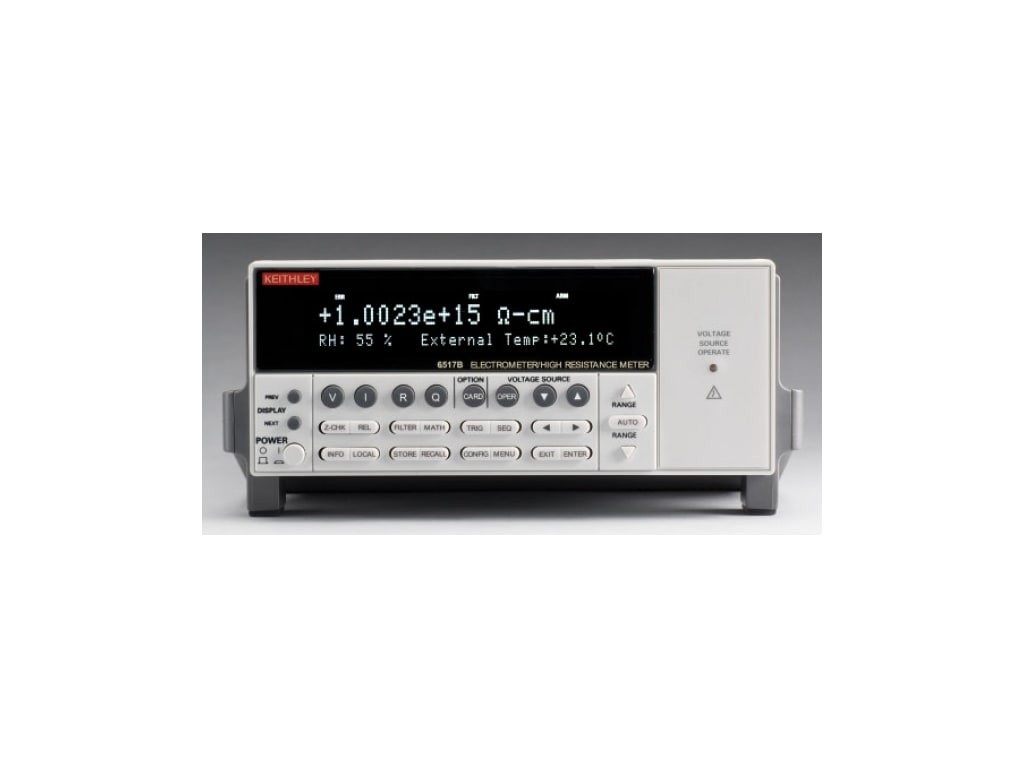
The Keithley 6517B is the industry standard electrometer for high-resistance and low-current measurements. It replaced the 6517A with improved voltage source stability and added humidity readback. The built-in 1000V source eliminates the need for an external supply when measuring insulation resistance, volume/surface resistivity (with appropriate electrode fixtures), and material properties. Zero check must always be enabled when connecting or disconnecting test leads to protect the sensitive input amplifier.
Status Byte
Section titled “Status Byte”| Bit 7 | Bit 6 | Bit 5 | Bit 4 | Bit 3 | Bit 2 | Bit 1 | Bit 0 |
|---|---|---|---|---|---|---|---|
| Operation Summary | RQS/MSS | ESB | MAV | Questionable Data | Error Queue | Unused | Measurement Summary |
| Operation status summary bit | Requesting service / Master summary status | Event status byte summary bit | Message available in output buffer | Questionable data summary bit | One or more errors in error queue | Not used | Measurement event summary bit |
Use *STB? to read status byte, *SRE to set service request enable register
Commands
Section titled “Commands”IEEE 488.2 Common Commands
Section titled “IEEE 488.2 Common Commands”Standard IEEE 488.2 commands supported by all compliant instruments
| Command | Type | Description |
|---|---|---|
*IDN? | query | Identification query -- returns manufacturer, model, serial, firmware |
Details Returns (string) — Comma-separated identification
Example: KEITHLEY INSTRUMENTS INC.,MODEL 6517B,1234567,A01/A01 | ||
*RST | command | Reset to factory default state |
*CLS | command | Clear status registers and error queue |
*ESE {mask} | command | Set event status enable register |
Details Parameters
| ||
*ESE? | query | Query event status enable register |
Details Returns (numeric)
Example: 0 | ||
*ESR? | query | Read and clear event status register |
Details Returns (numeric)
Example: 0 | ||
*OPC | command | Set operation complete bit in ESR when all pending operations finish |
*OPC? | query | Returns 1 when all pending operations complete |
Details Returns (numeric)
Example: 1 | ||
*SRE {mask} | command | Set service request enable register |
Details Parameters
| ||
*SRE? | query | Query service request enable register |
Details Returns (numeric)
Example: 0 | ||
*STB? | query | Read status byte register |
Details Returns (numeric) — Status byte value
Example: 0 | ||
*TST? | query | Self-test; returns 0 for pass, 1 for fail |
Details Returns (numeric)
Example: 0 Note: Takes several seconds to complete | ||
*TRG | command | Trigger measurement from bus (requires trigger source BUS) |
Measurement Configuration
Section titled “Measurement Configuration”Configure measurement function, range, and resolution using high-level CONF commands
| Command | Type | Description |
|---|---|---|
CONF:VOLT [{range}] | command | Configure for DC voltage measurement |
Details Parameters
Example CONF:VOLT 20 | ||
CONF:CURR [{range}] | command | Configure for DC current measurement |
Details Parameters
Example CONF:CURR 2e-9 | ||
CONF:RES [{range}] | command | Configure for resistance measurement |
Details Parameters
Note: Resistance is calculated from applied voltage / measured current | ||
CONF:CHAR [{range}] | command | Configure for charge measurement |
Details Parameters
| ||
CONF? | query | Query current measurement configuration |
Details Returns (string)
Example: "VOLT:DC +2.000000E+01" | ||
Measurement Execution
Section titled “Measurement Execution”Trigger and read measurements
| Command | Type | Description |
|---|---|---|
MEAS:VOLT? [{range}] | query | Configure, trigger, and return one DC voltage reading |
Details Parameters
Returns (numeric) — Voltage in volts
Example: +1.23456789E+00 | ||
MEAS:CURR? [{range}] | query | Configure, trigger, and return one DC current reading |
Details Returns (numeric) — Current in amps
Example: +5.00000000E-14 | ||
MEAS:RES? [{range}] | query | Configure, trigger, and return one resistance reading |
Details Returns (numeric) — Resistance in ohms
Example: +1.00000000E+12 | ||
MEAS:CHAR? [{range}] | query | Configure, trigger, and return one charge reading |
Details Returns (numeric) — Charge in coulombs
Example: +1.50000000E-09 | ||
READ? | query | Trigger and return one reading using current configuration |
Details Returns (numeric) — Measurement result in current function's units
Example: +1.23456789E+00 | ||
INIT | command | Initiate measurement and place in wait-for-trigger state |
FETCH? | query | Return stored readings from buffer (no new trigger) |
Details Returns (numeric) — Comma-separated readings
Example: +1.23456789E+00,+1.23456790E+00 | ||
Voltage Source
Section titled “Voltage Source”Built-in programmable voltage source (0 to +/-1000V) for resistance and resistivity measurements
| Command | Type | Description |
|---|---|---|
SOUR:VOLT {value} | command | Set voltage source output level |
Details Parameters
Example SOUR:VOLT 100 | ||
SOUR:VOLT? | query | Query voltage source output level |
Details Returns (numeric)
Example: +1.00000000E+02 | ||
SOUR:VOLT:RANG {range} | command | Set voltage source range |
Details Parameters
Note: 100V range: 0 to +/-100V; 1000V range: 0 to +/-1000V | ||
SOUR:VOLT:RANG? | query | Query voltage source range |
Details Returns (numeric)
Example: +1.00000000E+02 | ||
SOUR:VOLT:LIM {value} | command | Set voltage source current limit (compliance) |
Details Parameters
| ||
SOUR:VOLT:LIM? | query | Query voltage source current limit |
Details Returns (numeric)
Example: +2.50000000E-03 | ||
SOUR:VOLT:STAT {state} | command | Enable or disable voltage source output |
Details Parameters
Note: WARNING: Voltages up to 1000V can be lethal. Always verify connections before enabling. | ||
SOUR:VOLT:STAT? | query | Query voltage source output state |
Details Returns (numeric)
Example: 0 | ||
Sense Configuration
Section titled “Sense Configuration”Detailed configuration of measurement sense parameters
| Command | Type | Description |
|---|---|---|
SENS:FUNC '{function}' | command | Select measurement function |
Details Parameters
Example SENS:FUNC 'VOLT' | ||
SENS:FUNC? | query | Query current measurement function |
Details Returns (string)
Example: "VOLT:DC" | ||
SENS:VOLT:RANG {range} | command | Set voltage measurement range |
Details Parameters
| ||
SENS:VOLT:RANG? | query | Query voltage measurement range |
Details Returns (numeric)
Example: +2.00000000E+01 | ||
SENS:VOLT:RANG:AUTO {state} | command | Enable/disable voltage autoranging |
Details Parameters
| ||
SENS:CURR:RANG {range} | command | Set current measurement range |
Details Parameters
| ||
SENS:CURR:RANG? | query | Query current measurement range |
Details Returns (numeric)
Example: +2.00000000E-09 | ||
SENS:CURR:RANG:AUTO {state} | command | Enable/disable current autoranging |
Details Parameters
| ||
SENS:RES:MODE {mode} | command | Set resistance measurement mode |
Details Parameters
Note: In MAN mode, use SOUR:VOLT to set the test voltage for resistance measurement | ||
SENS:RES:MODE? | query | Query resistance measurement mode |
Details Returns (string)
Example: NORM | ||
SENS:VOLT:NPLC {nplc} | command | Set voltage measurement integration time in power line cycles |
Details Parameters
Note: Higher NPLC = better noise rejection but slower measurement | ||
SENS:VOLT:NPLC? | query | Query voltage integration time |
Details Returns (numeric)
Example: +5.00000000E+00 | ||
SENS:CURR:NPLC {nplc} | command | Set current measurement integration time in power line cycles |
Details Parameters
| ||
SENS:CURR:NPLC? | query | Query current integration time |
Details Returns (numeric)
Example: +5.00000000E+00 | ||
SENS:AVER {state} | command | Enable/disable digital averaging filter |
Details Parameters
| ||
SENS:AVER? | query | Query averaging filter state |
Details Returns (numeric)
Example: 0 | ||
SENS:AVER:COUN {count} | command | Set number of readings to average |
Details Parameters
| ||
SENS:AVER:TCON {type} | command | Set averaging filter type |
Details Parameters
| ||
Trigger
Section titled “Trigger”Trigger system configuration for the arm-trigger-sample model
| Command | Type | Description |
|---|---|---|
TRIG:SOUR {source} | command | Set trigger source |
Details Parameters
| ||
TRIG:SOUR? | query | |
Details Returns (string)
Example: IMM | ||
TRIG:COUN {count} | command | Set number of triggers to accept |
Details Parameters
| ||
TRIG:COUN? | query | |
Details Returns (numeric)
Example: +1 | ||
TRIG:DEL {seconds} | command | Set trigger delay |
Details Parameters
| ||
TRIG:DEL? | query | |
Details Returns (numeric)
Example: +0.00000000E+00 | ||
SAMP:COUN {count} | command | Set number of readings per trigger (sample count) |
Details Parameters
| ||
SAMP:COUN? | query | |
Details Returns (numeric)
Example: +1 | ||
ARM:SOUR {source} | command | Set arm layer source |
Details Parameters
| ||
ARM:SOUR? | query | |
Details Returns (string)
Example: IMM | ||
ARM:COUN {count} | command | Set arm layer count |
Details Parameters
| ||
ARM:COUN? | query | |
Details Returns (numeric)
Example: +1 | ||
Calculate
Section titled “Calculate”Math and calculation functions applied to measurements
| Command | Type | Description |
|---|---|---|
CALC:FUNC {function} | command | Select calculation function |
Details Parameters
| ||
CALC:STAT {state} | command | Enable/disable calculation |
Details Parameters
| ||
CALC:NULL {state} | command | Enable/disable relative (null/offset) mode |
Details Parameters
Note: When enabled, the stored null value is subtracted from each reading | ||
CALC:NULL:ACQ | command | Acquire a new null offset value from the current reading |
CALC:NULL:OFFS {value} | command | Manually set the null offset value |
Details Parameters
| ||
CALC:NULL:OFFS? | query | Query the current null offset value |
Details Returns (numeric)
Example: +0.00000000E+00 | ||
CALC:LIM:STAT {state} | command | Enable/disable limit testing |
Details Parameters
| ||
CALC:LIM:LOW {value} | command | Set lower limit for limit test |
Details Parameters
| ||
CALC:LIM:UPP {value} | command | Set upper limit for limit test |
Details Parameters
| ||
CALC:LIM:FAIL? | query | Query limit test result (0=pass, 1=fail) |
Details Returns (numeric)
Example: 0 | ||
System
Section titled “System”System configuration, zero check, zero correct, guard, and autozeroing
| Command | Type | Description |
|---|---|---|
SYST:ERR? | query | Read and remove one error from error queue |
Details Returns (string) — Error code and message
Example: +0,"No error" | ||
SYST:ZCH {state} | command | Enable/disable zero check (input protection relay) |
Details Parameters
Note: Zero check opens the input relay to protect the input from overload. Must be disabled to take readings. Enable before connecting/disconnecting signals to protect the input. | ||
SYST:ZCH? | query | Query zero check state |
Details Returns (numeric)
Example: 1 | ||
SYST:ZCOR {state} | command | Enable/disable zero correct (offset correction acquired with zero check on) |
Details Parameters
Note: Acquires an offset reading with zero check ON, then subtracts it from subsequent measurements. Must have zero check enabled first, then acquire correction, then disable zero check. | ||
SYST:ZCOR? | query | Query zero correct state |
Details Returns (numeric)
Example: 0 | ||
SYST:ZCOR:ACQ | command | Acquire a new zero correct value (zero check must be enabled) |
Details Note: Takes a reading with zero check on to establish the correction offset | ||
SYST:GUAR {state} | command | Enable/disable guarded measurement mode |
Details Parameters
Note: Guard drives the cable shield at the same potential as the inner conductor, eliminating leakage current errors. Essential for measurements above 1 Gohm. | ||
SYST:GUAR? | query | Query guard mode state |
Details Returns (numeric)
Example: 0 | ||
SYST:AZER {state} | command | Enable/disable auto-zero for drift correction |
Details Parameters
Note: Auto-zero takes periodic reference readings to compensate for thermal drift. Disabling doubles measurement speed. | ||
SYST:AZER? | query | Query auto-zero state |
Details Returns (numeric)
Example: 1 | ||
SYST:TSC {state} | command | Enable/disable external temperature reading via thermocouple input |
Details Parameters
Note: When enabled, temperature is appended to readings via the rear-panel thermocouple connector | ||
SYST:TSC? | query | Query temperature reading state |
Details Returns (numeric)
Example: 0 | ||
Data Buffer
Section titled “Data Buffer”Trace/buffer storage for reading sequences
| Command | Type | Description |
|---|---|---|
TRAC:CLE | command | Clear all readings from the buffer |
TRAC:POIN {size} | command | Set buffer size (number of readings to store) |
Details Parameters
| ||
TRAC:POIN? | query | Query buffer size |
Details Returns (numeric)
Example: +100 | ||
TRAC:POIN:ACT? | query | Query number of readings currently stored in buffer |
Details Returns (numeric)
Example: +0 | ||
TRAC:FEED {source} | command | Select data source fed into buffer |
Details Parameters
| ||
TRAC:FEED:CONT {control} | command | Set buffer control mode |
Details Parameters
| ||
TRAC:DATA? | query | Read all stored readings from the buffer |
Details Returns (string) — Comma-separated readings
Example: +1.23456789E-12,+1.23456790E-12,... | ||
TRAC:TST:FORM {format} | command | Set timestamp format for buffered readings |
Details Parameters
| ||
Format
Section titled “Format”Control output data format and elements
| Command | Type | Description |
|---|---|---|
FORM:ELEM {elements} | command | Select data elements to include in readings |
Details Parameters
Note: READ=reading value, TST=timestamp, RNUM=reading number, CHAN=channel, ETEM=external temperature, HUM=humidity, STAT=status, VSO=voltage source output | ||
FORM:ELEM? | query | Query which data elements are enabled |
Details Returns (string)
Example: READ | ||
FORM:DATA {format} | command | Set data transfer format |
Details Parameters
Note: REAL formats are faster for bulk data transfer but require binary parsing | ||
FORM:DATA? | query | |
Details Returns (string)
Example: ASC | ||
Common Workflows
Section titled “Common Workflows”High Resistance Measurement
Section titled “High Resistance Measurement”Measure ultra-high resistance (>1 Gohm) using the built-in voltage source with zero check/correct for accuracy
Reset to known state
*RST Clear status registers
*CLS Enable zero check (protects input)
SYST:ZCH ON Configure for resistance measurement
CONF:RES Set manual resistance mode for voltage source control
SENS:RES:MODE MAN Set voltage source to desired test voltage
SOUR:VOLT 100 Enable guard mode for ultra-high impedance
SYST:GUAR ON Acquire zero correct offset while zero check is still on
SYST:ZCOR:ACQ Enable zero correct subtraction
SYST:ZCOR ON Disable zero check to connect to DUT
SYST:ZCH OFF Enable voltage source output
SOUR:VOLT:STAT ON Read the resistance value
READ? +X.XXXXXXXXE+XX Disable voltage source when done
SOUR:VOLT:STAT OFF Re-enable zero check to protect input
SYST:ZCH ON Low Current Measurement
Section titled “Low Current Measurement”Measure sub-picoamp DC current with zero check/correct for maximum accuracy
Reset to known state
*RST Clear status registers
*CLS Enable zero check (protects input)
SYST:ZCH ON Configure for current measurement on lowest range
CONF:CURR 20e-12 Set slow integration for best noise rejection
SENS:CURR:NPLC 10 Acquire zero correct offset
SYST:ZCOR:ACQ Enable zero correct subtraction
SYST:ZCOR ON Disable zero check to begin measuring
SYST:ZCH OFF Read the current value
READ? +X.XXXXXXXXE-XX Re-enable zero check when done
SYST:ZCH ON