Tektronix TDS 2024B
TDS 2024B
200 MHz, 4-Channel, 2 GS/s Digital Storage Oscilloscope
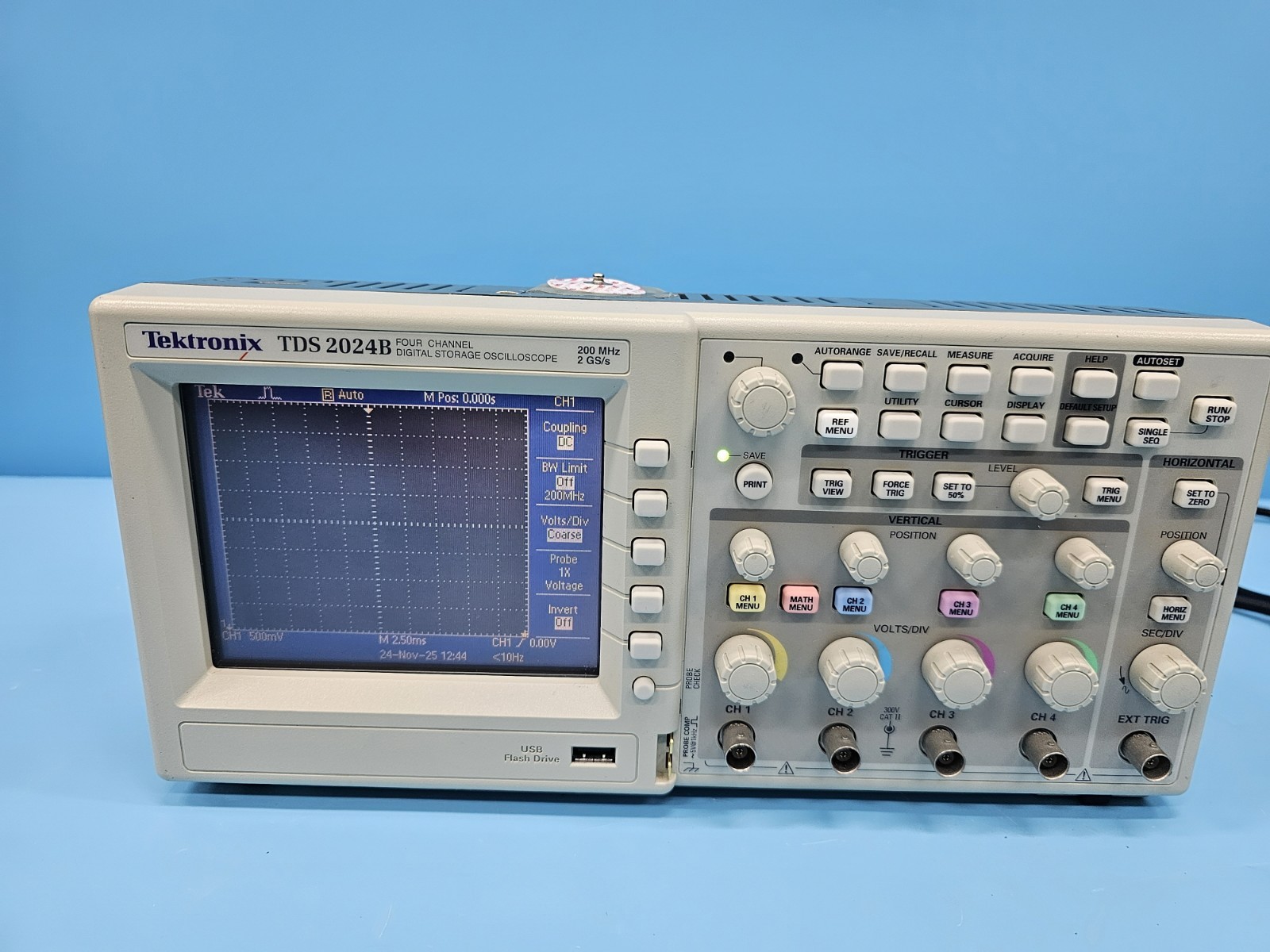
The TDS 2024B command set closely follows SCPI conventions, though Tektronix documentation describes it as a Tektronix proprietary command set. Commands use the colon-separated hierarchical syntax familiar to SCPI users. The HEAD and VERB commands control response formatting: set HEAD OFF and VERB OFF for machine-parseable output. Query responses return 9.9E37 when a measurement cannot be made (no signal, wrong measurement type for signal shape, etc.). Waveform data from CURV? must be scaled using the WFMP? preamble parameters: voltage = ((raw_value - YOFF) * YMULT) + YZERO.
Status Byte
Section titled “Status Byte”| Bit 7 | Bit 6 | Bit 5 | Bit 4 | Bit 3 | Bit 2 | Bit 1 | Bit 0 |
|---|---|---|---|---|---|---|---|
| Unused | RQS/MSS | ESB | MAV | Questionable Data | Error Queue | Unused | Unused |
| Not used | Requesting service / Master summary status | Event status byte summary bit | Message available in output buffer | Questionable data summary bit | One or more errors in error/event queue | Not used | Not used |
Use *STB? to read status byte, *SRE to set service request enable register
Commands
Section titled “Commands”System
Section titled “System”IEEE 488.2 common commands, header/verbose control, error handling, and factory reset
| Command | Type | Description |
|---|---|---|
*IDN? | query | Identification query -- returns manufacturer, model, serial, firmware |
Details Returns (string) — Comma-separated identification
Example: TEKTRONIX,TDS 2024B,C012345,CF:91.1CT FV:v22.11 | ||
*RST | command | Reset to factory default state |
*CLS | command | Clear status registers and error queue |
*ESE {mask} | command | Set event status enable register |
Details Parameters
| ||
*ESE? | query | Query event status enable register |
Details Returns (numeric)
Example: 0 | ||
*ESR? | query | Read and clear event status register |
Details Returns (numeric)
Example: 0 | ||
*OPC | command | Set operation complete bit in ESR when all pending operations finish |
*OPC? | query | Returns 1 when all pending operations complete |
Details Returns (numeric)
Example: 1 | ||
*SRE {mask} | command | Set service request enable register |
Details Parameters
| ||
*SRE? | query | Query service request enable register |
Details Returns (numeric)
Example: 0 | ||
*STB? | query | Read status byte register |
Details Returns (numeric) — Status byte value
Example: 0 | ||
*TST? | query | Self-test; returns 0 for pass, non-zero for failure code |
Details Returns (numeric)
Example: 0 Note: Takes several seconds to complete | ||
*TRG | command | Execute trigger command (Group Execute Trigger) |
*LRN? | query | Returns complete instrument setup as a block of commands that can restore the current state |
Details Returns (string) — Concatenated setup commands | ||
*WAI | command | Wait for all pending operations to complete before executing next command |
HEAD {state} | command | Enable/disable response headers (command echo in query responses) |
Details Parameters
Note: When ON, query responses include the command name (e.g., ':CH1:SCA 1.0'). When OFF, only the value is returned ('1.0'). Set OFF for machine parsing. | ||
HEAD? | query | Query header state |
Details Returns (numeric)
Example: 1 | ||
VERB {state} | command | Enable/disable verbose response format |
Details Parameters
Note: When ON, responses use full keywords (e.g., 'SAMPLE'). When OFF, abbreviated (e.g., 'SAM'). | ||
VERB? | query | Query verbose state |
Details Returns (numeric)
Example: 1 | ||
SYST:ERR? | query | Read and remove one error from the error/event queue |
Details Returns (string) — Error code and message
Example: 0,"No error" | ||
FACT:REST | command | Restore factory default settings |
Details Note: Resets all scope settings to factory defaults, more thorough than *RST | ||
Acquisition
Section titled “Acquisition”Control waveform acquisition mode, averaging, and run/stop state
| Command | Type | Description |
|---|---|---|
ACQ:MOD {mode} | command | Set acquisition mode |
Details Parameters
| ||
ACQ:MOD? | query | Query acquisition mode |
Details Returns (string)
Example: SAMPLE | ||
ACQ:NUMAV {count} | command | Set number of waveforms to average |
Details Parameters
Note: Only applies when ACQ:MOD is set to AVE | ||
ACQ:NUMAV? | query | Query number of averages |
Details Returns (numeric)
Example: 16 | ||
ACQ:NUME {count} | command | Set number of envelopes for envelope mode |
Details Parameters
| ||
ACQ:STOPA {mode} | command | Set acquisition stop-after mode |
Details Parameters
| ||
ACQ:STOPA? | query | Query stop-after mode |
Details Returns (string)
Example: RUNSTOP | ||
ACQ:STATE {state} | command | Start or stop acquisition |
Details Parameters
| ||
ACQ:STATE? | query | Query acquisition state (1=running, 0=stopped) |
Details Returns (numeric)
Example: 1 | ||
Channel Setup
Section titled “Channel Setup”Configure vertical channel parameters for channels 1-4
| Command | Type | Description |
|---|---|---|
CH{n}:SCA {scale} | command | Set channel vertical scale (volts per division) |
Details Parameters
Example CH1:SCA 1.0 | ||
CH{n}:SCA? | query | Query channel vertical scale |
Details Returns (numeric)
Example: 1.0E+0 | ||
CH{n}:POS {position} | command | Set channel vertical position in divisions from center |
Details Parameters
| ||
CH{n}:POS? | query | Query channel vertical position |
Details Returns (numeric)
Example: 0.0E+0 | ||
CH{n}:COUP {coupling} | command | Set channel input coupling |
Details Parameters
| ||
CH{n}:COUP? | query | Query channel coupling |
Details Returns (string)
Example: DC | ||
CH{n}:BWL {bandwidth} | command | Set channel bandwidth limit |
Details Parameters
Example CH1:BWL ON | ||
CH{n}:BWL? | query | Query channel bandwidth limit state |
Details Returns (string)
Example: OFF | ||
CH{n}:PROB {attenuation} | command | Set probe attenuation factor |
Details Parameters
| ||
CH{n}:PROB? | query | Query probe attenuation factor |
Details Returns (numeric)
Example: 1.0E+1 | ||
CH{n}:YUNIT {unit} | command | Set vertical axis units string |
Details Parameters
| ||
SEL:CH{n} {state} | command | Turn channel display on or off |
Details Parameters
| ||
SEL:CH{n}? | query | Query channel display state |
Details Returns (numeric)
Example: 1 | ||
Horizontal (Timebase)
Section titled “Horizontal (Timebase)”Horizontal timebase scale, position, and record length controls
| Command | Type | Description |
|---|---|---|
HOR:MAI:SCA {scale} | command | Set horizontal scale (seconds per division) |
Details Parameters
Example HOR:MAI:SCA 1e-3 | ||
HOR:MAI:SCA? | query | Query horizontal scale |
Details Returns (numeric)
Example: 1.0E-3 | ||
HOR:MAI:POS {position} | command | Set horizontal trigger position (percentage from left edge) |
Details Parameters
Note: 0% = left edge, 50% = center (default) | ||
HOR:MAI:POS? | query | Query horizontal position |
Details Returns (numeric)
Example: 5.0E+1 | ||
HOR:REC {length} | command | Set record length |
Details Parameters
| ||
HOR:REC? | query | Query record length |
Details Returns (numeric)
Example: 2500 | ||
HOR:DEL:STATE {state} | command | Enable/disable delayed sweep (Window/Zoom) |
Details Parameters
| ||
HOR:DEL:STATE? | query | Query delayed sweep state |
Details Returns (numeric)
Example: 0 | ||
HOR:DEL:SCA {scale} | command | Set delayed timebase scale |
Details Parameters
| ||
HOR:DEL:POS {position} | command | Set delayed timebase position |
Details Parameters
| ||
Trigger
Section titled “Trigger”Trigger system configuration for edge, video, and pulse width triggers
| Command | Type | Description |
|---|---|---|
TRIG:MAI:TYP {type} | command | Set trigger type |
Details Parameters
| ||
TRIG:MAI:TYP? | query | Query trigger type |
Details Returns (string)
Example: EDGE | ||
TRIG:MAI:LEV {level} | command | Set trigger level in volts |
Details Parameters
Example TRIG:MAI:LEV 1.5 | ||
TRIG:MAI:LEV? | query | Query trigger level |
Details Returns (numeric)
Example: 1.5E+0 | ||
TRIG:MAI:EDGE:SOU {source} | command | Set edge trigger source |
Details Parameters
| ||
TRIG:MAI:EDGE:SOU? | query | Query edge trigger source |
Details Returns (string)
Example: CH1 | ||
TRIG:MAI:EDGE:SLOP {slope} | command | Set edge trigger slope |
Details Parameters
| ||
TRIG:MAI:EDGE:SLOP? | query | Query edge trigger slope |
Details Returns (string)
Example: RISE | ||
TRIG:MAI:EDGE:COUP {coupling} | command | Set trigger coupling |
Details Parameters
| ||
TRIG:MAI:EDGE:COUP? | query | Query trigger coupling |
Details Returns (string)
Example: DC | ||
TRIG:MAI:MOD {mode} | command | Set trigger mode |
Details Parameters
| ||
TRIG:MAI:MOD? | query | Query trigger mode |
Details Returns (string)
Example: AUTO | ||
TRIG FORC | command | Force a trigger event regardless of signal conditions |
Measurement
Section titled “Measurement”Automatic waveform measurements (immediate and display slots 1-5)
| Command | Type | Description |
|---|---|---|
MEASU:IMM:TYP {type} | command | Set immediate measurement type |
Details Parameters
| ||
MEASU:IMM:TYP? | query | Query immediate measurement type |
Details Returns (string)
Example: FREQUENCY | ||
MEASU:IMM:SOU {source} | command | Set immediate measurement source channel |
Details Parameters
| ||
MEASU:IMM:SOU? | query | Query immediate measurement source |
Details Returns (string)
Example: CH1 | ||
MEASU:IMM:VAL? | query | Execute and return the immediate measurement result |
Details Returns (numeric) — Measurement value in appropriate units
Example: 1.0E+3 Note: Returns 9.9E37 if measurement cannot be made (no signal, wrong type for signal shape, etc.) | ||
MEASU:MEAS{n}:TYP {type} | command | Set display measurement slot type |
Details Parameters
| ||
MEASU:MEAS{n}:SOU {source} | command | Set display measurement slot source channel |
Details Parameters
| ||
MEASU:MEAS{n}:VAL? | query | Query display measurement slot value |
Details Returns (numeric)
Example: 1.0E+3 Note: Returns 9.9E37 if measurement cannot be made | ||
Cursor
Section titled “Cursor”Cursor measurement controls for manual on-screen voltage and time measurements
| Command | Type | Description |
|---|---|---|
CURS:FUNC {function} | command | Set cursor function mode |
Details Parameters
| ||
CURS:FUNC? | query | Query cursor function mode |
Details Returns (string)
Example: OFF | ||
CURS:HBA:POS1 {position} | command | Set horizontal bar cursor 1 position (voltage level) |
Details Parameters
| ||
CURS:HBA:POS1? | query | Query horizontal bar cursor 1 position |
Details Returns (numeric)
Example: 1.0E+0 | ||
CURS:HBA:POS2 {position} | command | Set horizontal bar cursor 2 position (voltage level) |
Details Parameters
| ||
CURS:HBA:POS2? | query | Query horizontal bar cursor 2 position |
Details Returns (numeric)
Example: -1.0E+0 | ||
CURS:HBA:DELT? | query | Query delta between horizontal bar cursors |
Details Returns (numeric) — Voltage difference
Example: 2.0E+0 | ||
CURS:VBA:POS1 {position} | command | Set vertical bar cursor 1 position (time) |
Details Parameters
| ||
CURS:VBA:POS1? | query | Query vertical bar cursor 1 position |
Details Returns (numeric)
Example: -1.0E-3 | ||
CURS:VBA:POS2 {position} | command | Set vertical bar cursor 2 position (time) |
Details Parameters
| ||
CURS:VBA:POS2? | query | Query vertical bar cursor 2 position |
Details Returns (numeric)
Example: 1.0E-3 | ||
CURS:VBA:DELT? | query | Query delta between vertical bar cursors |
Details Returns (numeric) — Time difference in seconds
Example: 2.0E-3 | ||
Waveform Transfer
Section titled “Waveform Transfer”Transfer waveform data and scaling parameters from the oscilloscope
| Command | Type | Description |
|---|---|---|
DAT:SOU {source} | command | Set waveform data source for transfer |
Details Parameters
| ||
DAT:SOU? | query | Query waveform data source |
Details Returns (string)
Example: CH1 | ||
DAT:ENC {encoding} | command | Set waveform data encoding format |
Details Parameters
Note: ASCI is easiest for GPIB parsing; binary formats are faster for large transfers | ||
DAT:ENC? | query | Query waveform encoding |
Details Returns (string)
Example: RIBINARY | ||
DAT:WID {width} | command | Set bytes per data point |
Details Parameters
| ||
DAT:WID? | query | Query data width |
Details Returns (numeric)
Example: 1 | ||
DAT:STAR {point} | command | Set first data point to transfer |
Details Parameters
| ||
DAT:STOP {point} | command | Set last data point to transfer |
Details Parameters
| ||
WAVF? | query | Transfer waveform preamble and data together in a single response |
Details Returns (string) — Combined preamble and waveform data Note: Returns both scaling parameters and curve data in one query, reducing bus transactions | ||
CURV? | query | Transfer waveform data from the selected source |
Details Returns (string) — Waveform data in selected encoding format Note: Use WFMP? preamble to interpret the raw data values | ||
WFMP? | query | Query waveform preamble (scaling parameters needed to convert raw data to engineering units) |
Details Returns (string) — Semicolon-separated parameters including YMULT, YOFF, YZERO, XINCR, XZERO, PT_OFF Note: voltage = ((data_value - YOFF) * YMULT) + YZERO; time = (point_number - PT_OFF) * XINCR + XZERO | ||
WFMP:YMUL? | query | Query Y-axis scale factor (volts per digitizer level) |
Details Returns (numeric)
Example: 4.0E-2 | ||
WFMP:YOF? | query | Query Y-axis offset (in digitizer levels) |
Details Returns (numeric)
Example: 0.0E+0 | ||
WFMP:YZE? | query | Query Y-axis zero (volts) |
Details Returns (numeric)
Example: 0.0E+0 | ||
WFMP:XIN? | query | Query X-axis increment (seconds per point) |
Details Returns (numeric)
Example: 4.0E-6 | ||
WFMP:XZE? | query | Query X-axis zero (seconds) |
Details Returns (numeric)
Example: -5.0E-3 | ||
WFMP:PT_O? | query | Query trigger point offset within record |
Details Returns (numeric)
Example: 0 | ||
WFMP:NR_P? | query | Query number of points in the waveform record |
Details Returns (numeric)
Example: 2500 | ||
Display
Section titled “Display”Display format, persistence, and contrast controls
| Command | Type | Description |
|---|---|---|
DISP:FORM {format} | command | Set display format |
Details Parameters
| ||
DISP:FORM? | query | Query display format |
Details Returns (string)
Example: YT | ||
DISP:PERS {persistence} | command | Set waveform persistence |
Details Parameters
| ||
DISP:PERS? | query | Query persistence setting |
Details Returns (string)
Example: OFF | ||
DISP:CONTRAST {level} | command | Set display contrast level |
Details Parameters
| ||
DISP:CONTRAST? | query | Query display contrast |
Details Returns (numeric)
Example: 50 | ||
Common Workflows
Section titled “Common Workflows”Basic Waveform Capture
Section titled “Basic Waveform Capture”Configure a channel, acquire a triggered waveform, and read it back via GPIB
Reset to known state
*RST Clear status registers
*CLS Disable response headers for clean parsing
HEAD OFF Enable channel 1
SEL:CH1 ON Set channel 1 coupling to DC
CH1:COUP DC Set channel 1 scale to 1V/div
CH1:SCA 1.0 Set channel 1 probe attenuation
CH1:PROB 10 Set horizontal scale to 1ms/div
HOR:MAI:SCA 1e-3 Set record length to 2500 points
HOR:REC 2500 Set trigger source to CH1, rising edge
TRIG:MAI:EDGE:SOU CH1 Set trigger slope to rising
TRIG:MAI:EDGE:SLOP RISE Set trigger level to 1V
TRIG:MAI:LEV 1.0 Set single sequence acquisition
ACQ:STOPA SEQ Start acquisition
ACQ:STATE RUN Wait for acquisition to complete
*OPC? 1 Select waveform source
DAT:SOU CH1 Set ASCII encoding for easy parsing
DAT:ENC ASCI Set 2-byte width for full precision
DAT:WID 2 Read waveform preamble for scaling
WFMP? Transfer waveform data
CURV? Comma-separated integer values Frequency Measurement
Section titled “Frequency Measurement”Measure frequency and amplitude of a signal on channel 1 using immediate measurements
Reset to known state
*RST Disable headers for machine parsing
HEAD OFF Set channel 1 coupling to DC
CH1:COUP DC Set channel 1 scale to 1V/div
CH1:SCA 1.0 Set trigger source to CH1
TRIG:MAI:EDGE:SOU CH1 Set trigger mode to auto
TRIG:MAI:MOD AUTO Set immediate measurement source to CH1
MEASU:IMM:SOU CH1 Set measurement type to frequency
MEASU:IMM:TYP FREQ Read frequency measurement
MEASU:IMM:VAL? Frequency in Hz (e.g., 1.0E+3 for 1 kHz) Switch to peak-to-peak measurement
MEASU:IMM:TYP PK2 Read peak-to-peak voltage
MEASU:IMM:VAL? Peak-to-peak voltage in volts Switch to RMS measurement
MEASU:IMM:TYP CRM Read RMS voltage
MEASU:IMM:VAL? RMS voltage in volts Waveform Data Transfer
Section titled “Waveform Data Transfer”Transfer full waveform data with scaling parameters for post-processing
Disable headers and verbose for compact responses
HEAD OFF Disable verbose mode
VERB OFF Select waveform source channel
DAT:SOU CH1 Set ASCII encoding for easy parsing
DAT:ENC ASCI Set 2-byte width for best resolution
DAT:WID 2 Set start point to beginning of record
DAT:STAR 1 Set stop point to end of record
DAT:STOP 2500 Query Y-axis multiplier
WFMP:YMUL? Volts per level (e.g., 4.0E-2) Query Y-axis offset
WFMP:YOF? Offset in digitizer levels Query Y-axis zero
WFMP:YZE? Voltage offset Query X-axis increment
WFMP:XIN? Seconds per point Query X-axis zero
WFMP:XZE? Time offset in seconds Transfer waveform data
CURV? Comma-separated integer sample values Convert to engineering units
Manual step